
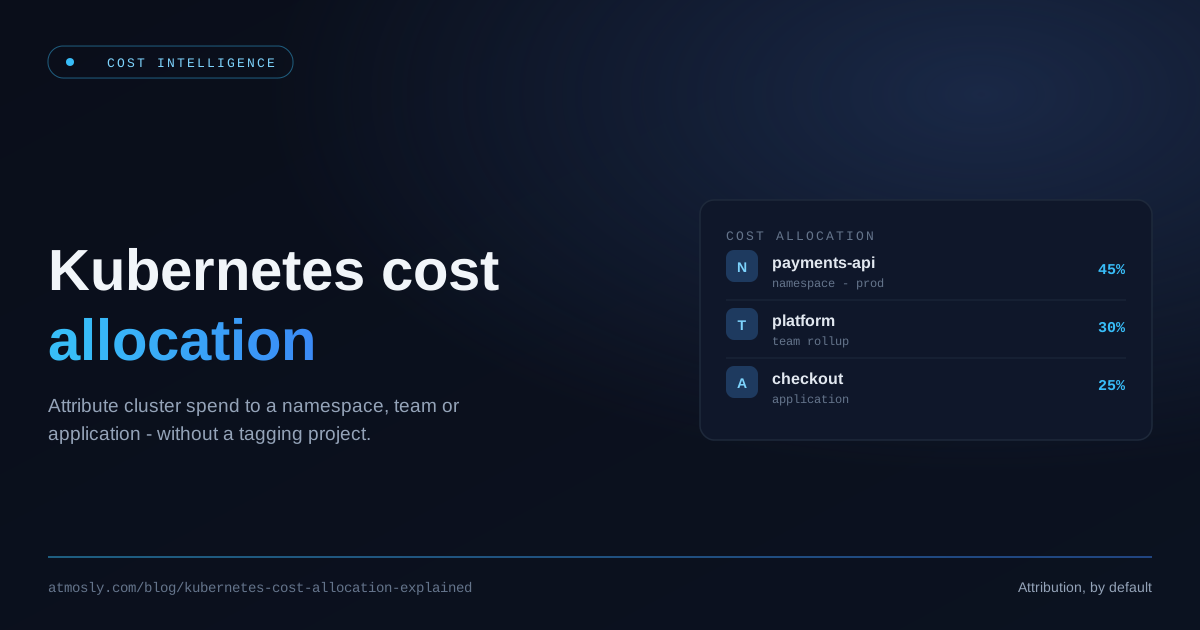
Ask a platform team "what did the payments service cost to run last month?" and watch the room go quiet. The cloud bill can tell you what the whole account spent, and your Kubernetes dashboard can tell you which pods are running — but joining the two, so you can put a real number next to a namespace, a team, or an application, is where most organizations hit a wall. That join is what Kubernetes cost allocation is, and getting it right is the foundation of every FinOps conversation that follows.
This is the pillar reference for Kubernetes cost allocation: what it means, why shared nodes make it genuinely hard, the allocation models you can choose between, and how to attribute spend down to a namespace, team, or application — without kicking off a months-long tagging project first. We'll keep the focus on the attribution itself; for the separate question of whether to bill teams back or simply report their spend, we link out to a dedicated guide rather than repeat it here.
What Is Kubernetes Cost Allocation?
Kubernetes cost allocation is the practice of attributing the cost of a cluster to the things that actually consume it — namespaces, teams, workloads, and applications — rather than leaving it as one undifferentiated compute bill. It answers "who spent what," which is the prerequisite for accountability, budgeting, and optimization. Without it, every cost conversation stalls at "the cluster costs $X" with no way to act on the number.
The discipline sits at the intersection of two worlds that don't naturally speak to each other: the cloud provider's billing view (instances, hours, dollars) and the Kubernetes view (pods, namespaces, labels). Cost allocation is the translation layer between them.
What Accurate Allocation Unlocks
Allocation isn't reporting for its own sake — it's the key that unlocks everything downstream. Budgets become enforceable because you can hold a team to a number. Optimization gets targeted because you know which namespace is expensive before you go hunting.
See cost per namespace and workload now.
Free, read-only. Idle shown separately. No tagging project needed.
Unit economics become possible: cost per customer, per feature, per environment. And accountability shifts from a quarterly finance surprise to a metric engineers can see and own. Every one of those depends on first answering "who spent what," accurately.
Three Choices That Change Everyone's Number
Before the models, there are three rules you have to pick. Each one is defensible. Each one produces a different bill from exactly the same infrastructure. Most tools make these choices for you and never tell you.
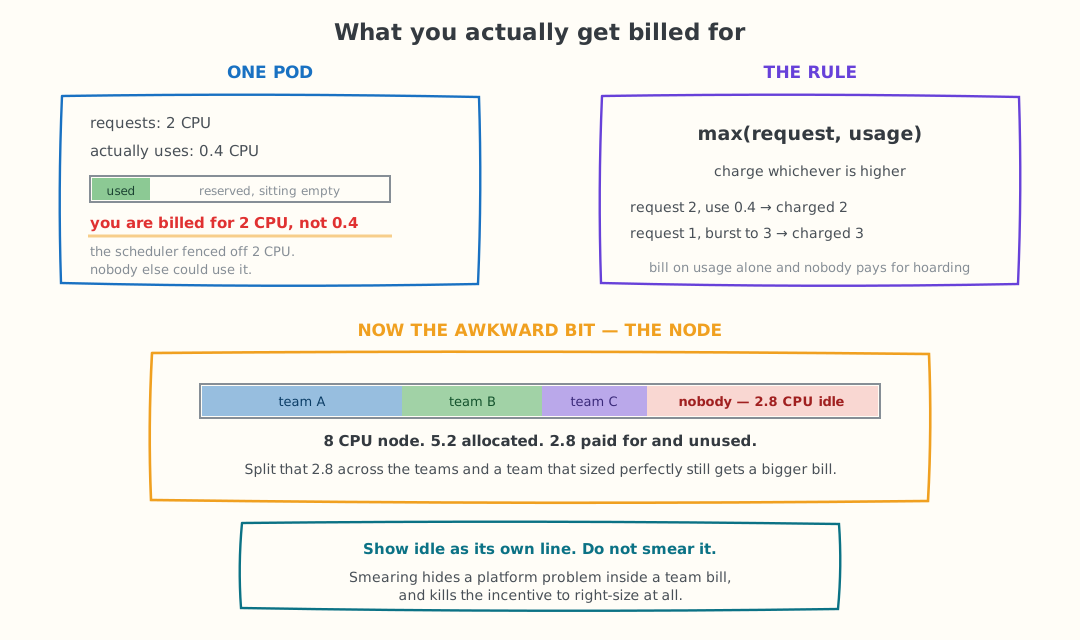
The same node, the same pods, and two rules that decide what each team sees on its bill.
1. Do you charge for what was requested, or what was used?
A pod asks for 2 CPU and uses 0.4. Bill it for 0.4 and you are being generous with money that is already spent — the scheduler fenced off 2 CPU and nobody else could touch it. Bill it for 2 and a team that bursts above its request pays nothing extra for the spike.
The usual answer is max(request, usage): charge whichever is higher. Requesting 2 and using 0.4 costs you 2. Requesting 1 and bursting to 3 costs you 3. It removes the incentive to hoard capacity and the incentive to under-request and hope.
2. Who pays for idle capacity?
Nodes are never fully packed. An 8-CPU node with 5.2 CPU allocated has 2.8 CPU that somebody is paying for and nobody is using.
You can spread that across the teams on the node, which balances the books neatly and quietly punishes the team that sized its workloads properly. Or you can show it as its own line — unallocated cluster overhead, owned by the platform team. The second is harder to explain in a meeting and much better for behaviour, because it puts a number on a platform problem instead of hiding it inside somebody else's bill.
3. Where do shared costs land?
The control plane, load balancers, monitoring stack and DaemonSets serve everyone. Split them evenly, split them in proportion to usage, or leave them unallocated as a platform cost. All three are defensible. All three give different answers.
Whichever you pick, write it down and publish it. Almost every argument about a cost number is really an argument about a rule nobody agreed on.
Why It's Harder Than It Looks: Shared Nodes
Here's the problem in one sentence: the cloud bills you per node, but many pods share a node. A single EC2 or GCE instance might host forty pods from six teams across three namespaces. The invoice shows one instance at one hourly rate. Splitting that one number fairly across the workloads packed onto it is the entire challenge of cost allocation — and it's why you can't just read allocation off a billing export.
To split a node's cost you need three things the invoice doesn't give you: which pods ran on which node and for how long, what that specific node actually costs per hour, and a defensible rule for dividing the node's cost among its tenants. All three live inside the cluster, not on the bill.
The Allocation Models: How Shared Cost Gets Split
There isn't one "correct" way to divide a shared node — there are a few, with different trade-offs in accuracy and honesty.
Cluster-average allocation
The simplest and least accurate: take the total cluster cost, divide by total usage, and apply that flat rate everywhere. Easy to compute, but it hides the fact that a GPU node and a burstable node cost wildly different amounts. Two namespaces using "the same CPU" can have very different real costs depending on which nodes they landed on.
Rate-proportional allocation
Better: split each node's cost across its pods in proportion to what they requested or used for CPU and memory, using a blended rate. This respects each pod's share within a node, though it can still blur the distinct cost of CPU versus memory.
Node-attributed allocation
The most honest: use the real per-node rate, work out that node's specific CPU and memory cost split, and attribute each pod its share based on placement and consumption. A pod is charged for the actual node it ran on, at that node's actual price. This is the model that survives scrutiny when a team asks "why is our number what it is."
| Model | How it splits cost | Where it breaks | Use it when |
|---|---|---|---|
| Cluster-average | Total cluster cost divided by total usage, one flat rate everywhere | A GPU node and a burstable node bill at the same rate. Two teams using identical CPU can have wildly different real costs. | One node type, one team, and you need a number this afternoon |
| Rate-proportional | Each node's cost split across its pods by requested or used CPU and memory, at a blended rate | Blurs the separate cost of CPU versus memory, so memory-heavy workloads look cheaper than they are | Mixed node types and you want something defensible without much engineering |
| Node-attributed | Real per-node rate, that node's own CPU/memory split, attributed by placement and consumption | Needs pod-to-node placement data and per-node pricing, including spot versus on-demand | You are billing teams, or anyone is going to challenge the number |
If someone is going to be held to the number, use node-attributed. The other two are fine for a rough picture and fall apart the first time a team disputes an invoice.
Attributing Cost Without a Tagging Project
A common myth is that you must tag every resource before you can allocate cost. Tagging is useful, but it's slow, easy to get wrong, and impossible to enforce retroactively. You can get accurate namespace-level allocation from data Kubernetes already emits.
The building blocks are Prometheus metrics you likely already collect. Per-namespace usage comes from cAdvisor series aggregated with something like sum by (namespace) (rate(container_cpu_usage_seconds_total[5m])). Pod-to-node placement — which pod is on which node — comes from kube-state-metrics. Combine the two with per-node pricing, apply your allocation model, and you have cost per namespace without a single tag. The result is verifiable, too: the sum of your allocated namespace costs should reconcile against the node bill, with the difference being genuine unallocated overhead rather than a rounding fudge. For the namespace hygiene that keeps this clean, see our guide to namespace management best practices.
Rolling Up to Team and Application
Namespace is the natural unit of allocation in Kubernetes, but it's rarely the unit people care about. Finance wants cost by team; engineering leads want cost by application or service. Both are roll-ups of the namespace layer.
Team cost is a mapping problem: define which namespaces belong to which team, then sum. Application cost is a labeling problem: Kubernetes labels like app or app.kubernetes.io/name let you slice within and across namespaces down to the workload level. Get the label conventions right once, and cost-by-app comes almost for free on top of your namespace allocation.
A workable taxonomy is small. Four labels will carry almost every cost question you get asked:
metadata:
  labels:
    app.kubernetes.io/name: checkout-api      # the workload
    app.kubernetes.io/part-of: checkout       # the product it belongs to
    atmosly.io/team: payments                 # who owns the bill
    atmosly.io/env: production                # prod vs staging vs dev
Two rules keep it useful. Use the app.kubernetes.io/* names where a standard already exists, because tooling understands them. And put your own labels under a prefix you control, so they never collide with something a Helm chart sets.
Enforce it at admission rather than asking nicely. A policy that rejects a Deployment with no owner label takes an afternoon to write and saves the quarterly hunt for whoever owns namespace-7:
# Kyverno: require an owning team on every Deployment
validationFailureAction: Enforce
rules:
  - name: require-team-label
    match:
      any:
        - resources:
            kinds: [Deployment, StatefulSet]
    validate:
      message: "atmosly.io/team label is required for cost allocation"
      pattern:
        metadata:
          labels:
            atmosly.io/team: "?*"
Start enforcing on new workloads only. Turning this on across an existing cluster blocks every redeploy until someone backfills labels, which is how these projects get abandoned in week two.
Handling the Messy Reality
Clean allocation runs into real-world complications, and how a system handles them separates honest numbers from confident-looking fiction.
- Spot vs on-demand. The same instance type costs very differently on spot. Allocation has to use the capacity type of the node a pod actually ran on, not a list price.
- Idle and unallocated capacity. A node is rarely 100% used. The gap between what a node costs and what its pods consumed is real money — it should be surfaced as unallocated cluster overhead, not silently smeared across tenants to make the books balance.
- Missing prices. Sometimes a rate genuinely isn't available for a node type. The honest move is to show that gap as "—" rather than invent a number. Fabricated precision is worse than an acknowledged unknown, because someone will make a decision on it.
From Allocation to Showback, Chargeback, and Action
Allocation is the foundation. What you do with the numbers afterwards splits three ways.
- Report it, or bill it. Showing teams what they spent is a different decision from charging it to their budget, and the difference is organisational rather than technical. We cover that choice in showback vs chargeback.
- Act on it. Once you know which namespace is expensive, right-sizing tells you what to change about it.
- Build the practice around it. Budgets, forecasting and who owns the number are covered in the Kubernetes FinOps guide.
One boundary worth drawing early: allocating cost inside a cluster is a different job from managing spend across a whole cloud account. We separate the two in cloud cost management vs Kubernetes cost optimization.
How Atmosly Handles Cost Allocation
Atmosly's Cost Intelligence is built around this exact attribution problem — turning a shared cluster bill into per-namespace, per-team, and per-workload numbers you can actually act on. Here's how it works, starting with visibility.
Cost visibility, from live cluster usage
The cost data is live — drawn from in-cluster Prometheus usage and reconciled against connected billing, aggregated daily — so what you see reflects what actually ran, not an estimate.
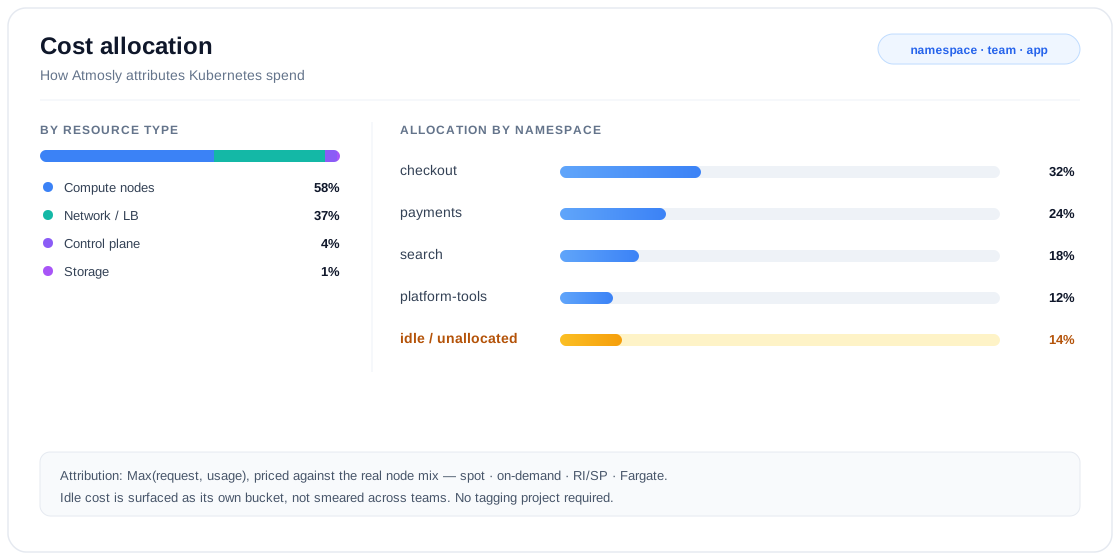
Atmosly breaks cluster spend down by resource type and attributes it across namespaces, teams, and applications — surfacing idle and unallocated cost as its own bucket rather than smearing it across teams.
A handful of choices are what make those numbers trustworthy:
- Broken down by resource type — compute nodes, control plane, storage, and network / load balancers, trended over the last 30 days.
- Attributed to namespace, team, and application — down to the individual workload, across AWS, GCP, and Azure, with no tagging project to get started.
- Honest attribution — a Max(request, usage) method charges each workload for the capacity it actually reserves or consumes, whichever is higher.
- Dynamic pricing — each cluster is priced against its real node mix (spot, on-demand, Reserved-Instance or Savings-Plan-covered, and Fargate), not a flat rate.
- Idle as its own bucket — capacity cost minus allocated cost is surfaced separately, so you decide how to handle it instead of having it smeared across teams.
- Waste alongside spend — every figure sits next to an efficiency score, wasted CPU and memory, and a realizable-savings estimate.
- Guardrails built in — budget thresholds and cost anomaly detection catch a runaway workload before it reaches the invoice, and the read-only agent keeps your data inside the cluster.
And it reads at whatever altitude you need:
| Level | What Atmosly shows |
|---|---|
| Cluster | Run-rate, spend by resource type, efficiency score, wasted CPU and memory |
| Namespace / team | Allocated cost, share of total spend, idle and unallocated bucket |
| Workload | Cost, p95 usage vs request, right-sizing recommendation and its saving |
From visibility to action
Visibility is only useful if it leads somewhere. Atmosly closes the loop in four steps:
- Surface — over-provisioned workloads rise to the top, ranked by potential saving and priority.
- Recommend — each gets a current-versus-recommended CPU and memory target derived from p95 usage, with a confidence level attached.
- Apply — push the change through a GitOps pull request (the durable path for ArgoCD and Helm shops) or a direct apply for non-GitOps clusters, with a time-boxed sync-pause and a revert window so a temporary change can't silently drift.
- Track — a savings ledger records what's potential, in progress, and realized, so optimization is measured rather than assumed.
The result is a per-team view that pairs every cost number with a waste number — a target, not just a report. You can explore it on the Atmosly Cost Intelligence page.
Key Takeaways
- Allocation is the translation layer between the cloud's per-node bill and the Kubernetes view of pods and namespaces.
- Shared nodes are the hard part. One node, many tenants — splitting its cost fairly needs placement data, real per-node rates, and a defined model.
- Node-attributed is the honest model. Charge each workload for the node it ran on, at that node's real price.
- You don't need tags. Prometheus usage plus pod-to-node placement gets you accurate namespace, team, and application allocation.
- Be honest about gaps. Surface idle and unallocated cost, and show "—" for unknown prices instead of inventing numbers.
Want cost broken down by namespace, team, and application across your clusters — accurately, and without a tagging project? Start with Atmosly and turn your cluster bill into answers you can act on.