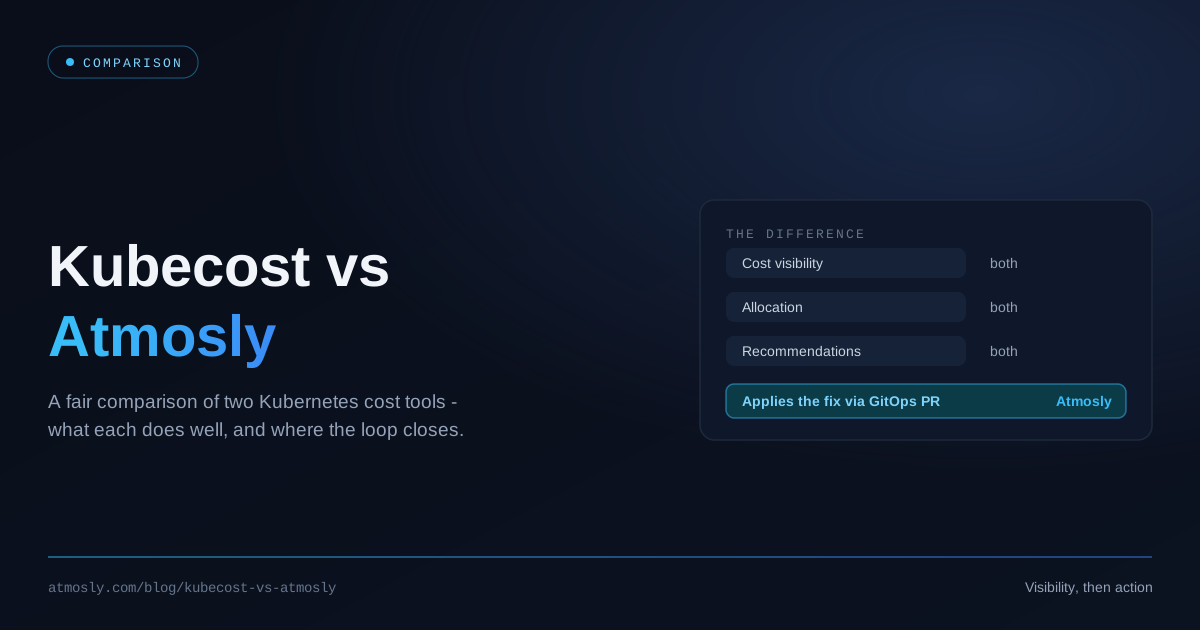
If you've started looking at Kubernetes cost tooling, you've looked at Kubecost. It's the default answer, the one every thread recommends, and — let's be clear from the outset — it's a genuinely good tool. It effectively created this category, and the open-source engine underneath it is the closest thing the ecosystem has to a standard for measuring Kubernetes cost.
So this comparison isn't going to pretend otherwise. Instead, it does something more useful: it explains what Kubecost is excellent at, what it's genuinely like to run in production (the parts that don't appear in a feature matrix), and where a different design — Atmosly's — makes a different trade-off. If you finish this article and conclude Kubecost is right for you, that's a perfectly good outcome. What we want to avoid is you finding out six months in that the tool you picked solves a different problem than the one you have.
Credit Where It's Due: What Kubecost Gets Right
Kubecost's reputation is earned. Before we discuss any limitation, here's what it does well — and none of it is faint praise.
- It defined the category. The Kubecost team built the allocation engine that became OpenCost, then donated it to the CNCF, where it's now an incubating project. If you use almost any Kubernetes cost tool today, you're benefiting from work that started here.
- The allocation model is sound. Cost by cluster, node, namespace, controller, service, pod, and label — computed properly from resource consumption and cloud pricing data. This is the hard part of Kubernetes cost, and Kubecost does it well.
- It's genuinely open at the core. OpenCost is Apache 2.0, vendor-neutral, and community-governed. For teams with a hard "open source only" policy, that matters enormously — and it's a real answer, not a marketing one.
- You can start for free. There's a free tier, and on EKS, AWS offers an optimized Kubecost bundle at no additional charge. The barrier to your first cost dashboard is close to zero.
- Enterprise features are real. Multi-cluster aggregation, budget alerts, anomaly detection, SSO, RBAC, and billing reconciliation against your actual cloud discounts rather than list prices — plus a vendor to call when something breaks.
- It has serious backing. IBM acquired Kubecost in 2024. Whatever you think of large-vendor acquisitions, it means the project isn't going anywhere.
If your need is "I want to know what my Kubernetes clusters cost, broken down properly, and I'm happy to run the tooling to get it" — Kubecost answers that question well. Genuinely. You can stop reading here and go install it.
The rest of this article is about the questions it doesn't answer, and whether those questions matter to you.
How Kubecost Actually Works
To understand the trade-offs, it helps to know the architecture. Historically, Kubecost has been a self-hosted application in your cluster: an agent scrapes resource usage into Prometheus, an aggregator joins that usage against cloud pricing data, and a frontend serves the dashboards. For multi-cluster setups, each cluster ships data to a central store so it can be aggregated into one view.
That architecture has been evolving. Kubecost 3.0 was a substantial re-platforming: it moved to a ClickHouse database (replacing the DuckDB used in 2.8) for faster queries at scale, and introduced a unified agent that removes the hard Prometheus dependency and reduces memory footprint. For multi-cluster deployments, the newer agent pushes metrics to S3-compatible object storage, from which an aggregator computes costs.
Two things follow from this. First, Kubecost has clearly listened to its users — the direction of travel is toward less operational weight. Second, and more relevantly for you: the thing you deploy is a data platform, and you own it. That's the source of most of the friction below.
The Honest Challenges of Running Kubecost
None of what follows means Kubecost is a bad tool. These are the trade-offs of a self-hosted, visibility-first architecture — and they're the things teams tell us about after the first quarter, not the first week.
1. The Prometheus tax
In the classic deployment, accurate cost data means high-cardinality metrics retained long enough to be useful. Kubernetes cost analysis wants weeks or months of history — you cannot right-size a workload from three days of data, and you cannot investigate last month's spike if last month is gone. That means Prometheus with real retention, which means real storage, real memory, and often Thanos, Mimir, or Cortex once a single Prometheus stops coping.
The irony is well known to anyone who's done it: your cost monitoring stack becomes a line item on the bill it's monitoring. It's not usually huge, but it's not free, and it's yours to tune. Kubecost 3's unified agent is a direct, credible response to this criticism — but if you're on an older version, or running the free/OpenCost path, this is your reality today.
2. The retention cliff on the free tier
The free tier is a genuinely good on-ramp, but it has caps — on scale, and crucially on how long your metrics are retained. That second limit is the one that bites. Cost work is inherently retrospective: you want to compare this month against last quarter, see whether a right-sizing change actually held, and investigate a spike after someone noticed it. A short retention window means the free tier is excellent for "what does my cluster cost right now" and frustrating for "why did it change." Many teams discover this precisely when they start doing serious cost work — which is to say, at the worst moment.
Tier limits and pricing change (especially post-acquisition), so check the current terms rather than trusting any blog — including this one.
3. Multi-cluster is a project, not a checkbox
One cluster is easy. Ten clusters across three accounts and two clouds is a different exercise: a central store to stand up, object storage to configure, an aggregator to size, network paths to open, and version skew to manage across agents. It's all documented and it all works — but it's platform engineering work, and it recurs at every upgrade. Budget for it honestly rather than assuming the second cluster costs the same effort as the first.
4. Accurate pricing needs the billing integration
Out of the box, cost calculations lean on public list prices. If you have an enterprise discount, Reserved Instances, Savings Plans, or heavy spot usage, list prices are simply wrong — often by a lot. Fixing that means wiring up billing integration (the AWS Cost and Usage Report, for instance) so calculations reflect what you actually pay. This is entirely doable and well documented; it's also another integration to build, permission, and maintain, and a common reason a team's first Kubecost numbers don't reconcile with their invoice.
5. Upgrades are real work
The v1 → v2 → v3 path has included genuine architectural change: a new database backend, a new agent, a new storage model for multi-cluster. These are improvements. They are also migrations, and migrations consume engineering weeks. A self-hosted data platform means you're on the upgrade treadmill for as long as you run it.
6. The one that actually matters: it stops at the dashboard
Everything above is operational friction — annoying, budgetable, survivable. This one is structural.
Kubecost tells you what's expensive. In its paid tiers it will also tell you what to do about it, with right-sizing recommendations. What it does not do is make the change. The recommendation lives in a dashboard. Your manifests live in Git. Between the two sits a human being who must open the repo, find the right values file, edit the numbers, open a pull request, get it reviewed, and merge it — for every workload, every time, forever.
This is not a Kubecost-specific failing. It's true of OpenCost too, and of most of the category: these are visibility layers, and acting on what they surface still requires engineering time. But it is the reason so many teams have a beautiful cost dashboard and a bill that hasn't moved. The recommendations are correct. Nobody has time to apply them.
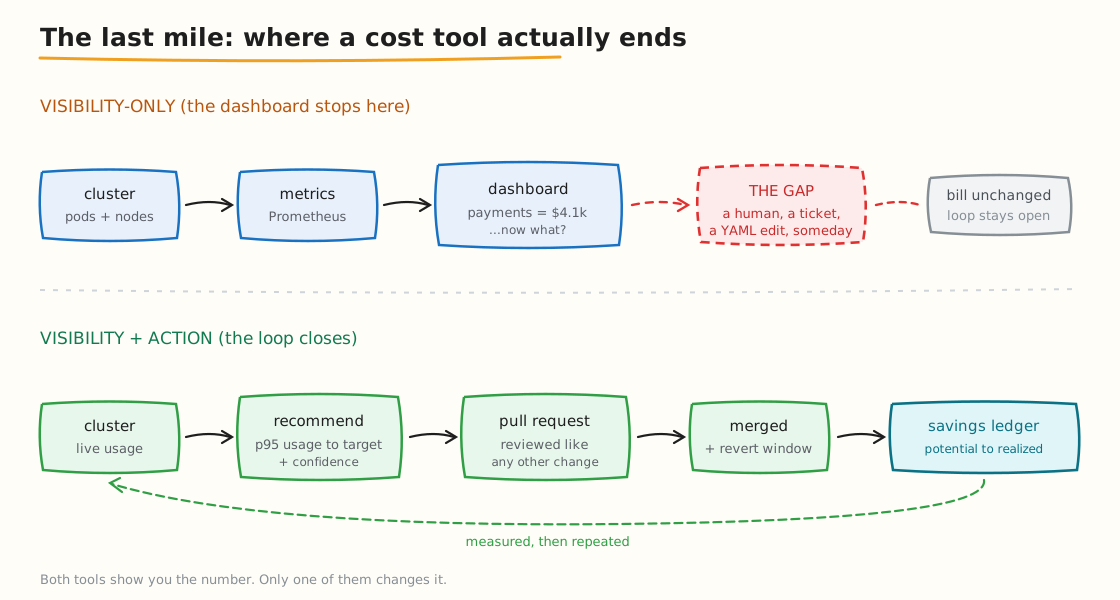
The gap isn't in the analysis — it's in the last mile between "we know this is wasteful" and "the change is merged."
We've seen this pattern often enough to name it: the insight-to-action gap. A team buys a cost tool, gets excellent visibility, generates a backlog of forty right-sizing recommendations, applies six of them in the first enthusiastic fortnight, and then the backlog ages quietly while the cluster drifts back toward over-provisioning. The tool did its job. The bill didn't change.
Where Atmosly Takes a Different Path
Atmosly starts from the same foundation — you cannot optimize what you cannot see — and then makes two different bets: own the last mile, and be managed rather than self-hosted.
Visibility, with the same rigour
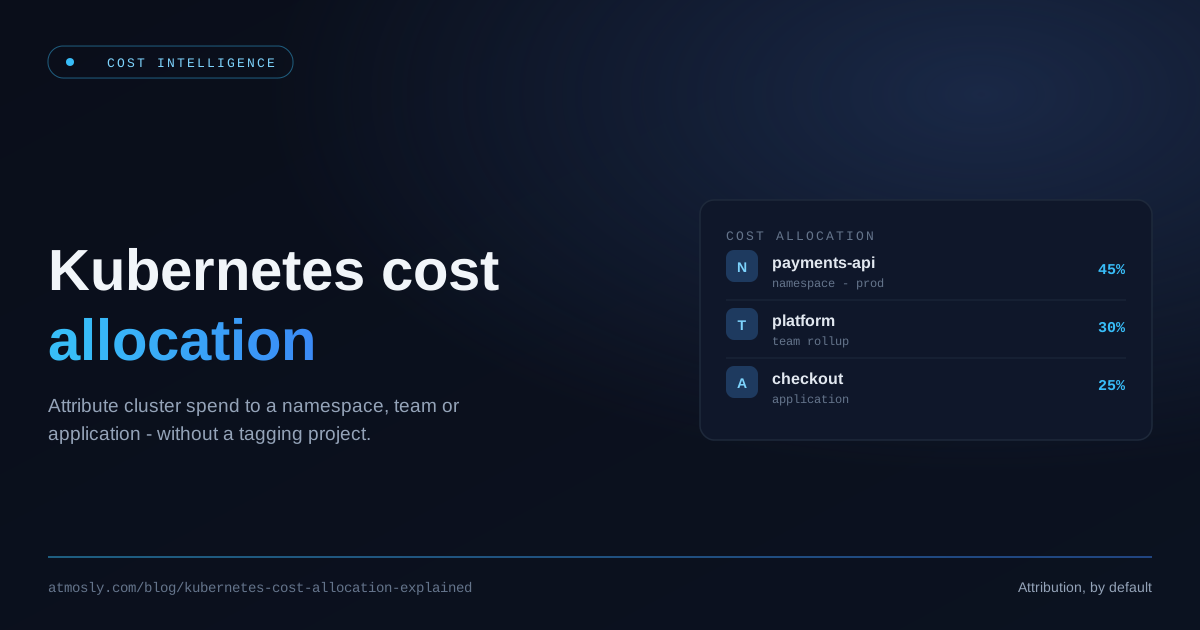
The cost data is live, drawn from in-cluster usage and reconciled against connected billing, aggregated daily. Spend breaks down by resource type — compute nodes, control plane, storage, network and load balancers — and is attributed to namespace, workload, and team across AWS, GCP, and Azure, with no tagging project required to start.
Attribution uses a Max(request, usage) method, so a workload is charged for the capacity it reserves or consumes, whichever is higher. Pricing is dynamic against the cluster's real node mix — spot, on-demand, Reserved-Instance or Savings-Plan-covered, and Fargate — rather than a flat rate. Idle cost (capacity cost minus allocated cost) is surfaced as its own bucket instead of being smeared across teams to make the totals balance. And every spend figure sits next to a waste figure: an efficiency score, wasted CPU and memory, and how much of current spend is realistically recoverable.
Then the part that closes the loop
Every over-provisioned workload comes with a right-sizing recommendation — current CPU and memory requests versus a target derived from p95 usage, with a confidence level, a priority, and an estimated saving. So far, so familiar.
The difference is what happens next. Atmosly opens the pull request. The change lands in your Git repository, against your manifests, and gets reviewed exactly like any other code change — the durable path for ArgoCD and Helm teams, because the fix survives the next sync instead of being reverted by it. For teams not on GitOps, there's a direct apply with a time-boxed sync-pause and a revert window, so a temporary change can't quietly become permanent drift. A savings ledger then tracks what's potential, what's in progress, and what's actually been realized — so optimization is measured rather than assumed.
That last point is worth dwelling on. Most cost tools report potential savings — a number that has never, in the history of software, matched what a company actually saved. Tracking realized savings is a harder, more honest metric, and it's the only one finance will believe.
And the stack you don't have to run
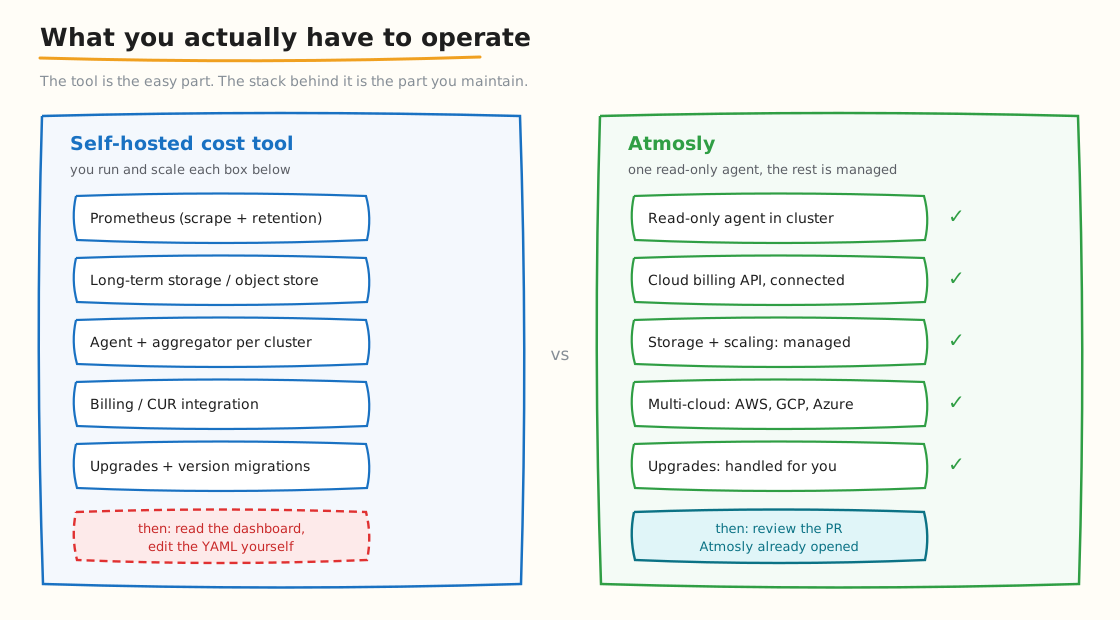
The feature list is only half the decision. The other half is what you're signing up to operate.
Atmosly deploys a read-only agent into the cluster — it reads events, metadata, and configuration, and your data stays in the cluster. There's no Prometheus retention strategy to design, no object store to provision, no aggregator to size, no version migration to schedule. Multi-cluster and multi-cloud are the default rather than a configuration project.
Cost also isn't a standalone product here: it sits on a platform that also does AI-assisted SRE, security drift detection, and deployment. The practical benefit is context — the same system that knows a workload is over-provisioned also knows it was OOMKilled twice last week, which is exactly the context you need before you cut its memory limit.
Side-by-Side Comparison
| Dimension | Kubecost | Atmosly |
|---|---|---|
| Core allocation | Excellent — the category standard, built on OpenCost | Namespace, workload, team; Max(request, usage) |
| Open source | Yes — OpenCost core is Apache 2.0, CNCF | No |
| Deployment | Self-hosted (SaaS available on enterprise tiers) | Managed; read-only in-cluster agent |
| Operational overhead | Prometheus/storage/aggregator are yours to run and upgrade | Agent only; storage and scaling managed |
| Data retention | Limited on the free tier; you own retention when self-hosted | Managed |
| Right-sizing recommendations | Yes (paid tiers) | Yes — p95-based, with confidence and priority |
| Applies the change | No — you edit the YAML | Yes — GitOps pull request, or direct apply with revert window |
| Realized-savings tracking | Not a core focus | Yes — potential, in progress, realized |
| Scope beyond cost | Cost only | Cost, AI SRE, security, deployment on one platform |
| Free entry point | Yes — free tier; free optimized bundle on EKS | Trial |
| Best at | Rigorous, open, self-controlled cost visibility | Turning cost findings into merged changes |
So Which Should You Actually Choose?
Here's the honest decision framework — including the cases where we're not the answer.
Choose OpenCost if…
You're running one or two clusters, you already operate Prometheus, you have platform engineers who enjoy this kind of thing, and you need cost allocation without a licence. It's free, actively maintained, CNCF-governed, and completely sufficient for accurate allocation. Don't pay for something you don't need.
Choose Kubecost if…
Open source at the core is a hard requirement or a procurement constraint. Or you need deep, self-controlled cost visibility across many clusters and have the platform capacity to run it. Or you're on EKS and want a solid free starting point via the AWS bundle. Or you have an existing FinOps practice where humans already own the act of applying changes, and what's missing is purely the data. In all of these, Kubecost is a strong, defensible choice.
Choose Atmosly if…
Your problem isn't seeing the waste — it's eliminating it. If you already know roughly where the money is going and the backlog of unapplied recommendations is the actual bottleneck, then more dashboards won't help; a pull request will. Atmosly also fits when you don't want to run another data platform, when you're multi-cloud and want one consistent view without three integrations, or when you'd rather cost, reliability, and security lived in one system instead of three.
A reasonable middle path
Run OpenCost or Kubecost's free tier for a month and see what your clusters cost. That data will tell you which problem you actually have. If the answer is "we didn't know, and now we do, and we'll act on it" — you're done, keep what you have. If the answer is "we knew, we still know, and nothing has changed in three months" — you don't have a visibility problem, and no amount of extra visibility will fix it.
Key Takeaways
- Kubecost is a good tool and the category standard. Its open-source core, allocation rigour, and free entry point are real strengths, not marketing.
- The friction is operational. Self-hosting means Prometheus retention, storage, multi-cluster aggregation, billing integration, and upgrade migrations — all doable, all ongoing.
- The structural gap is the last mile. Kubecost and OpenCost stop at visibility; applying the fix is still a human editing YAML. That's why so many teams have great dashboards and a flat bill.
- Atmosly's bet is on action. Same allocation rigour, plus the recommendation arrives as a GitOps pull request, with realized savings tracked afterwards.
- Diagnose before you buy. If your bottleneck is knowledge, get a visibility tool. If your bottleneck is execution, a better dashboard won't save you a rupee.
Already have visibility and still have the same bill? That's an execution problem, not a data problem. Start with Atmosly and see your first right-sizing pull request within a day.
Related reading: Kubernetes cost allocation explained · Cloud cost management vs Kubernetes cost optimization · Right-sizing Kubernetes workloads · The Kubernetes FinOps guide · Atmosly Cost Intelligence