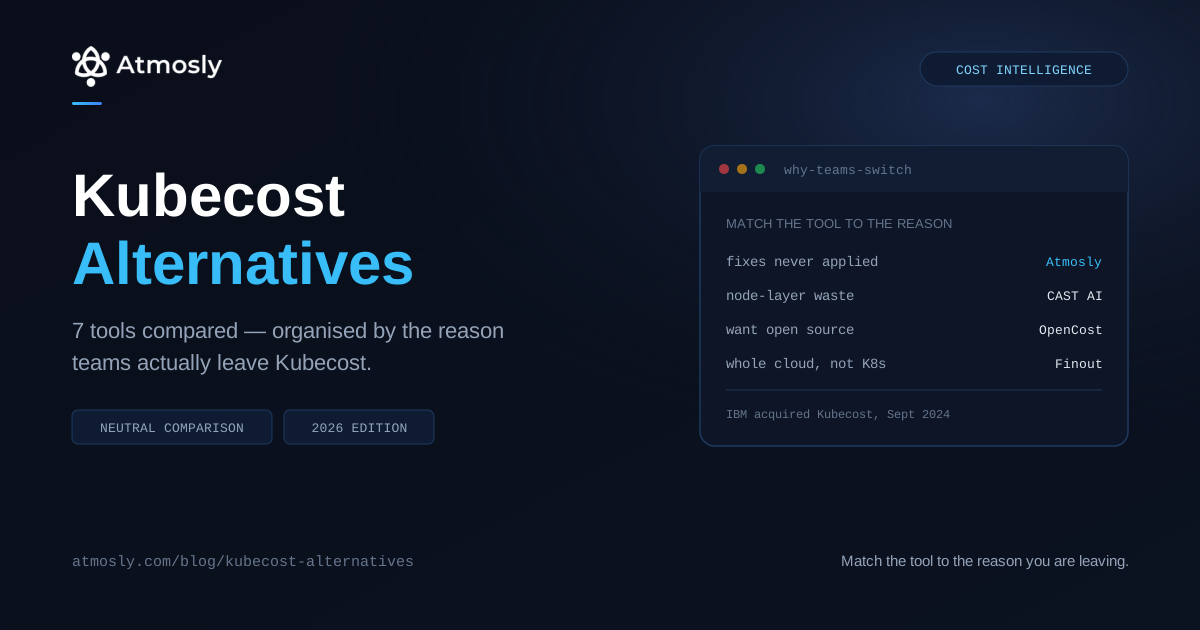
Nobody searches for Kubecost alternatives out of curiosity. You're here because something specific pushed you — a renewal conversation you didn't like, a rightsizing recommendation you can't get applied, a finance team asking about spend outside Kubernetes, or the realisation that your "free" tool costs a Prometheus stack to operate.
That reason matters more than any feature table, because these seven tools are not substitutes for each other. Some replace Kubecost's reporting. Some replace the thing Kubecost was never going to do. Pick the wrong category and you'll be shopping again in six months.
This guide is organised by why teams leave rather than by feature grid. (Disclosure: Atmosly is our product. It appears here on the same terms as the others, and there are several reasons for leaving Kubecost where it isn't the right answer — those are named explicitly.)
Kubecost Alternatives Compared
Start with the reason, then the tool.
| If you're leaving because… | Look at | What it replaces | Licence |
|---|---|---|---|
| Recommendations never get applied | Atmosly | Adds node/spot visibility + GitOps-durable pod fixes | Commercial (free tier) |
| Reporting isn't reducing the bill | CAST AI | Adds node + spot automation | Commercial |
| You want rightsizing that just happens | ScaleOps | Adds continuous pod rightsizing | Commercial |
| You want open source, no vendor | OpenCost | Kubecost's allocation engine | Open source (CNCF) |
| Kubernetes is only part of the bill | Finout | Widens to whole-estate FinOps | Commercial |
| Finance needs cost per customer | CloudZero | Reframes to unit economics | Commercial |
| You run VMs alongside Kubernetes | Densify | Spans containers and VMs | Commercial |
The short answer
- Most teams leave because the bill didn't move. Kubecost reported the waste; nothing reclaimed it. If recommendations pile up unapplied — or get applied and then revert — Atmosly closes that specific gap by delivering changes as reviewable pull requests. If the waste is at the node layer instead, CAST AI moves the bill faster.
- If the objection is the vendor rather than the product, OpenCost is the honest answer — Kubecost is built on it, so you keep the cost model and drop the licence.
- If Kubernetes is only a slice of your bill, you've outgrown the category, not the product. Finout or CloudZero.
First: What Actually Changed With Kubecost
Worth being accurate here, because a lot of the commentary is competitive noise.
IBM acquired Kubecost in September 2024, folding it into the IBM FinOps Suite alongside Cloudability and Turbonomic. The product continues, and it remains built on the open-source OpenCost project that Kubecost's own team contributed to the CNCF.
See exactly where your cluster is wasting money.
Connect read-only in 10 minutes. Free, no credit card, nothing changes in your cluster.
What the acquisition changed is less technical than organisational. Teams re-evaluating tend to cite one of three things:
- Roadmap direction. A standalone Kubernetes cost tool and a component of an enterprise FinOps suite get prioritised differently. Whether that's good or bad depends on whether you're the enterprise buying the suite.
- Licensing and renewal. Uncertainty at renewal is a normal trigger for a market scan, and this is the single most common reason we see teams start looking.
- Procurement gravity. Some organisations that deliberately avoided large-vendor lock-in now find themselves inside one.
The honest position: none of that makes Kubecost a bad product. Its allocation model is still among the most mature available, and it doesn't demand perfect tagging to produce usable numbers. If your only concern is the acquisition and the tool works, "do nothing" is a legitimate option. Switching cost is real.
The reasons below are the ones worth acting on.
Reason 1: The Recommendations Never Actually Get Applied
This is the most common reason, and it's usually diagnosed wrong. The tool gets blamed when the tool was right.
Kubecost identifies the waste correctly. Someone has to turn that into a manifest change, get it reviewed, and merge it. At twenty workloads that happens. At four hundred it doesn't — recommendations accumulate until the backlog is intimidating enough to ignore entirely.
Then there's the failure mode specific to GitOps clusters, which is worse because it looks like success. Someone applies the change with kubectl patch or through a UI. The pods restart with the new limits. Everyone moves on. The next ArgoCD or Flux sync restores the manifest value and the saving silently disappears. Weeks later the bill hasn't moved and nobody can explain why.
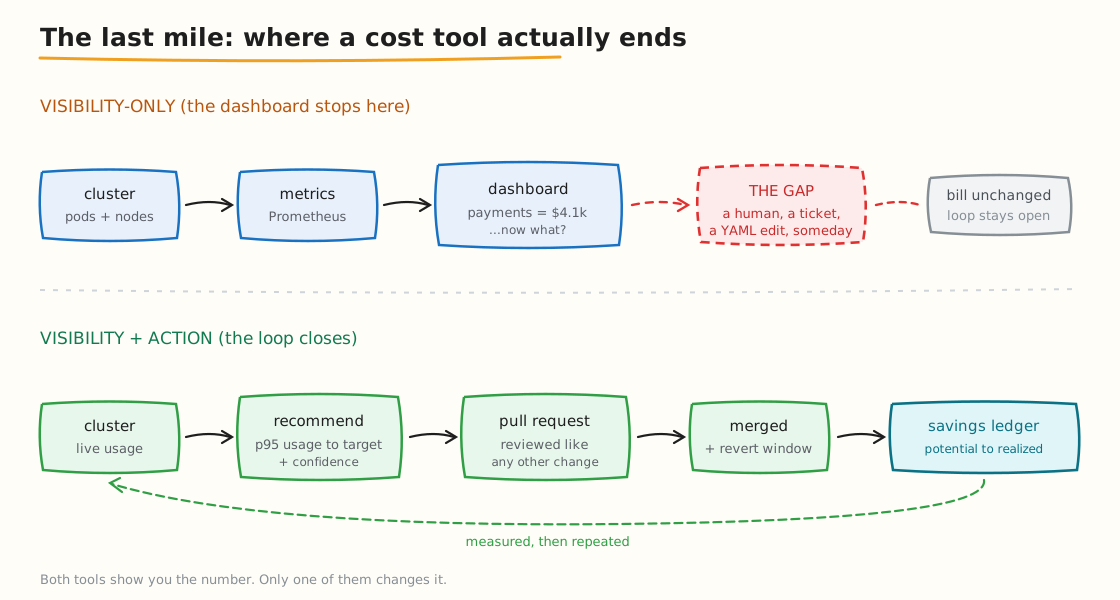
The last mile: a dashboard ends at the recommendation. Between it and the bill sits a human, a ticket and a YAML edit — which is where most savings die.
# Is your cluster GitOps-managed? If either returns resources, applied changes will revert.
kubectl get applications.argoproj.io -A 2>/dev/null | head
kubectl get kustomizations.kustomize.toolkit.fluxcd.io -A 2>/dev/null | head

# Compare live resources against what the manifest declares
kubectl get deploy checkout -o jsonpath='{.spec.template.spec.containers[0].resources}'
Atmosly
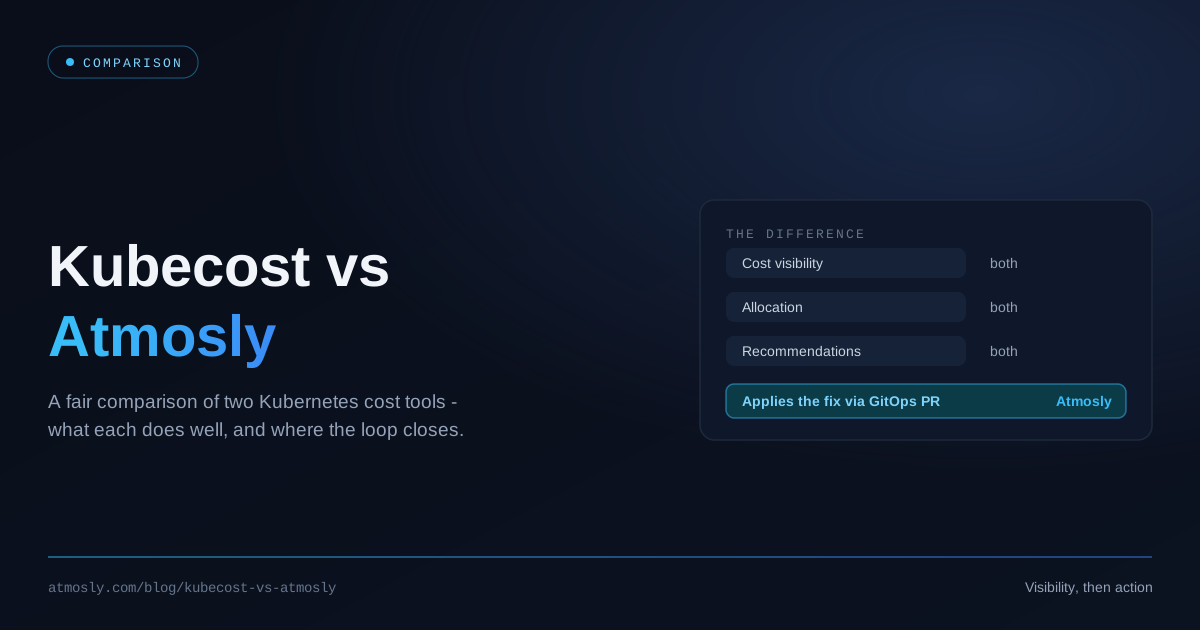
Atmosly sits in the same layer as Kubecost — per-namespace and per-workload cost attribution from in-cluster Prometheus reconciled against connected cloud billing — with one structural difference: right-sizing changes are delivered as a GitOps pull request.
The manifest change is generated, opened for review, and a human merges it. That's the only form of the change that survives a sync. Direct apply exists with a time-boxed sync-pause and revert window when you want speed, but the reviewable PR is the default because it's the one that actually reduces the bill next month.
On attribution, three details differ from most tools in this list:
- Allocation uses max(request, usage) against the real node mix, with spot, on-demand and commitment-covered rates priced separately — so the numbers reflect what you pay, not list price.
- Idle capacity is surfaced as its own bucket rather than smeared across teams. That matters when you're asking a team to justify spend they didn't cause.
- Recommendations carry confidence, priority and an estimated saving, tracked from potential through in-progress to realized in a savings ledger — which is the only honest way to answer "did this work."
Coverage beyond pod right-sizing. Where Kubecost reports allocation, the same console also carries per-nodegroup bin-packing — requests against allocatable — flagging an over-provisioned nodegroup with a specific cheaper instance type that still fits, and checking spot eligibility against live spot pricing on your current on-demand nodes with the monthly delta attached. Well-utilised nodegroups are marked healthy rather than padded with recommendations nobody needs.
Where the line sits. Pod right-sizing is written as a pull request. Node and spot opportunities are surfaced with the saving attached for a human to act on — Atmosly does not replace your cluster autoscaler or manage spot interruptions in real time the way CAST AI does. Breadth of visibility with a human in the loop, rather than autonomous control of compute.
Cost is one module alongside Astra, an AI SRE agent, live-cluster security scanning and CI/CD, on one control plane. Capabilities switch on one at a time, and it runs alongside your existing tooling rather than replacing it. Connection is read-only, and there's a free tier covering one cluster and one environment.
Best fit: GitOps-managed clusters where the durability of a change matters as much as the quality of the recommendation, and teams who want cost, incidents and security posture connected on one control plane instead of three tools that don't talk to each other.
Most customers save 20–40% on Kubernetes costs within the first three months — a range across a customer base, not a guarantee for your cluster, which is why the read-only audit exists rather than a savings calculator.
Reason 2: Reporting Isn't Reducing the Bill
Related but distinct: sometimes the problem isn't delivery, it's that pod-level rightsizing was never where your waste lived.
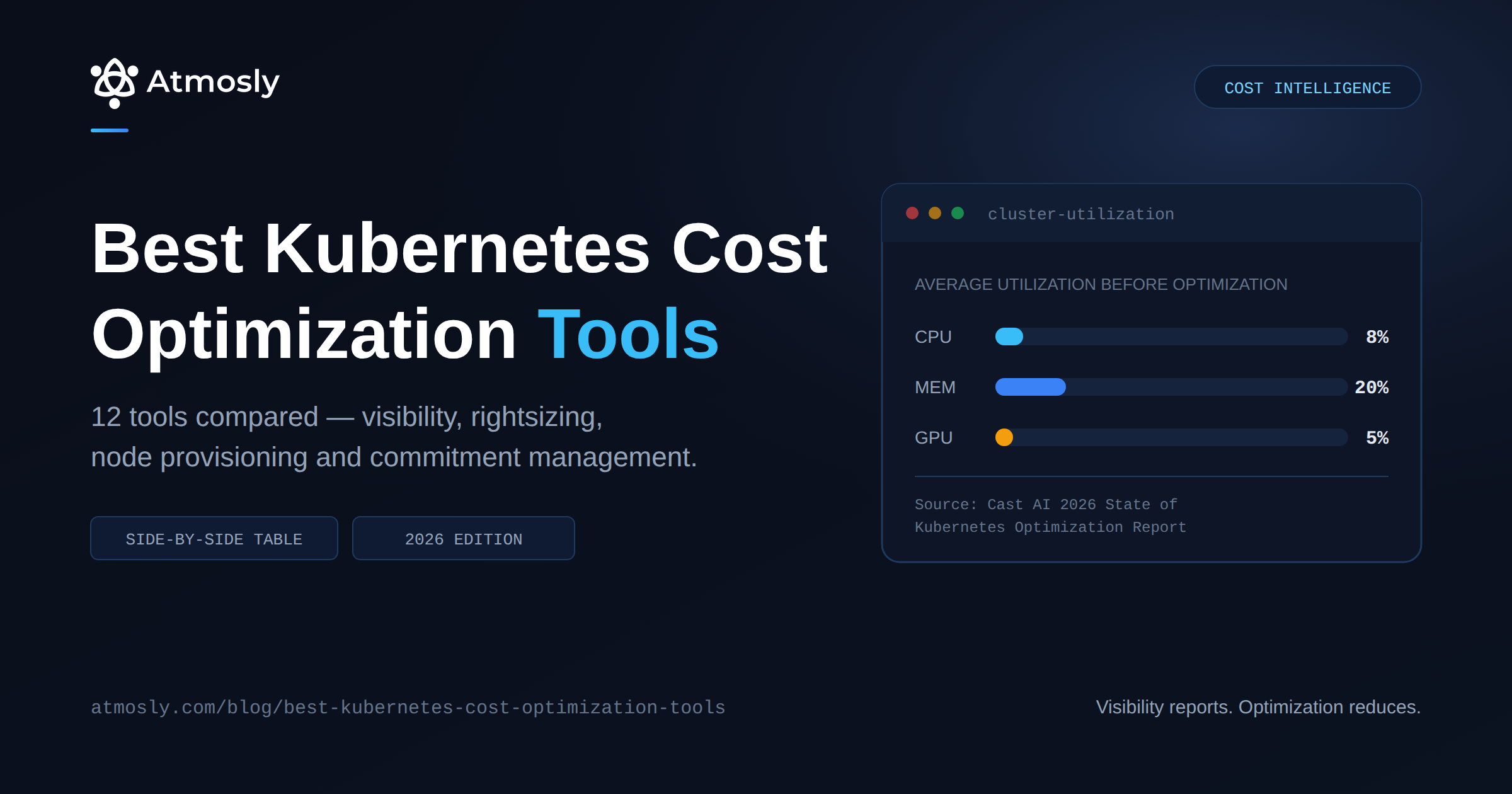
According to Cast AI's 2026 State of Kubernetes Optimization Report, average CPU utilization across tens of thousands of clusters sits at 8% and memory at 20%, with CPU overprovisioning up from 40% to 69% year over year. If your nodes are oversized or entirely on-demand, right-sizing pods produces headroom rather than savings.
CAST AI
CAST AI is the most complete automation platform in this list. It replaces the Cluster Autoscaler, manages spot instances including interruption handling and fallback, optimizes bin-packing, selects instance types, and rightsizes workloads across AWS, GCP and Azure.
The important difference from Kubecost: it changes your infrastructure rather than describing it. You connect read-only, get an analysis, then decide whether to hand over the compute layer.
What you gain: the fastest path to a smaller bill when waste is at the node layer. Spot automation done properly — with interruption handling and fallback — is genuinely hard to build in-house.
What to weigh: it takes real control of compute, which deserves a non-production cluster first. Pricing is typically tied to managed spend, so model it at your actual scale. And the utilization benchmarks everyone cites, including above, are CAST AI's own research — good data, published by a vendor selling the remedy.
ScaleOps
ScaleOps targets the same gap from the workload side: continuous, automated pod rightsizing that reacts in near real time, with guardrails aimed at the reliability concerns that make teams distrust automation.
What you gain: the rightsizing loop closed with no human in it. At several hundred workloads that's often the only thing that produces savings.
What to weigh: you're granting a controller authority to change production workload specs continuously. If your organisation requires every production change to arrive as a reviewable diff, that's a governance conversation before it's a technical evaluation.
Reason 3: You Want Open Source Without a Vendor
OpenCost
OpenCost is the obvious stop here, because Kubecost is built on it. The allocation engine you already trust is the open-source project — what Kubecost adds is the UI, longer retention, multi-cluster aggregation, alerting and support.
helm repo add opencost https://opencost.github.io/opencost-helm-chart
helm repo update
helm install opencost opencost/opencost \
  --namespace opencost --create-namespace

# Same allocation query shape you're used to
kubectl port-forward -n opencost service/opencost 9003:9003 &
curl "http://localhost:9003/allocation/compute?window=30d&aggregate=namespace" | jq
What you gain: no licence, no vendor relationship, CNCF governance, full control of your data. For teams whose objection is structural rather than functional, this is the cleanest answer available.
What you give up:
- You operate the stack. Prometheus, long-term metric storage, scaling, upgrades and backups become yours. This is the cost people underestimate when they call it free.
- Short retention by default. Meaningful trend analysis needs storage you provision and pay for.
- Basic UI, no alerting worth the name, and no support contract when it breaks at quarter close.
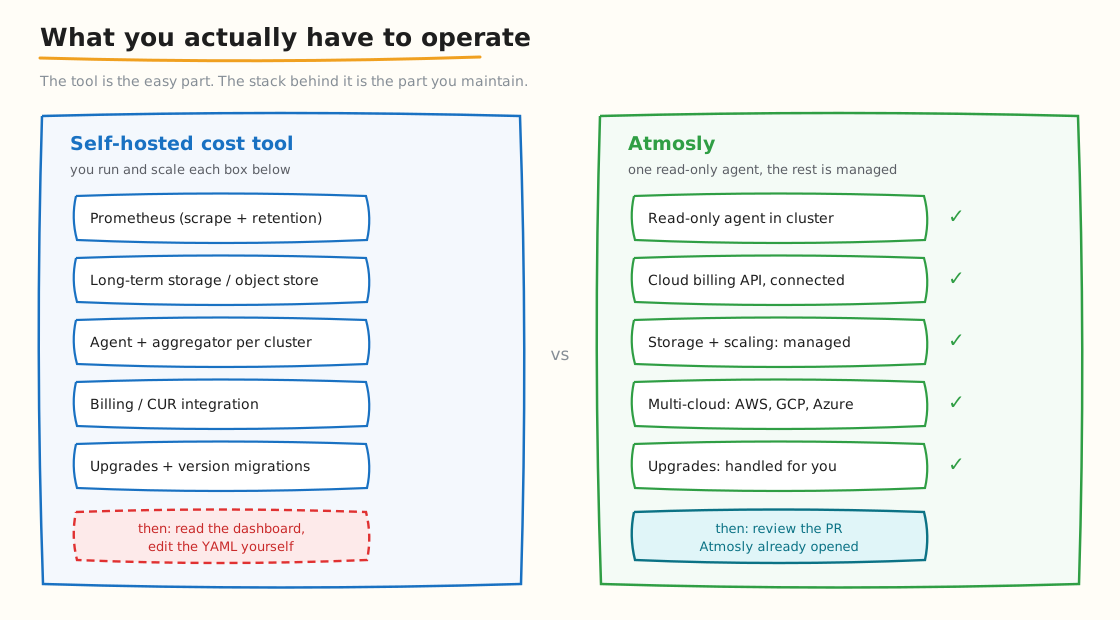
The hidden cost of free: a self-hosted stack means you run Prometheus, long-term storage, the aggregator and the billing integration — and upgrade all of it.
OpenCost vs Kubecost: the detailed comparison
Because one is built on the other, this comparison is unusually clean — you're deciding how much product you want wrapped around an identical cost model.
| OpenCost | Kubecost | |
|---|---|---|
| Allocation engine | The engine | Same engine, plus reconciliation |
| Cost | Free software | Free tier, then commercial |
| Interface | Basic UI, API, Prometheus metrics | Full product UI with saved views |
| Data retention | Whatever you provision and operate | Managed, longer windows |
| Multi-cluster | Aggregate it yourself | Built in |
| Alerting & budgets | Build your own on the metrics | Budgets, anomaly alerts, reports |
| Billing reconciliation | Basic rate handling | Reconciles against actual cloud bills including RI/SP rates |
| Support | Community | Commercial |
| Who runs the metrics stack | You | You |
Note the last row — it's the one people get wrong. Neither option removes Prometheus from your responsibilities. Kubecost buys you a product layer, not a managed metrics pipeline. If escaping that operational burden is the actual goal, neither of these is the answer and you should be looking at agent-based or agentless platforms instead.
Reason 4: Kubernetes Is Only Part of the Problem
Kubecost is Kubernetes-native by design. If your actual question spans RDS, S3, Snowflake and a growing OpenAI bill, you've outgrown the category rather than the product.
Finout
Finout is an enterprise FinOps platform that consolidates cloud, Kubernetes, SaaS and AI spend into a single unified bill. Two capabilities matter most for teams coming from Kubecost:
- Virtual Tagging. Allocates spend across untagged resources without touching your infrastructure or retagging in the console. If you've ever abandoned a tagging project halfway, this is the pitch.
- Agentless integration. It connects to your existing Prometheus or Datadog rather than installing another agent in production clusters.
It also includes CostGuard for waste detection and rightsizing recommendations with savings simulation.
What to weigh: it's enterprise-shaped and priced accordingly. For a Kubernetes-only shop it's heavier than the problem requires, and its Kubernetes depth is one part of a broad platform rather than the whole focus.
CloudZero
CloudZero solves an adjacent problem: unit economics. Cost per customer, per feature, per product line, mapped to business dimensions you define.
What you gain: the ability to answer "what does it cost us to serve this account." For a SaaS business where infrastructure is a gross margin line, that framing is worth more to the CFO than any per-namespace breakdown.
What to weigh: like Kubecost, it reports. It will not rightsize a workload or reconfigure a node group. If your reason for leaving was that reporting wasn't enough, CloudZero doesn't fix that — it reports better, about different things.
Reason 5: You Have VMs Alongside Kubernetes
Densify
Densify reasons across containers and virtual machines together, matching workload patterns to both container resource specs and the right underlying instance types.
What you gain: no gap at the boundary. Running one tool for Kubernetes and another for VMs means each optimizes its half and nobody owns the interaction between them.
What to weigh: enterprise sales cycle, longer implementation, and it's a recommendation layer rather than an execution engine. Value depends on integrating its output into existing pipelines.
What Kubecost Still Does Better Than Most Alternatives
Almost every article on this topic is written by a vendor selling the replacement, which makes them unreliable about the incumbent. Three things Kubecost does genuinely well are worth weighing before you switch.
- Allocation without a tagging project. It produces usable per-namespace and per-workload numbers from cluster metadata, without requiring you to retrofit tags across your estate first. Several alternatives depend far more heavily on tagging discipline you may not have — and a tagging programme quietly becomes the real cost of switching.
- Depth of the cost model. Shared cost distribution, idle handling, and reconciliation against actual cloud rates including reserved instances and Savings Plans are all mature. Newer entrants often price against list rates, which overstates cluster cost, sometimes substantially for a heavily committed account.
- It's the reference implementation. Being built on OpenCost means the model is open, inspectable and widely understood. When a number looks wrong, you can find out why. That isn't true of every commercial alternative.
Where it genuinely stops is the same place it always did: it reports and recommends, it doesn't act. That's a scope decision rather than a defect.
Migrating Off Kubecost Without Losing History
The practical part nobody covers.
- Export your historical allocation data first. Kubecost's allocation API gives you per-namespace history; pull it before the licence lapses. Most tools cannot backfill someone else's data, so whatever you don't export is gone.
- Run both in parallel for at least two weeks. Different tools use different attribution models and different idle handling. Numbers will disagree. Understand why before you cut over, not during a budget review.
- Reconcile against the actual cloud bill, not against each other. The tool whose total lands closest to your invoice is the one modelling your discounts correctly.
- Check whether you still need Prometheus. If Kubecost was its only consumer, a managed alternative may let you decommission infrastructure — which belongs in the migration business case.
- Keep the dashboards someone actually opens. Adoption dies when a finance stakeholder's weekly view disappears. Rebuild those first, not last.
The Hidden Costs of Switching
Every vendor here will show you a savings number. None will show you the cost of getting there.
- Lost historical data. No tool can backfill another vendor's history. Whatever you fail to export becomes a permanent gap in your trend analysis.
- Attribution model change. Your new tool will produce different numbers for the same cluster. Expect to explain to finance why last month's figure moved when nothing in the infrastructure did.
- Re-onboarding humans. Dashboards, saved views, scheduled reports and the mental model your team built all reset.
- Parallel-run overhead. Two tools scraping the same cluster for a fortnight costs real resources, and cluster footprint if both install agents.
- The tagging project you may now need. If your new tool leans on tags more heavily than Kubecost did, that's potentially months nobody scoped.
- Contract overlap. Renewal dates rarely align with migration timelines. Expect to pay for both for a period.
None of this argues against switching. It argues for switching for a reason strong enough to justify the friction — which is why this guide is organised by reason rather than by feature count.
Key Takeaways
- Match the tool to your reason for leaving. These seven aren't substitutes — they replace different things.
- The most common failure is delivery, not detection. Kubecost usually found the waste; nobody applied the fix, or the fix reverted on sync.
- Kubecost is built on OpenCost. If your objection is the vendor rather than the product, keep the cost model and drop the licence.
- "Free" open source means you operate Prometheus and long-term storage. Budget that engineering time honestly.
- If reporting wasn't enough, don't replace it with better reporting. CloudZero and Finout report more broadly; Atmosly, CAST AI and ScaleOps change something.
- Export your history before you cancel. No tool can backfill another vendor's data.
- Doing nothing is a valid option. Kubecost's allocation model remains among the best available. Switching cost is real.
See the Comparison Against Your Own Cluster
Every tool here will show you a savings estimate. The only numbers worth trusting are the ones from your own workloads.
- Connect a cluster read-only for a free audit — real cost per namespace, idle capacity separated out, and right-sizing recommendations with confidence scores. Nothing changes in your cluster, no sales call.
- Or start on the free tier — one cluster, one environment, no credit card.
- Going deeper: the direct Kubecost vs Atmosly comparison, the Atmosly vs Kubecost feature breakdown, or the wider guide to Kubernetes cost optimization tools.