
You run kubectl get nodes and one line reads NotReady. Kubernetes stops scheduling new pods onto that node, existing pods may be evicted after a grace period, and your effective cluster capacity just dropped. Node NotReady is not a single fault — it is a symptom with a handful of distinct causes, from a dead kubelet to disk pressure to a broken CNI. This guide covers what the status means, the exact commands to diagnose it, and the fix for each root cause, plus how to prevent it.
What "NotReady" actually means
Every node runs a kubelet, the agent that reports node health to the control plane and manages the pods scheduled there. The node's Ready condition is True only while the kubelet posts healthy status to the API server. When those heartbeats stop or the kubelet reports a problem, the node flips to NotReady.
The control plane records the reason in the node's conditions. Reading them first is the fastest path to the cause, because the condition usually names it:
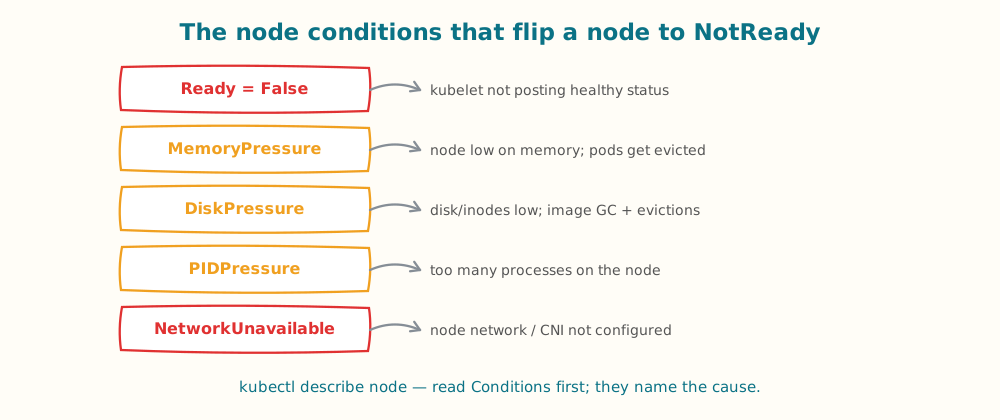
Read the node Conditions first — Ready, MemoryPressure, DiskPressure, PIDPressure, and NetworkUnavailable point straight at the cause.
What happens to your pods when a node goes NotReady
Understanding the timeline tells you how urgent the fix is. When a node stops reporting, the control plane does not evict pods instantly:
- Grace period first. The node controller waits for a monitor grace period (about 40 seconds by default) before marking the node unhealthy, to ride out transient blips.
- Taint, then eviction. The node is tainted
node.kubernetes.io/not-ready. Pods tolerate that taint for a window — commonly around five minutes viatolerationSeconds— after which they are evicted and rescheduled onto healthy nodes. - No new scheduling. Throughout, the scheduler places no new pods on the node, so capacity is already reduced even before eviction begins.
That five-minute-ish window is your runway: a NotReady node that recovers quickly may lose no pods, but one left NotReady will shed its workloads. If those pods cannot be placed elsewhere, they enter Pending — which is why a NotReady node often shows up first as a wave of unschedulable pods.
First commands to run
Start broad, then zoom into the affected node. These four commands resolve most cases:
# 1. Which nodes, and how long have they been NotReady?
kubectl get nodes -o wide

# 2. The most important command: conditions, events, and capacity
kubectl describe node <node-name>

# 3. Recent cluster events referencing the node
kubectl get events --field-selector involvedObject.name=<node-name> --sort-by=.lastTimestamp

# 4. On the node itself (SSH): is the kubelet alive?
systemctl status kubelet
journalctl -u kubelet -n 200 --no-pager
The describe output's Conditions block is where you should look before anything else. MemoryPressure=True or DiskPressure=True immediately narrows the search; a stale Ready heartbeat with no pressure points at the kubelet, runtime, or network.
The common causes and how to fix each
Work from the outside in — cloud instance, then kubelet, runtime, resource pressure, and network. The first "no" in that chain is usually your fix.
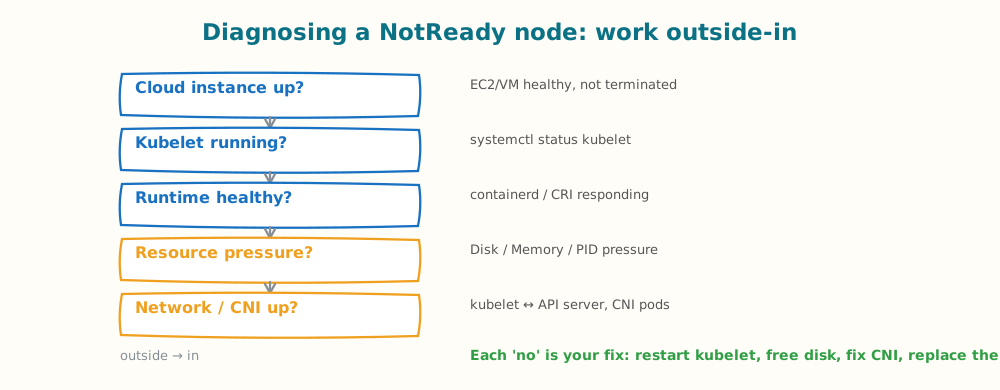
Diagnose a NotReady node outside-in; each check has a specific command and fix.
1. Cloud instance or VM failure
If the underlying EC2 instance or VM is unhealthy, terminated, or unreachable, the kubelet cannot report and the node goes NotReady. Check instance health and status checks in your cloud console. Fix: for a managed node group, cordon and drain the node, then let autoscaling replace it (kubectl drain <node> --ignore-daemonsets --delete-emptydir-data). Replacing a bad instance is almost always faster than repairing it.
2. Kubelet down or misconfigured
If systemctl status kubelet shows the service dead or crash-looping, that is your cause. Read journalctl -u kubelet for the reason — a bad config, an expired certificate, or a failure to reach the API server. Fix: correct the config or credentials and systemctl restart kubelet. Confirm the node can reach the control plane endpoint on the API server port.
3. Container runtime failure
The kubelet depends on a CRI runtime (containerd or CRI-O). If the runtime is down, the kubelet reports the node unhealthy. Check it with systemctl status containerd and crictl info. Fix: restart the runtime (systemctl restart containerd), clear a full image store if that is the trigger, and verify the kubelet reconnects.
4. Resource pressure (disk, memory, PID)
Nodes flip to NotReady when they exhaust critical resources, and the kubelet begins node-pressure eviction. The condition names which:
- DiskPressure: the disk or inodes are near full. Free space — prune images (
crictl rmi --prune), clear logs, expand the volume. This is the most common pressure cause. - MemoryPressure: available memory is below the eviction threshold. Identify heavy pods, set proper requests/limits, and consider larger nodes. Our OOMKilled guide covers the memory side in depth.
- PIDPressure: too many processes on the node. Find the offender and cap PIDs; it usually signals a fork bomb or a misbehaving workload.
5. Network or CNI failure
Network problems are the most frequent cause: the kubelet must reach the API server, and the CNI plugin must be healthy for the node to be usable. Check that CNI pods (Calico, Cilium, the VPC CNI, etc.) are running on the node with kubectl get pods -n kube-system -o wide, and confirm connectivity to the API server. Fix: restart or reinstall the failed CNI DaemonSet pod, and resolve any security-group, route, or DNS issue blocking node-to-control-plane traffic.
6. Certificate expiry
An expired kubelet client certificate stops the node authenticating to the API server, and it goes NotReady. journalctl -u kubelet will show TLS or x509 errors. Fix: rotate the kubelet certificate (most managed distributions auto-rotate; self-managed clusters may need kubeadm certs renew or a manual CSR approval).
Cloud-specific notes: EKS, GKE, AKS
Managed Kubernetes narrows the surface but adds provider-specific causes. Consult the provider runbooks — GKE and AKS both publish NotReady guides — but the recurring themes are:
- EKS: IAM/role misconfiguration on the node, a broken VPC CNI, or an unhealthy instance in the managed node group. Replacement via the node group is the usual fix.
- GKE: node auto-repair handles many cases automatically; persistent NotReady often traces to resource pressure or a custom DaemonSet.
- AKS: check the node pool health and the kubelet/containerd status via the node's serial console or the AKS troubleshooting tooling.
Preventing NotReady nodes
Most NotReady incidents are preventable with a few controls:
- Set resource requests and limits so a single workload cannot starve the node into memory or PID pressure.
- Reserve system resources with
--kube-reservedand--system-reservedso the kubelet and OS always have headroom. - Monitor disk usage and prune images proactively; DiskPressure is the most common and most avoidable cause.
- Right-size and autoscale so nodes are not chronically overcommitted — see our autoscaling guide.
- Enable node auto-repair where your provider supports it.
Detecting node issues automatically
Node NotReady is a node-scope failure that sits alongside pod-scope issues like CrashLoopBackOff and Pod Pending (which a NotReady node can itself cause, since the scheduler avoids the node). Atmosly's AI SRE agent classifies node_notready as its own detection class, surfaces the node conditions and evidence behind it, and flags it before pods start getting evicted — so you are diagnosing from a scoped incident rather than a wall of pod alerts. For the broader method, see our guide to debugging Kubernetes pods.
Key takeaways
- NotReady means the kubelet is not reporting healthy status — the node's
Conditionsusually name the reason. - Run
kubectl describe nodefirst, then check the kubelet withsystemctl status kubeletandjournalctl. - Diagnose outside-in: cloud instance, kubelet, runtime, resource pressure, network/CNI, certificates.
- DiskPressure and network/CNI failures are the most common causes — and the most preventable.
- Prevent it with resource limits, reserved system resources, disk monitoring, right-sizing, and node auto-repair.
Want NotReady nodes caught and explained before they evict your pods? Connect Atmosly read-only and run a free five-minute cluster audit. Start with Atmosly.