Every workload that ships to production carries either a cost profile that was thought through or a cost profile that got copy-pasted from the last workload. The difference does not show up on the first bill; it shows up two quarters later when a routine cost audit finds that half the namespace's spend is on capacity nobody uses. A Kubernetes cost optimization checklist run before production deployment is the discipline of catching that gap while it is still cheap to fix — the moment a workload leaves staging, its resource requests, autoscaler bounds, storage class, and lifecycle policies are effectively frozen, and every subsequent adjustment carries risk that the pre-production version did not.
Pre-production cost reviews are not glamorous. They add friction to the deploy path, they surface uncomfortable questions about resource requests that were "just placeholder values," and they force teams to think about a bill they cannot see yet. But they are dramatically cheaper than the alternative, which is fixing the same class of waste every quarter across dozens of services that all shipped with the same defaults. The teams that do this consistently do not run cleanup projects; the teams that do not run cleanup projects roughly quarterly, roughly forever.
This checklist covers what to review before a workload ships, organized by category — rightsizing, compute and storage choices, autoscaling and limits, and the final gate. It is designed to be run in about 30-45 minutes for a typical service by whoever owns the deploy, not as a full-day platform team exercise. The specific numbers assume a mainstream setup (managed Kubernetes on a major cloud, standard Prometheus-based observability), but the categories translate to any environment.
The checklist is one input into the broader cost program — the guardrails that enforce the checks automatically, the reporting that catches drift after deploy, the anomaly detection that catches the surprises. Teams that would rather have the whole loop wired together, rather than maintaining the checklist as documentation and hoping it gets followed, can layer a Kubernetes Cost Optimization platform that turns each of the checks below into an automated policy or dashboard signal. Either way, the mechanics of what to look for are the same.
Why Cost Optimization Should Start Before Production
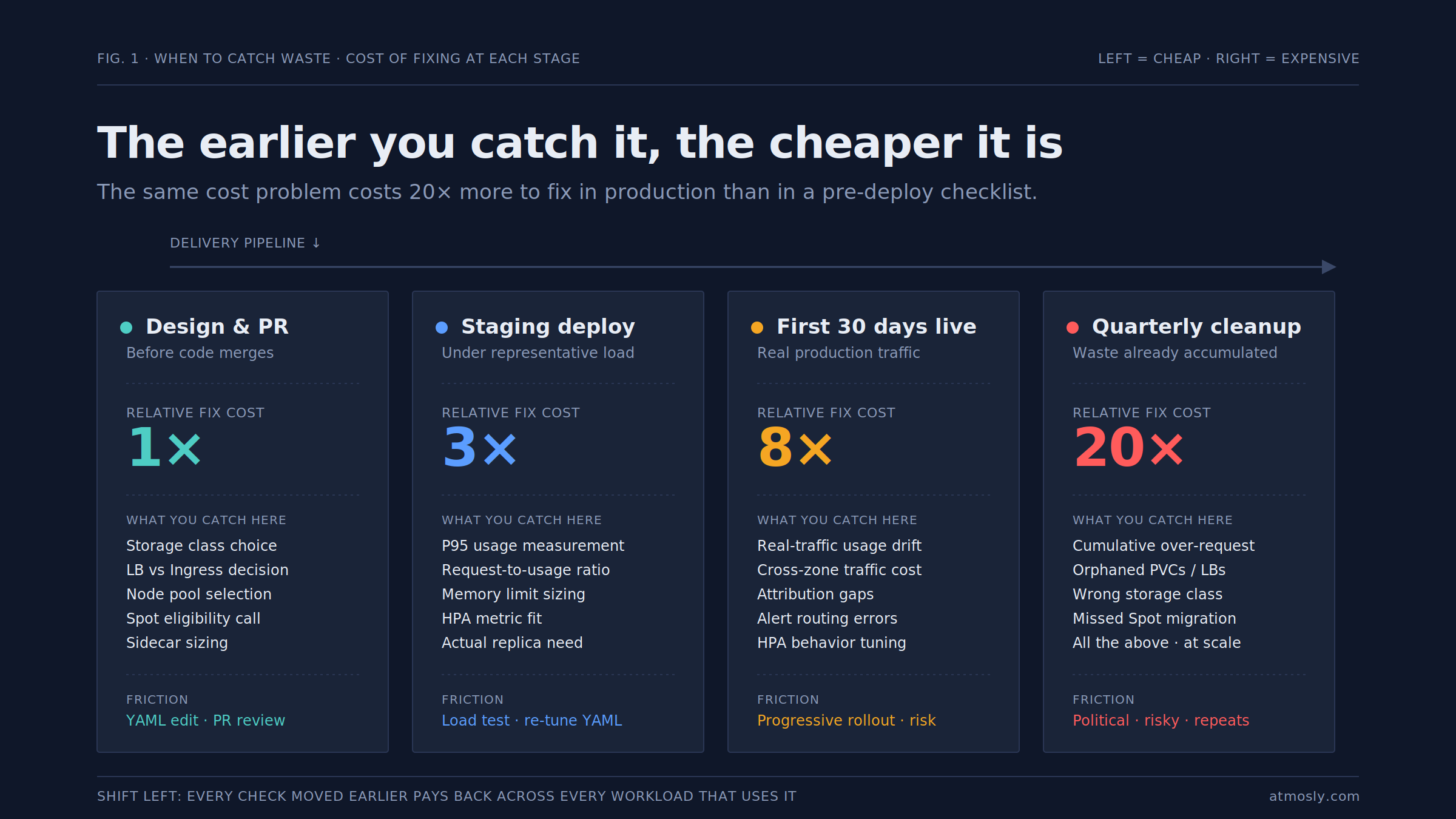
The core reason to move cost review upstream is that Kubernetes workloads are much easier to rightsize before they carry production traffic than after. Once a service is live, the team owning it has an incentive to leave resource requests generous — the reliability cost of undersizing is immediate and visible, the cost saving of rightsizing is diffuse and delayed. That asymmetry works against the platform team for the entire lifetime of the service unless the initial deploy landed with reasonable numbers.
The second reason is that the cheapest time to make a cost decision is before the workload has a track record to defend. A service that shipped with 4Gi memory requests and used 500Mi will get pushback if you propose dropping requests six months later, even though the data supports it. A service that ships with requests set to observed staging usage plus a 2× buffer has the same effective allocation with none of the political friction. The bill is the same either way; the conversation is not.
The third reason is that many cost decisions are effectively one-way doors after production launch. Choosing pd-ssd for a PVC when pd-balanced would have sufficed is easy to fix at deploy time and painful to fix after data has landed on the disk. Provisioning a dedicated LoadBalancer when an Ingress rule would have shared one costs $18-25/month base fee for as long as the service exists, and consolidating it later requires DNS changes and traffic cutover. The pre-production checklist catches these while they are still just YAML.
The fourth reason is that pre-production checks scale where post-production audits do not. A platform team of five can review deploys at admission time via automation and lightweight owner-run checklists. That same team cannot manually audit hundreds of live workloads for waste on any reasonable cadence. Every check you shift left is a check that scales to the number of deploys rather than the size of the platform team.
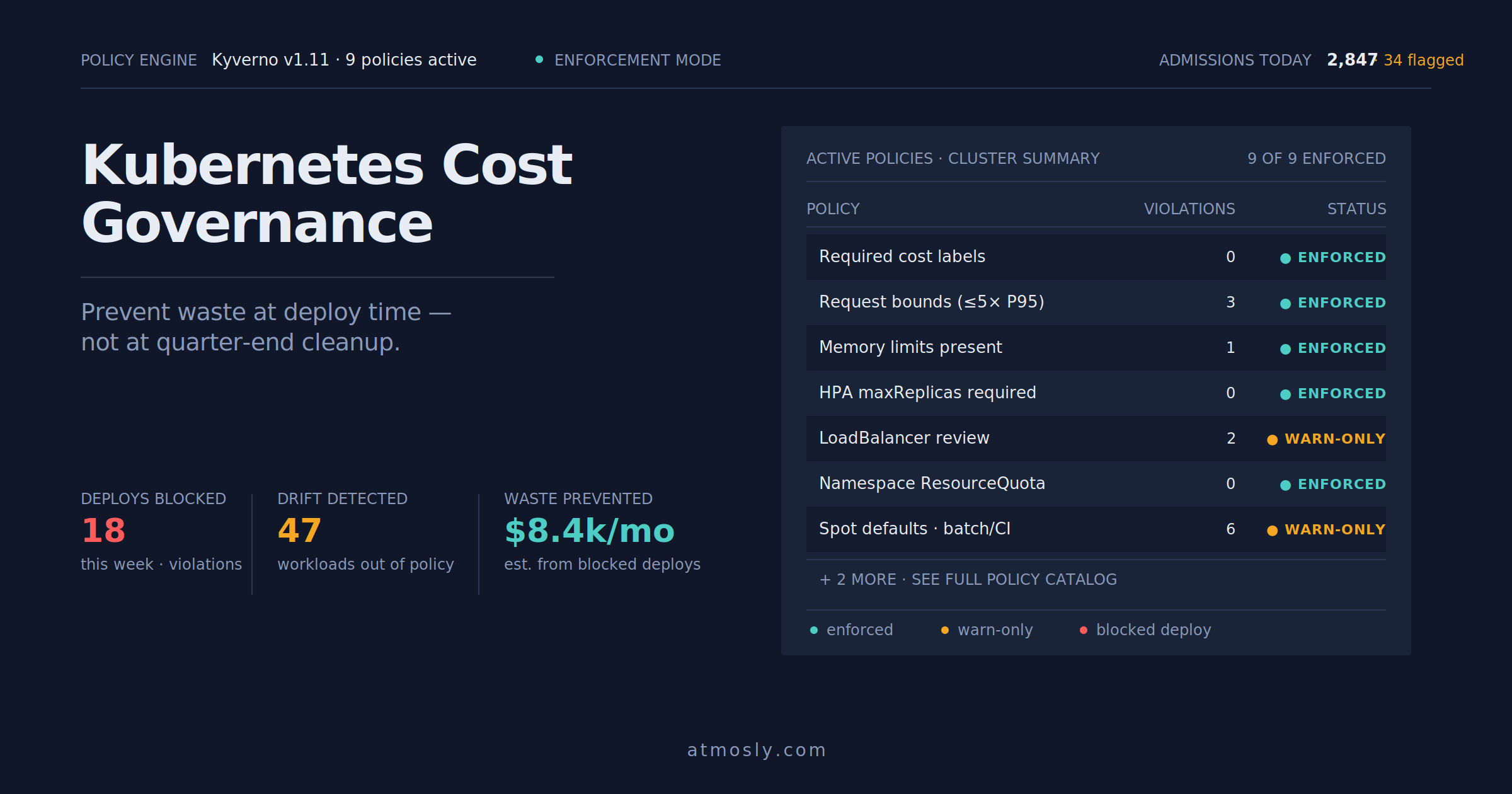
The pattern of catching problems at the earliest cheap point rather than the latest painful point is the same discipline that underlies broader Kubernetes cost governance — the checklist is what a team does per workload; governance is what the organization enforces across every workload.
Kubernetes Resource and Workload Right-Sizing Checklist
The single largest lever in pre-production cost review is right-sizing — matching what the workload requests to what it actually uses. This section is where the majority of the savings live, and where the most avoidable mistakes get baked in.
Observed usage from staging is the starting point. The rightsizing conversation begins with data, not opinion. Before the workload ships, someone should have run it under representative load in staging for at least 48-72 hours and captured CPU and memory usage at the P95 percentile. If staging traffic does not resemble production traffic, load-test it first. Requests set without data are just guesses in a Helm template, and they will be wrong in the direction of over-provisioning roughly always.
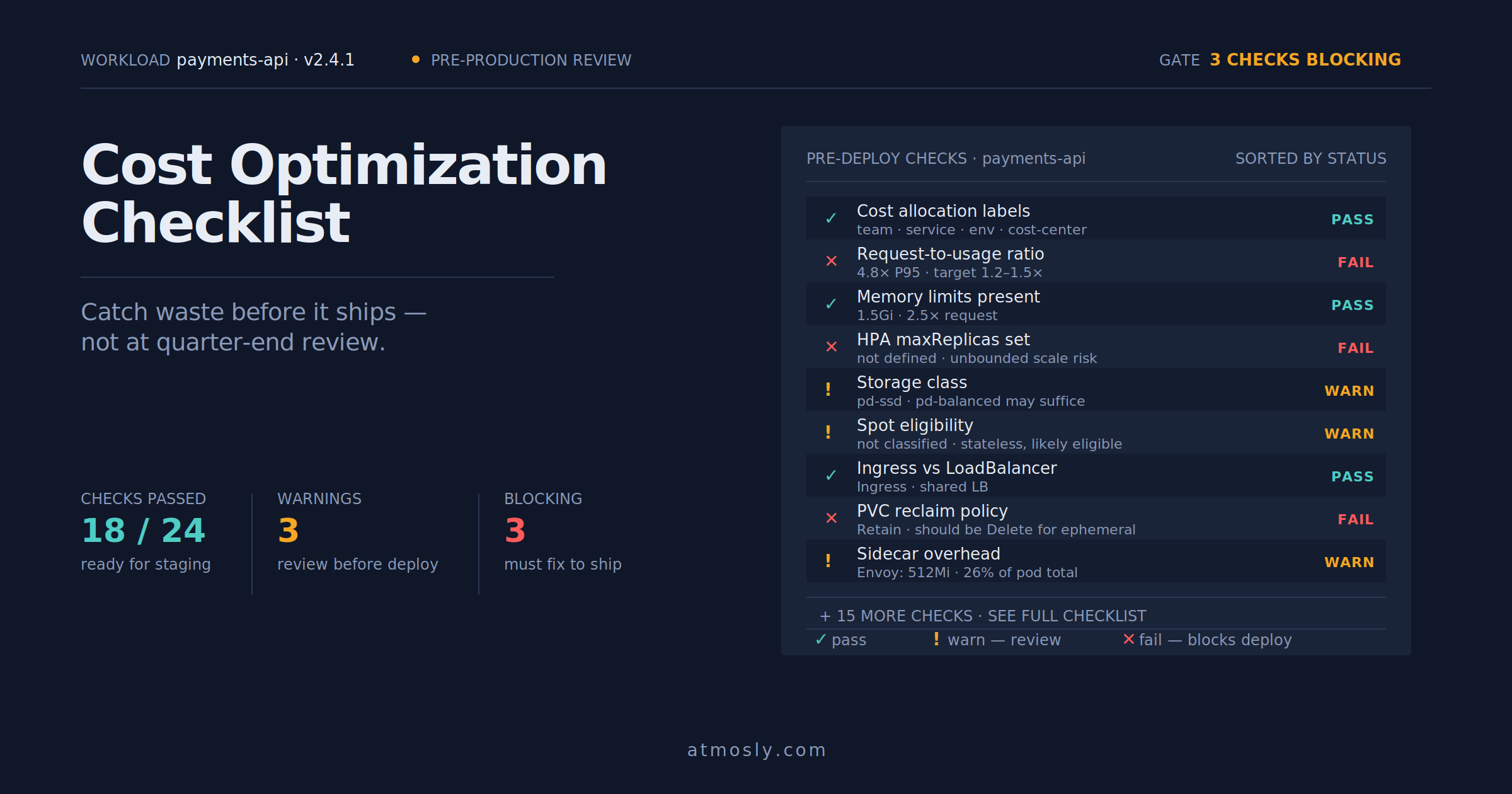
Request-to-usage ratio target. The healthy ratio is 1.2-1.5× P95 usage for both CPU and memory. Lower means throttling and OOMKills; higher means paid-for capacity that never gets used. Requests set at 3-5× P95 are severely oversized and should be the first thing reviewed; requests set below 1.0× P95 are undersized and will cause incidents. This is the check that catches the copy-pasted-template pattern that produces most cluster-wide waste.
Limits set correctly per resource. Memory limits should be 2-3× the request to leave headroom for legitimate spikes without reserving that headroom on the node. CPU limits are more contentious — for latency-sensitive workloads, many teams remove CPU limits entirely because CPU throttling causes worse problems than the runaway itself; for batch or background workloads, CPU limits are usually fine and prevent noisy-neighbor issues. Missing memory limits is never fine — a runaway workload without a memory limit will OOM the entire node.
Replica count sized to actual demand. A service that ships with 3 replicas because 3 is a "safe" number, when 1 replica would handle the traffic with 40% headroom, is paying 3× for the same throughput. Replica counts should be sized to the actual load pattern, with HPA taking over from there if the workload is variable. Overprovisioned replica counts are especially expensive because they multiply every other rightsizing mistake in the same pod spec.
Init container and sidecar overhead accounted for. Every sidecar (service mesh proxy, log forwarder, security agent) has its own resource requests, and those get added to the pod's total on every replica. A pod with an "efficient" main container and an oversized Envoy sidecar can carry more overhead from the sidecar than the main workload. Sidecar requests should be reviewed with the same rigor as application containers — often more rigor, because they get copy-pasted across every workload in a namespace.
Workload type matches the compute pattern. A batch workload configured as a Deployment (always running) instead of a Job (runs to completion) burns compute during idle time. A latency-sensitive service running on a node pool sized for batch workloads gets scheduled with wrong bin-packing assumptions. The workload type — Deployment, StatefulSet, Job, CronJob — should match the traffic and lifecycle pattern.
Compute, Storage, and Network Cost Checks
Beyond rightsizing the individual workload, several checks apply to how the workload interacts with the underlying infrastructure. These are less about "how big is the pod" and more about "which infrastructure is it running on and how."
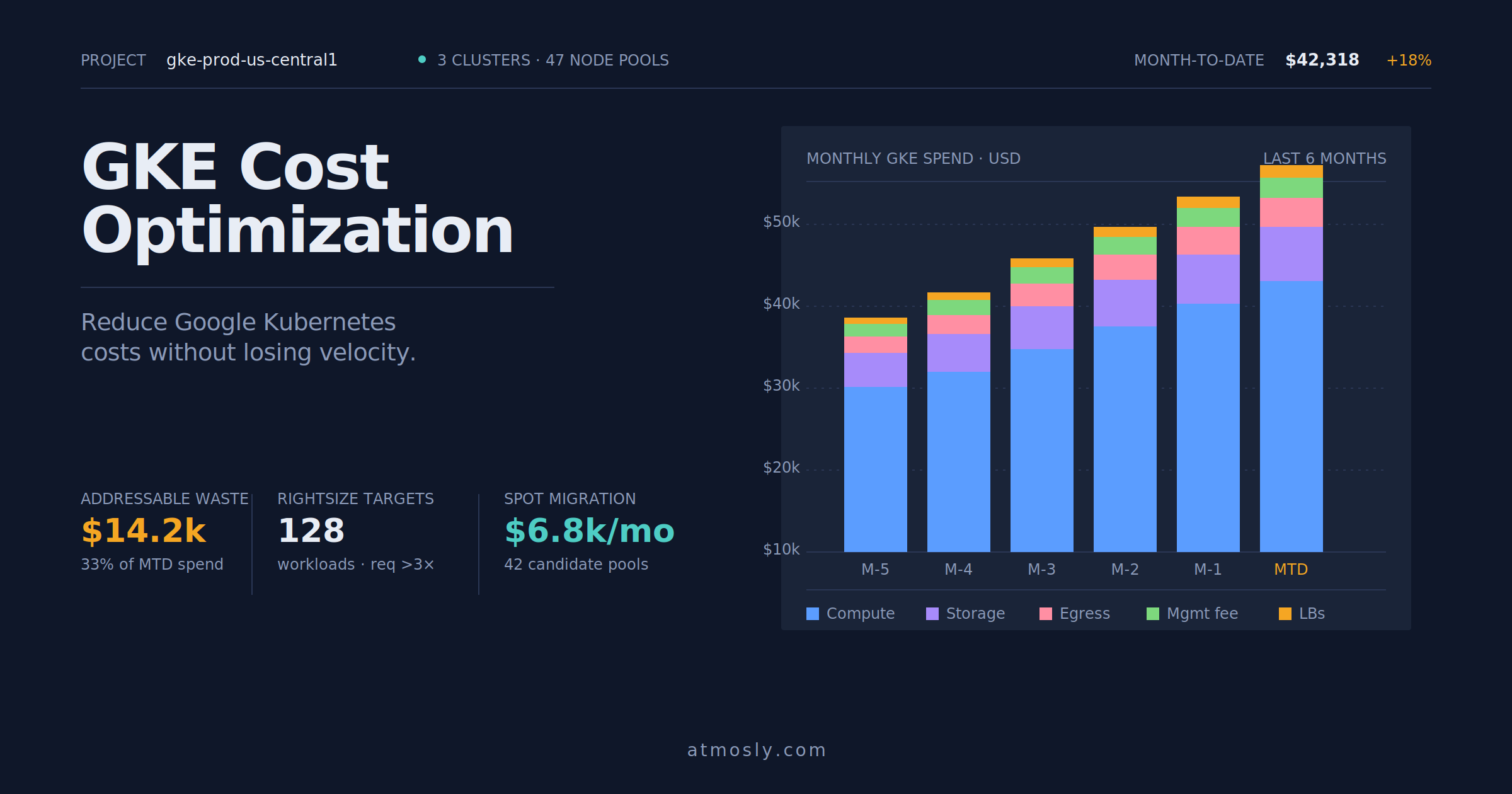
Node pool selection. Every workload should run on the node pool whose machine family matches its resource profile. Memory-heavy workloads on memory-optimized instances, compute-heavy workloads on compute-optimized instances, general-purpose workloads on general-purpose. Running everything on default N-series (GCP) or M5 (AWS) instances is the most common cost mistake, and per-workload it usually costs 20-30% more than the right choice.
Spot / Preemptible eligibility. Every workload should be classified as Spot-eligible or not before it ships. Fault-tolerant workloads — batch jobs, CI runners, stateless services with multiple replicas, ML training with checkpointing — should default to Spot node pools. Stateful services, databases, and singletons should not. The default node pool selection at deploy time locks in a 40-80% cost difference for the lifetime of the workload.
Storage class matches the workload's I/O profile. Pre-production check: does this workload actually need pd-ssd (or equivalent premium storage), or would pd-balanced or pd-standard suffice? Databases and I/O-heavy services benefit from SSD; log archives, backup targets, and batch inputs almost never do. A workload running on pd-ssd when pd-balanced would work is silently overpaying 40-60% on storage for its entire life.
Persistent Volume reclaim policy. StorageClass reclaimPolicy should be Delete for anything that will be recreated (staging PVCs, ephemeral data) and Retain only where the volume genuinely outlives the workload. The default reclaim policy across most StorageClasses is Delete, but ClusterAdmins sometimes change it to Retain at cluster setup and forget. Retained volumes from long-deleted workloads are one of the most common "orphaned PVC" patterns in every audit. A closer walkthrough of finding orphaned volumes and other invisible waste appears in the Kubernetes idle resources playbook.
Snapshot lifecycle policy. If the workload's PVC is subject to a backup or snapshot job, there should be a retention policy that expires old snapshots. Daily snapshots retained forever are how storage bills quietly climb.
LoadBalancer vs. Ingress choice. Any Service of type LoadBalancer should have an explicit justification. In most cases, an Ingress rule under a shared LoadBalancer is the right choice — same routing, one shared LB base fee instead of per-service base fees. The check is trivial (does this service really need a dedicated LB?) and prevents the accumulation of unnecessary $18-25/month base costs across the namespace.
Cross-zone traffic awareness. If the workload calls services in other availability zones (databases, caches, external APIs), the traffic will incur cross-zone egress costs at $0.01-0.02/GB. At low traffic this is invisible; at high traffic it adds up. Pre-production is the right time to check whether the service should use topology-aware routing to prefer same-zone endpoints, and whether the dependencies (database read replicas, caches) should be placed in the same zone as the callers.
External egress volume estimate. If the workload sends significant traffic out of the cloud (customer-facing API responses, large data downloads, third-party API calls), the egress cost can dominate the workload's total bill. Pre-production is the right time to plan for CDN placement, response compression, or architectural changes that reduce egress volume — retrofitting these after production launch is expensive.
Autoscaling, Limits, and Resource Allocation Checks
Autoscaling is the mechanism that lets clusters absorb variable load without over-provisioning. It is also the mechanism that produces the most spectacular runaway cost incidents when misconfigured. Every autoscaled workload needs specific pre-production checks that a static workload does not.
HPA metric appropriateness. The Horizontal Pod Autoscaler scales replicas based on a metric — CPU utilization by default, custom metrics for more sophisticated setups. The check is whether the chosen metric actually correlates with the workload's real load. A queue-driven service scaled on CPU will scale too late (queue depth rises before CPU does); a burst-tolerant service scaled on P95 latency will scale too aggressively. Pre-production is where the metric choice should be validated against expected load patterns.
HPA min and max replicas both set. minReplicas sets the floor — the number of replicas even during quiet periods. maxReplicas sets the ceiling — the number the HPA cannot exceed even under runaway conditions. Missing maxReplicas is one of the fastest ways to produce a five-figure cost incident when a metric misbehaves. Pre-production check: is maxReplicas set to a number that represents genuine peak demand plus a modest buffer, not a placeholder like 100 that would produce catastrophic scaling if triggered?
HPA scale-down behavior sanity-checked. HPA scale-down is conservative by default — 5-minute stabilization windows and gradual replica reduction. For workloads with sharp traffic drops (batch completions, marketing campaigns ending), the default scale-down behavior leaves replicas running longer than needed. The behavior field lets you tune this per workload; the pre-production check is whether the scale-down profile matches the workload's actual drop pattern.
VPA in recommendation mode. Vertical Pod Autoscaler in Auto mode can restart pods with new resource requests, which is disruptive in production. Most teams run VPA in Off (recommendation-only) mode and apply the recommendations manually via PRs. Pre-production check: is VPA configured, and if so, is it in the mode you actually want?
PodDisruptionBudget set for critical workloads. Not a direct cost check, but PDBs prevent Cluster Autoscaler from consolidating nodes if doing so would violate availability requirements. A missing PDB can produce either availability incidents (if the autoscaler drains too aggressively) or wasted capacity (if the autoscaler is too conservative because it cannot tell what to preserve). The pre-production check is whether critical workloads have PDBs and whether those PDBs are sized realistically.
ResourceQuota fit at the namespace level. The workload's total requests, multiplied by max replica count, need to fit within the namespace's ResourceQuota. A workload that will hit quota during a legitimate scale-up gets blocked from scaling, producing user-facing degradation. Pre-production check: does the workload's peak resource envelope fit within its namespace's quota, with room for the other workloads in that namespace?
Cluster Autoscaler / Karpenter node pool alignment. The workload's node selector, tolerations, and affinity rules need to match at least one node pool that the autoscaler can provision from. A workload that requests a node pool the autoscaler cannot scale results in Pending pods indefinitely. Pre-production check: does the workload actually land on nodes when deployed to staging, and does it land on the intended node pool?
Final Kubernetes Cost Optimization Checklist
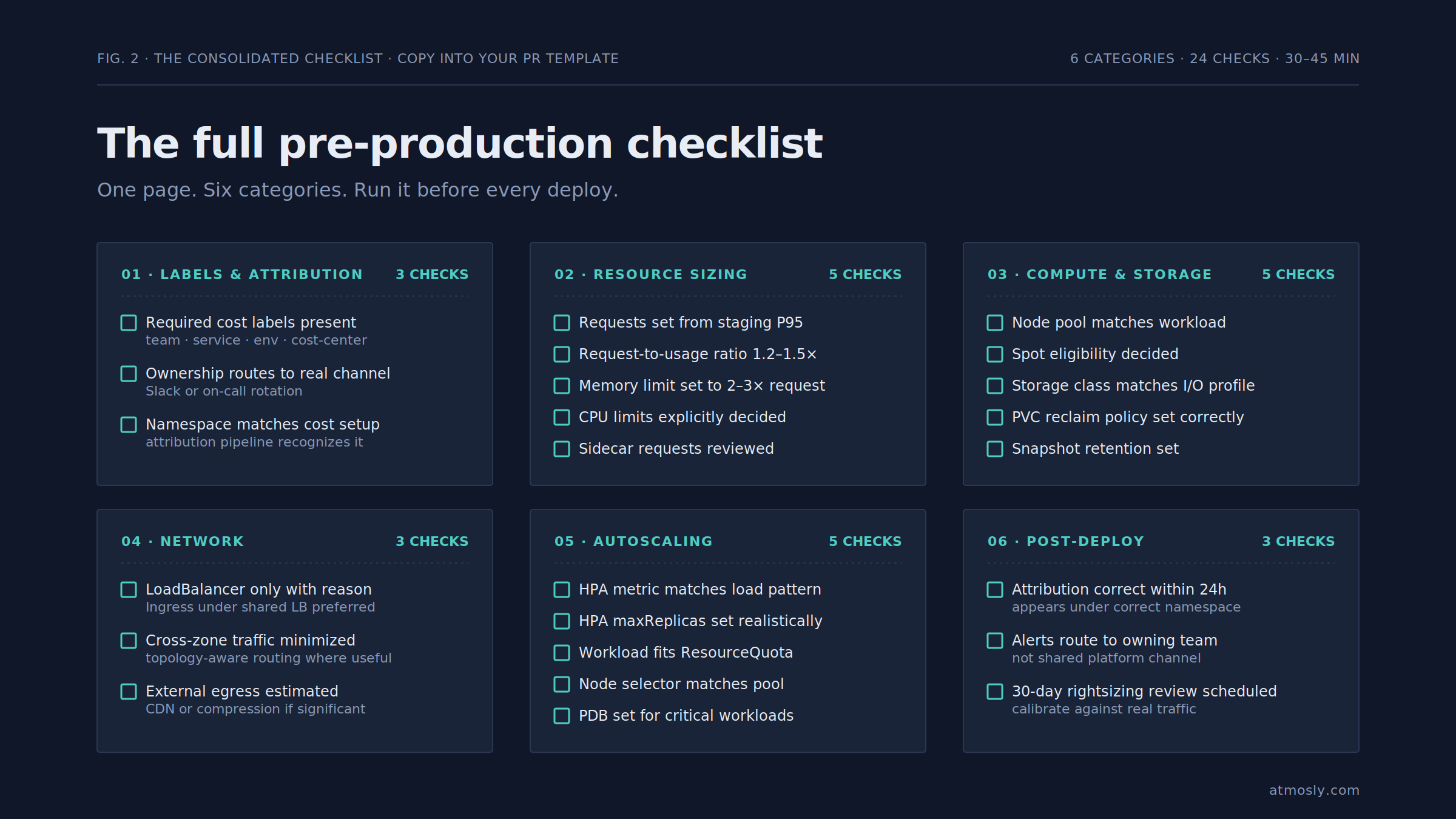
The consolidated checklist to run before any workload ships to production. Copy this into the PR template, the deploy runbook, or wherever your team gates promotions.
Labels and attribution
- Required cost allocation labels present (
team,service,environment,cost-center) - Ownership tag routes to a real Slack channel or on-call rotation
- Namespace matches the team's cost allocation setup
Resource sizing
- Requests based on P95 usage from staging under representative load
- Request-to-usage ratio between 1.2× and 1.5×
- Memory limit set to 2-3× the request
- CPU limits explicitly chosen (present, absent, or with justification)
- Sidecar resource requests reviewed with the same rigor as application containers
- Replica count sized to actual demand, not a "safe" default
Compute and storage choice
- Node pool machine family matches workload profile
- Spot / Preemptible eligibility explicitly decided
- Storage class matches I/O profile (not defaulting to premium)
- Reclaim policy set correctly (
Deleteunless volume genuinely outlives the workload) - Snapshot retention policy set if backups are configured
Network
- LoadBalancer only used with explicit justification (Ingress preferred)
- Cross-zone traffic minimized where possible (topology-aware routing)
- External egress volume estimated; CDN or compression considered if significant
Autoscaling
- HPA metric chosen matches actual load pattern
- HPA
minReplicasandmaxReplicasboth set to realistic values - HPA scale-down behavior matches the workload's traffic drop pattern
- VPA mode explicitly chosen (typically recommendation-only for production)
- PodDisruptionBudget set for critical workloads
- Workload fits within namespace ResourceQuota
- Node pool selector matches a pool the autoscaler can provision from
Post-deploy
- Cost attribution dashboard shows the workload correctly within 24 hours
- Alerts route to the owning team, not a shared platform channel
- Rightsizing review scheduled for 30 days post-deploy once real production data lands
The checklist looks long the first time you run it; by the third or fourth workload, most items are decisions the team makes reflexively rather than reviews. The value is not in ceremonially running through every item — it is in ensuring the team owning the workload has thought about each one at least once before the deploy lands.
Kubernetes' own guidance on managing resources for containers covers the mechanics of the resource request and limit primitives that most of this checklist depends on. The checklist is the operational layer that turns those primitives into a repeatable pre-deploy practice.
Automate the checklist against your cluster.
Connect a cluster read-only and get a pre-deploy compliance report against the checks above, plus rightsizing recommendations based on your actual usage data. Setup takes a few minutes. Try it free →