Introduction: Why Kubernetes is the Perfect Platform for Microservices
Microservices architecture decomposing monolithic applications into dozens or hundreds of small, independently deployable services that communicate over networks has become the dominant architectural pattern for modern cloud-native applications, enabling teams to scale development velocity, deploy changes independently without coordinating across the entire organization, use different technology stacks optimized for specific service requirements, scale services independently based on individual load patterns rather than scaling the entire monolith, and achieve better fault isolation where failures in one service don't cascade into complete application failure. However, microservices introduce significant operational complexity that traditional deployment platforms struggle to handle: you need to deploy, monitor, scale, and manage potentially hundreds of services instead of one monolith, network communication between services becomes critical and complex with service discovery, load balancing, and failure handling, configuration management multiplies with each service needing its own environment variables and secrets, observability becomes exponentially harder when a single user request touches 10-15 services requiring distributed tracing to understand flow, and resource utilization optimization requires per-service tuning rather than one-size-fits-all monolith configuration.
Kubernetes emerged as the de facto platform for running microservices because its core features align perfectly with microservices requirements: automatic service discovery through DNS and environment variables eliminates hardcoded service locations, built-in load balancing distributes traffic across service replicas, self-healing automatically restarts failed service instances, horizontal pod autoscaling scales services independently based on CPU/memory/custom metrics, rolling deployments enable zero-downtime updates one service at a time without affecting others, namespace isolation provides multi-tenancy for different teams or environments, resource quotas prevent one service from monopolizing cluster capacity, and the declarative configuration model using YAML manifests makes infrastructure-as-code and GitOps natural fits for managing hundreds of services with version control, code review, and automated deployment pipelines.
However, successfully running microservices on Kubernetes requires more than just containerizing your services and deploying them you must implement numerous best practices around architecture, deployment, networking, observability, security, and operations to avoid common pitfalls that plague poorly-designed microservices on Kubernetes including network timeout cascades where one slow service causes timeouts in all dependent services creating widespread failures, memory and CPU resource contention where services compete for limited node resources degrading performance for everyone, configuration drift where different environments (dev, staging, production) have subtly different configurations causing bugs that only manifest in production, deployment failures where broken new versions roll out causing outages, security vulnerabilities from overly permissive pod-to-pod network communication, cost explosions from inefficient resource allocation multiplied across hundreds of services, and monitoring blindness where you can't identify which of 50 services is causing latency spikes or errors in complex request paths spanning multiple hops.
This comprehensive guide teaches you battle-tested best practices for running microservices on Kubernetes at scale, covering: microservices architecture fundamentals and when Kubernetes features like Services, Deployments, and ConfigMaps map to microservices patterns, designing services for Kubernetes including stateless design for horizontal scaling, twelve-factor app methodology, and health check endpoint implementation, service communication patterns using synchronous HTTP/gRPC and asynchronous message queues with proper retry and circuit breaker patterns, deployment strategies including blue-green deployments, canary deployments, and progressive rollouts for safe releases, service discovery and load balancing leveraging Kubernetes Microservices and Ingress with session affinity considerations, configuration management with ConfigMaps and Secrets following environment separation and secret rotation practices, implementing observability for microservices including distributed tracing with OpenTelemetry, metrics collection with Prometheus ServiceMonitors, and centralized logging with label-based filtering, security hardening with service-to-service authentication, NetworkPolicies for micro-segmentation, and RBAC for access control, resource management and cost optimization setting appropriate requests/limits per service and using Vertical Pod Autoscaler for right-sizing, and how Atmosly's platform engineering capabilities specifically address microservices complexity through automatic service dependency mapping showing which services call which for impact analysis, per-service health monitoring with individual service SLA tracking, intelligent cost allocation showing spend per service enabling chargeback to owning teams, deployment coordination across multiple services, environment cloning for testing changes across full microservices stack, and AI-powered troubleshooting that automatically identifies which service in a 15-service request path is causing errors or latency degradation through distributed trace analysis and anomaly detection.
By implementing the best practices in this guide, you'll build robust, scalable, observable, secure, and cost-effective microservices architectures on Kubernetes that your team can operate confidently at scale.
Microservices Architecture Fundamentals on Kubernetes
Mapping Microservices Concepts to Kubernetes Resources
Understanding how microservices architectural patterns map to Kubernetes primitives is foundational:
1. Service (Business Logic) → Deployment + Service
- Deployment: Manages replica pods running your service code, handles rolling updates, ensures desired replica count
- Service: Provides stable DNS name and IP for discovery, load balances across replicas, enables pod-to-pod communication
# User service example
apiVersion: apps/v1
kind: Deployment
metadata:
  name: user-service
spec:
  replicas: 3  # Three instances for availability
  template:
    spec:
      containers:
      - name: user-api
        image: user-service:v1.2.0

---
apiVersion: v1
kind: Service
metadata:
  name: user-service  # Other services call user-service.namespace.svc
spec:
  selector:
    app: user-service
  ports:
  - port: 8080
    targetPort: 8080
2. Service Configuration → ConfigMap + Secret
- ConfigMap: Non-sensitive configuration (database host, feature flags, API endpoints)
- Secret: Sensitive data (database passwords, API keys, certificates)
# User service configuration
apiVersion: v1
kind: ConfigMap
metadata:
  name: user-service-config
data:
  database_host: "postgres.database.svc"
  log_level: "info"
  max_connections: "100"

---
apiVersion: v1
kind: Secret
metadata:
  name: user-service-secrets
type: Opaque
stringData:
  database_password: "SecurePassword123"
  jwt_secret: "random-jwt-secret-key"
3. Service Discovery → Kubernetes DNS
Services automatically get DNS records:
- Same namespace:
http://user-service:8080 - Different namespace:
http://user-service.users.svc:8080 - Fully qualified:
http://user-service.users.svc.cluster.local:8080
No hardcoded IPs, no service registry DNS just works.
4. Load Balancing → Service (ClusterIP/LoadBalancer)
Services provide automatic load balancing:
- ClusterIP (default): Internal load balancing across pod replicas
- LoadBalancer: External cloud load balancer for internet-facing services
- NodePort: Exposes service on node IPs (avoid in production, use LoadBalancer or Ingress)
5. API Gateway → Ingress
apiVersion: networking.k8s.io/v1
kind: Ingress
metadata:
  name: api-gateway
spec:
  rules:
  - host: api.example.com
    http:
      paths:
      - path: /users
        pathType: Prefix
        backend:
          service:
            name: user-service
            port:
              number: 8080
      - path: /orders
        pathType: Prefix
        backend:
          service:
            name: order-service
            port:
              number: 8080
Single entry point routing to multiple backend services.
Best Practice 1: Design Services for Cloud-Native (12-Factor App)
Stateless Service Design
Why stateless matters: Kubernetes pods are ephemeral. If your service stores state locally (sessions, cache, uploaded files), that state is lost when pod restarts or scales down.
Best practices:
- Store state externally: Use Redis for sessions, S3 for files, databases for persistence
- No local filesystem writes: Treat containers as immutable, write logs to stdout (not files)
- Enable horizontal scaling: Any replica can handle any request (no sticky sessions required)
Bad example (stateful):
# Stores sessions in-memory (lost on restart)
sessions = {}

# Writes to local disk (lost on pod deletion)
with open('/var/app/uploads/file.jpg', 'w') as f:
    f.write(data)
Good example (stateless):
# Store sessions in Redis
redis.setex(f'session:{session_id}', 3600, session_data)

# Write to S3
s3.put_object(Bucket='uploads', Key='file.jpg', Body=data)

# Enables scaling from 1 → 10 pods without issues
Configuration via Environment Variables
12-factor app: Store configuration in environment variables, not config files
env:
- name: DATABASE_URL
  valueFrom:
    configMapKeyRef:
      name: user-service-config
      key: database_url
- name: DATABASE_PASSWORD
  valueFrom:
    secretKeyRef:
      name: user-service-secrets
      key: password
Benefits: Same container image across dev/staging/production, configuration changes without rebuilding images, secrets separate from code.
Health Check Endpoints
Every microservice must implement health endpoints:
# Liveness: Is service alive?
GET /healthz → 200 OK if process running

# Readiness: Ready to handle traffic?
GET /ready → 200 if database connected, caches warm, dependencies available
           → 503 if not ready yet

# Startup: Has service completed initialization?
GET /startup → 200 once initialization complete
Configure probes:
livenessProbe:
  httpGet:
    path: /healthz
    port: 8080
  initialDelaySeconds: 10
  periodSeconds: 10

readinessProbe:
  httpGet:
    path: /ready
    port: 8080
  initialDelaySeconds: 5
  periodSeconds: 5
  failureThreshold: 3

startupProbe:  # New in Kubernetes 1.18+
  httpGet:
    path: /startup
    port: 8080
  failureThreshold: 30
  periodSeconds: 10
Best Practice 2: Service Communication Patterns
Synchronous HTTP/gRPC Communication
When to use: Request-response patterns, user-facing APIs, low latency required
Best practices:
- Implement timeouts: Every HTTP call needs timeout (5-30 seconds typical)
- Use circuit breakers: Stop calling failing services (Istio, Linkerd, or application-level)
- Implement retries with exponential backoff: Retry transient failures (503, timeout) but not permanent failures (404, 400)
- Use connection pooling: Reuse HTTP connections, don't create new connection per request
Example with retries:
# Python with retries
import requests
from requests.adapters import HTTPAdapter
from requests.packages.urllib3.util.retry import Retry

session = requests.Session()
retry_strategy = Retry(
    total=3,
    backoff_factor=1,  # 1s, 2s, 4s delays
    status_forcelist=[429, 500, 502, 503, 504]
)
adapter = HTTPAdapter(max_retries=retry_strategy)
session.mount("http://", adapter)

# Call other service with timeout
response = session.get('http://order-service:8080/orders', timeout=5)
Asynchronous Message Queue Communication
When to use: Background jobs, event-driven architecture, decoupling services, handling load spikes
Popular message brokers for Kubernetes:
- RabbitMQ: Feature-rich, supports multiple protocols (AMQP, MQTT, STOMP)
- Apache Kafka: High throughput, event streaming, durability
- NATS: Lightweight, cloud-native, simple
- Redis Streams: If already using Redis, built-in streaming
Pattern: Producer-Consumer
# Order service produces events
POST to RabbitMQ: {"event": "order_created", "order_id": 12345}

# Email service consumes events (separate pod, separate deployment)
# Processes asynchronously, sends confirmation email

# Benefits:
# - Order service doesn't wait for email sending
# - Email service can be down temporarily (messages queued)
# - Scale email service independently based on queue depth
Best Practice 3: Deployment Strategies for Microservices
Blue-Green Deployment
Pattern: Run two versions simultaneously, switch traffic instantly
# Blue version (current)
kubectl apply -f user-service-blue.yaml

# Deploy green version (new)
kubectl apply -f user-service-green.yaml

# Both running, test green version
curl http://user-service-green:8080/health

# Switch traffic (update Service selector)
kubectl patch service user-service -p \\
  '{"spec":{"selector":{"version":"green"}}}'

# Instant switch, rollback if issues
kubectl patch service user-service -p \\
  '{"spec":{"selector":{"version":"blue"}}}'
Pros: Instant rollback, zero downtime, full testing before switch
Cons: 2x resources during deployment (running both versions)
Canary Deployment
Pattern: Gradually shift traffic from old to new version
# 90% traffic to v1, 10% to v2 (test with subset of users)
# If v2 healthy, shift to 50/50
# Then 10% v1, 90% v2
# Finally 100% v2

# Using Istio VirtualService:
apiVersion: networking.istio.io/v1beta1
kind: VirtualService
metadata:
  name: user-service
spec:
  hosts:
  - user-service
  http:
  - match:
    - headers:
        canary:
          exact: "true"
    route:
    - destination:
        host: user-service
        subset: v2
  - route:
    - destination:
        host: user-service
        subset: v1
      weight: 90
    - destination:
        host: user-service
        subset: v2
      weight: 10  # 10% canary traffic
Pros: Lower risk (only 10% users affected if broken), gradual validation, A/B testing capability
Rolling Deployment (Kubernetes Default)
Gradually replaces old pods with new:
spec:
  strategy:
    type: RollingUpdate
    rollingUpdate:
      maxSurge: 1        # Max 1 extra pod during update
      maxUnavailable: 0  # Zero downtime (always keep all replicas available)
  replicas: 5
With maxUnavailable: 0 and 5 replicas:
- Create 1 new pod (6 total running)
- Wait for new pod ready
- Terminate 1 old pod (5 running, all new)
- Repeat until all 5 pods are new version
Pros: Built-in, zero downtime, gradual rollout
Cons: Can't easily rollback mid-deployment
Best Practice 4: Service Discovery and Communication
Using Kubernetes Service DNS
DNS naming patterns:
- Same namespace:
http://user-service:8080 - Cross-namespace:
http://order-service.orders.svc:8080 - Headless service (StatefulSet):
http://postgres-0.postgres.database.svc:5432
Best practice: Use environment variables for service URLs
env:
- name: USER_SERVICE_URL
  value: "http://user-service.users.svc:8080"
- name: ORDER_SERVICE_URL
  value: "http://order-service.orders.svc:8080"

# Application code reads from env:
user_service_url = os.getenv('USER_SERVICE_URL')
response = requests.get(f'{user_service_url}/users/123')
Enables easy URL changes without code modification.
Service Mesh for Advanced Traffic Management
Service mesh (Istio, Linkerd) provides:
- mTLS: Automatic encryption between services
- Traffic splitting: Route 10% to canary, 90% to stable
- Retries and timeouts: Automatic retry on failures
- Circuit breaking: Stop calling unhealthy services
- Observability: Automatic distributed tracing
When to use service mesh: 20+ microservices, complex traffic management needs, security requirements for service-to-service encryption, need for fine-grained observability
When to skip: <10 services, simple architecture, want to avoid operational complexity
Best Practice 5: Observability for Microservices
The Three Pillars: Metrics, Logs, Traces
1. Metrics (Prometheus)
Every microservice should expose Prometheus metrics:
# Expose /metrics endpoint
from prometheus_client import Counter, Histogram, start_http_server

request_count = Counter('http_requests_total', 'Total HTTP requests', ['service', 'endpoint', 'status'])
request_duration = Histogram('http_request_duration_seconds', 'HTTP request latency', ['service', 'endpoint'])

# Instrument code
@app.route('/users/')
def get_user(user_id):
    start = time.time()
    try:
        user = db.get_user(user_id)
        request_count.labels(service='user-service', endpoint='/users', status='200').inc()
        return jsonify(user)
    except Exception as e:
        request_count.labels(service='user-service', endpoint='/users', status='500').inc()
        raise
    finally:
        duration = time.time() - start
        request_duration.labels(service='user-service', endpoint='/users').observe(duration)
Configure ServiceMonitor for auto-discovery:
apiVersion: monitoring.coreos.com/v1
kind: ServiceMonitor
metadata:
  name: user-service-metrics
spec:
  selector:
    matchLabels:
      app: user-service
  endpoints:
  - port: metrics
    interval: 30s
2. Logs (Structured JSON)
Use structured logging for better searchability:
import json
import logging

# Configure JSON logging
logging.basicConfig(
    format='%(message)s',
    level=logging.INFO
)

# Log structured data
logging.info(json.dumps({
    "timestamp": "2025-10-27T14:30:00Z",
    "level": "info",
    "service": "user-service",
    "trace_id": "abc-123-xyz",
    "user_id": "user-456",
    "action": "user_login",
    "duration_ms": 145,
    "status": "success"
}))
Logs automatically collected by Fluentd/Promtail, searchable by any field.
3. Distributed Tracing (OpenTelemetry)
Critical for microservices — trace requests across service boundaries:
# Request flow:
API Gateway → User Service → Auth Service → Database
            |
          Order Service → Payment Service → Stripe API

# Single trace ID (abc-123-xyz) follows request through all 6 services
# Shows latency breakdown:
# - API Gateway: 5ms
# - User Service: 45ms (includes Auth call)
# - Auth Service: 35ms
# - Order Service: 120ms (includes Payment call)
# - Payment Service: 85ms (includes Stripe API)
# Total: 290ms

# Identifies: Payment Service (85ms) is bottleneck
Implement with OpenTelemetry, visualize in Jaeger or Zipkin.
Best Practice 6: Security for Microservices
Network Policies (Micro-Segmentation)
Implement zero-trust: Only allow required service-to-service communication
# Allow frontend → user-service, but block frontend → database
apiVersion: networking.k8s.io/v1
kind: NetworkPolicy
metadata:
  name: user-service-access
spec:
  podSelector:
    matchLabels:
      app: user-service
  ingress:
  - from:
    - podSelector:
        matchLabels:
          app: frontend
    - podSelector:
        matchLabels:
          app: api-gateway
    ports:
    - port: 8080

# Database only accessible from specific services
apiVersion: networking.k8s.io/v1
kind: NetworkPolicy
metadata:
  name: postgres-access
spec:
  podSelector:
    matchLabels:
      app: postgres
  ingress:
  - from:
    - podSelector:
        matchLabels:
          tier: backend  # Only backend tier
    ports:
    - port: 5432
Service-to-Service Authentication
Options:
- JWT tokens: API gateway issues JWT, services validate
- mTLS via service mesh: Automatic mutual TLS (Istio, Linkerd)
- API keys: Simple but less secure (share keys via Secrets)
Best Practice 7: Resource Management and Cost Optimization
Right-Sizing Per Service
Each microservice has different resource needs:
- API services: Low memory (256Mi-512Mi), moderate CPU (100m-500m)
- Workers: High CPU (1-2 cores), moderate memory (512Mi-1Gi)
- Caches (Redis): High memory (2-8Gi), low CPU (100m-200m)
- Databases: High memory (4-16Gi), high CPU (2-4 cores)
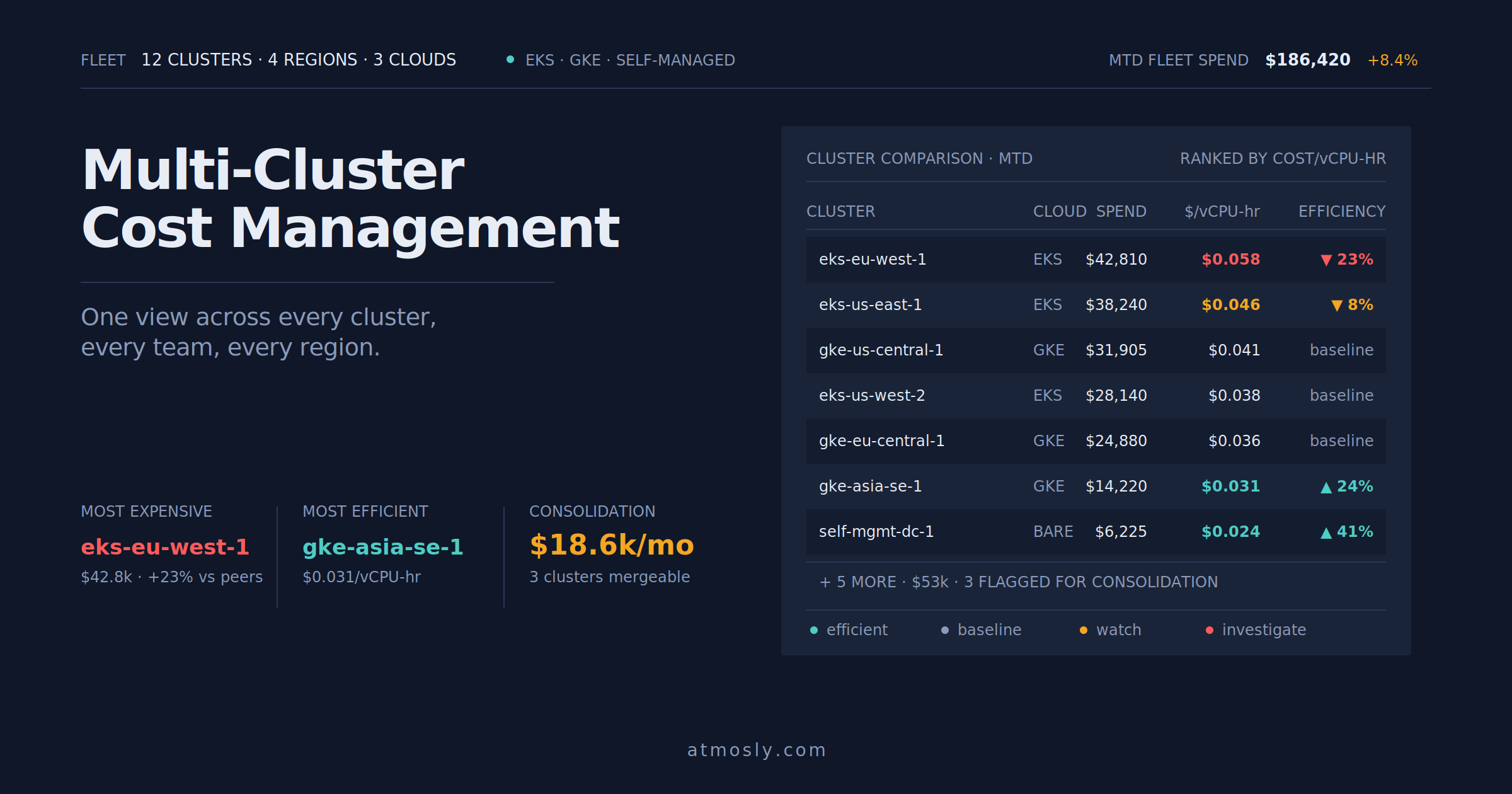
Atmosly's Per-Service Cost Analysis:
Microservices Cost Breakdown (Production Namespace)
Service Replicas Resources Monthly Cost Efficiency Recommendation api-gateway 5 500m CPU, 512Mi RAM $180 85% utilized Well-sized user-service 3 1 CPU, 1Gi RAM $162 92% utilized Well-sized order-service 3 2 CPU, 2Gi RAM $324 45% utilized Over-provisioned payment-service 2 500m CPU, 512Mi RAM $72 88% utilized Well-sized notification-worker 2 1 CPU, 512Mi RAM $96 25% utilized Wasteful Total: $834/month
Potential Savings: $156/month (19% reduction)Recommendations:
- order-service: Reduce from 2 CPU to 1 CPU (using only 900m) = $81/month savings
- notification-worker: Reduce from 1 CPU to 250m (using only 200m) = $75/month savings
Apply fixes:
kubectl set resources deployment/order-service --requests=cpu=1,memory=1.5Gi
kubectl set resources deployment/notification-worker --requests=cpu=250m,memory=256Mi
Horizontal Pod Autoscaling
Scale services independently based on load:
apiVersion: autoscaling/v2
kind: HorizontalPodAutoscaler
metadata:
  name: user-service-hpa
spec:
  scaleTargetRef:
    apiVersion: apps/v1
    kind: Deployment
    name: user-service
  minReplicas: 2
  maxReplicas: 20
  metrics:
  - type: Resource
    resource:
      name: cpu
      target:
        type: Utilization
        averageUtilization: 70
  - type: Resource
    resource:
      name: memory
      target:
        type: Utilization
        averageUtilization: 80
  # Custom metrics (requires metrics adapter)
  - type: Pods
    pods:
      metric:
        name: http_requests_per_second
      target:
        type: AverageValue
        averageValue: "1000"  # Scale at 1000 RPS per pod
Best Practice 8: Configuration Management
Environment-Specific ConfigMaps
# Dev environment
apiVersion: v1
kind: ConfigMap
metadata:
  name: user-service-config
  namespace: dev
data:
  database_host: "postgres.dev.svc"
  log_level: "debug"
  feature_new_ui: "true"

---
# Production environment
apiVersion: v1
kind: ConfigMap
metadata:
  name: user-service-config
  namespace: production
data:
  database_host: "postgres-primary.database.svc"
  log_level: "info"
  feature_new_ui: "false"
Same deployment YAML, different ConfigMap per environment.
How Atmosly Simplifies Microservices Management
Service Dependency Mapping
Atmosly automatically discovers and visualizes service dependencies:
- Which services call which (HTTP traffic analysis)
- Request rates between services (RPS per connection)
- Error rates per service-to-service call
- Latency percentiles for each hop
Impact analysis: "If user-service goes down, frontend, api-gateway, and order-service are impacted (they call user-service). Payment-service unaffected (no dependency)."
Per-Service Health and SLAs
Track SLAs individually:
- user-service: 99.9% uptime, p95 latency < 200ms
- order-service: 99.95% uptime, p95 < 500ms
- payment-service: 99.99% uptime (critical path)
Atmosly alerts when services violate their specific SLAs.
Environment Cloning
Clone entire microservices stack for testing:
One click creates complete staging environment with all 20 services, proper networking, databases, and configuration. Test changes across full stack before production.
AI Troubleshooting Across Services
"Why is checkout flow slow?"
AI traces request through 8 services:
- API Gateway (5ms)
- User Service (40ms)
- Cart Service (25ms)
- Inventory Service (850ms) — BOTTLENECK
- Pricing Service (waiting for inventory...)
- Payment Service (waiting...)
Identifies: "Inventory service has 850ms p95 latency (vs 50ms baseline). Root cause: Database query without index added in v2.1.0 deployment 2 hours ago."
Conclusion: Microservices Success on Kubernetes
Running microservices on Kubernetes requires thoughtful architecture, proper deployment strategies, comprehensive observability, security hardening, and cost management.
Critical Success Factors:
- Design services stateless for horizontal scaling
- Implement health checks for every service
- Use rolling or canary deployments for safety
- Implement proper timeouts, retries, circuit breakers
- Comprehensive observability: metrics + logs + traces
- Network Policies for service-to-service security
- Right-size resources per service (not one-size-fits-all)
- Use Atmosly for dependency mapping, cost allocation, and AI troubleshooting
Ready to run microservices on Kubernetes with AI-powered management? Start your free Atmosly trial for service dependency mapping, per-service cost tracking, and intelligent troubleshooting across your microservices architecture.