Introduction: The Convergence of Infrastructure and Intelligence
Machine Learning has moved from the research lab to the boardroom. Every Fortune 500 company now has an AI initiative. But the gap between a working Jupyter notebook and a production-grade ML system that serves 10 million predictions per day is massive. This gap is what MLOps (Machine Learning Operations) exists to bridge.
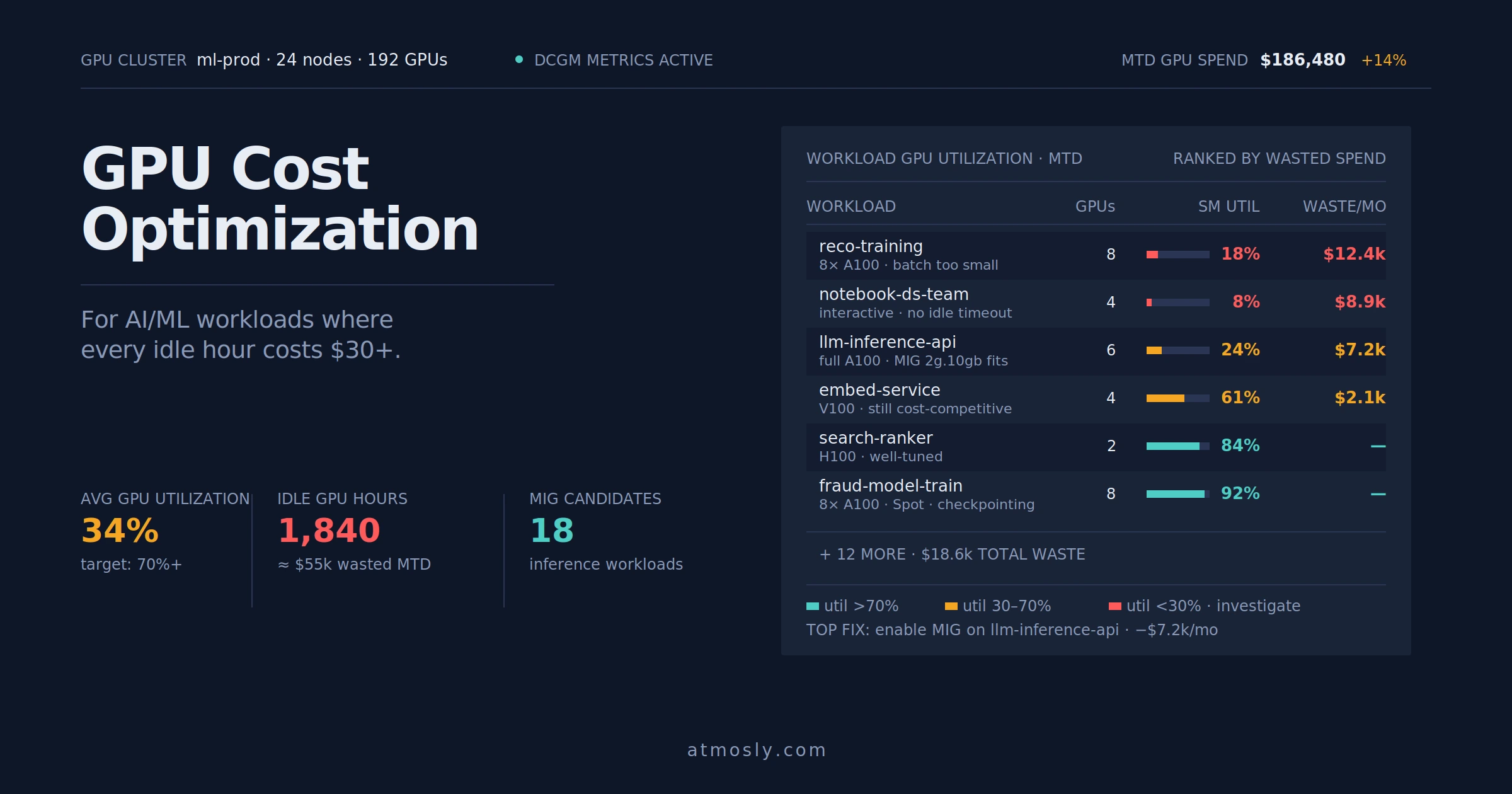
Traditional DevOps practices don't translate cleanly to ML. Code is just 5% of the system; the other 95% is data pipelines, model training infrastructure, experiment tracking, model versioning, and serving infrastructure. Unlike a stateless API that you can horizontally scale, ML models are stateful, require expensive GPUs ($30/hour for an A100), and have complex dependencies (CUDA drivers, specific Python library versions).
Kubernetes has emerged as the operating system for MLOps. Not because it was designed for ML (it wasn't), but because of its primitives: declarative configuration, resource scheduling, and the ability to abstract hardware. Tools like Kubeflow, Ray, KServe, and Seldon Core all run on Kubernetes. However, raw Kubernetes is brutally complex for ML teams. Data Scientists shouldn't need to understand Pod affinity rules or write Helm charts.
This definitive guide explores how to architect a production-grade MLOps platform on Kubernetes. We will cover the complete ML lifecycle: from interactive exploration in Jupyter, to distributed training with PyTorch/TensorFlow, to real-time inference at scale. We will dive into GPU scheduling strategies (Time-Slicing vs MIG vs dedicated nodes), cost optimization techniques (Spot instances, rightsizing), and how modern Kubernetes platforms can simplify these workflows for Data Science teams.
1. The Three-Stage MLOps Architecture
ML workloads are not homogeneous. They have fundamentally different infrastructure requirements depending on the stage of the lifecycle.
Stage 1: Exploration (Interactive Notebooks)
Data Scientists need ephemeral, on-demand environments to experiment with models. These environments must have:
- Interactive Access: JupyterLab or VSCode Server running in a pod.
- GPU Access: Ability to request 1-2 GPUs for prototyping.
- Persistent Storage: A mounted volume to save notebooks and small datasets.
- Library Flexibility: Ability to `pip install` arbitrary packages without waiting for IT approval.
Technical Implementation: JupyterHub on Kubernetes
JupyterHub is the de-facto standard for multi-user Jupyter environments. Here's how to configure it with GPU support:
# jupyterhub-config.yaml
apiVersion: v1
kind: ConfigMap
metadata:
  name: jupyterhub-config
data:
  jupyterhub_config.py: |
    c.KubeSpawner.profile_list = [
      {
        'display_name': 'CPU Only (2 cores, 4GB RAM)',
        'kubespawner_override': {
          'cpu_limit': 2,
          'mem_limit': '4G',
        }
      },
      {
        'display_name': 'Single GPU (Tesla T4)',
        'kubespawner_override': {
          'cpu_limit': 4,
          'mem_limit': '16G',
          'extra_resource_limits': {'nvidia.com/gpu': '1'},
          'node_selector': {'gpu-type': 't4'}
        }
      }
    ]
The Cost Problem: A Data Scientist launches a GPU notebook on Friday afternoon to run an experiment. They forget about it. It runs all weekend. Cost: $2,160 (72 hours * $30/hour).
Platform Solution: Modern Kubernetes platforms can detect idle resources and automatically terminate them based on configurable TTLs (time-to-live) or CPU utilization thresholds. This "idle detection + auto-shutdown" logic typically saves ML teams 40-60% on compute costs by preventing weekend waste.
Stage 2: Training (Batch Distributed Jobs)
Training a large language model or computer vision model requires massive compute for a finite duration. You might need 32 A100 GPUs for 6 hours, then zero GPUs for the next 18 hours.
Technical Implementation: Kubeflow Training Operators
Kubeflow provides CRDs (Custom Resource Definitions) for distributed training: `PyTorchJob`, `TFJob`, `MPIJob`. Here's a real-world example:
apiVersion: kubeflow.org/v1
kind: PyTorchJob
metadata:
  name: resnet50-imagenet-training
  namespace: ml-team
spec:
  pytorchReplicaSpecs:
    Master:
      replicas: 1
      template:
        spec:
          containers:
          - name: pytorch
            image: my-registry/pytorch-training:cuda11.8
            command:
            - python
            - /workspace/train.py
            - --epochs=100
            - --batch-size=256
            resources:
              limits:
                nvidia.com/gpu: 1
                memory: 32Gi
              requests:
                nvidia.com/gpu: 1
                memory: 32Gi
            volumeMounts:
            - name: training-data
              mountPath: /data
          volumes:
          - name: training-data
            persistentVolumeClaim:
              claimName: imagenet-dataset
    Worker:
      replicas: 7
      template:
        spec:
          containers:
          - name: pytorch
            image: my-registry/pytorch-training:cuda11.8
            resources:
              limits:
                nvidia.com/gpu: 1
                memory: 32Gi
          nodeSelector:
            karpenter.sh/capacity-type: spot # Use Spot Instances
The Scaling Challenge: You need to scale from 0 nodes to 8 GPU nodes in 5 minutes when the job starts, then back to 0 when it finishes. Standard Cluster Autoscaler is too slow (10-15 minutes).
Modern Approach: Tools like Karpenter (AWS's just-in-time provisioner) can provision nodes of the exact instance type (e.g., `p3.8xlarge`) within 90 seconds using Spot Fleet APIs. When the job completes, Karpenter detects the empty nodes and terminates them within 30 seconds, ensuring you only pay for the exact training duration. Kubernetes platforms that integrate with these autoscalers can dramatically reduce training infrastructure costs.
Stage 3: Inference (Real-Time Serving)
Once trained, the model needs to be deployed as an API. Inference has different requirements than training:
- Low Latency: P99 latency must be < 100ms.
- High Availability: 99.9% uptime.
- Auto-Scaling: Scale from 2 pods to 50 pods based on traffic.
- Cost Efficiency: Don't pay for idle capacity during low-traffic periods.
Technical Implementation: KServe (formerly KFServing)
KServe is the Kubernetes-native model serving framework. It supports autoscaling, canary deployments, and explainability.
apiVersion: serving.kserve.io/v1beta1
kind: InferenceService
metadata:
  name: fraud-detection-model
spec:
  predictor:
    tensorflow:
      storageUri: s3://ml-models/fraud-v2/
      resources:
        limits:
          cpu: 2
          memory: 4Gi
        requests:
          cpu: 1
          memory: 2Gi
    minReplicas: 2
    maxReplicas: 50
    scaleTarget: 80 # Target 80% CPU utilization
Platform Simplification: Deploying inference services typically requires understanding KServe CRDs, configuring HPA, and setting up monitoring. Modern Kubernetes platforms can provide simplified interfaces where Data Scientists input model location and expected traffic, and the platform generates the required configurations automatically.
2. GPU Management: The $1M Problem
A single NVIDIA A100 GPU costs $30/hour on AWS. If you have 10 Data Scientists and each wastes 30% of their GPU allocation, you are burning $78,000/year in idle compute. GPU management is the highest-leverage optimization in MLOps.
Strategy A: Time-Slicing (Software Partitioning)
Use Case: Inference workloads or small training experiments where multiple models can share a GPU without interfering.
How It Works: The NVIDIA Device Plugin is configured to advertise "virtual" GPU resources. Kubernetes schedules multiple pods on the same physical GPU, and the CUDA driver time-slices their execution.
Configuration Example
# nvidia-device-plugin-config.yaml
version: v1
sharing:
  timeSlicing:
    resources:
    - name: nvidia.com/gpu
      replicas: 4 # Advertise 1 physical GPU as 4 virtual GPUs
Trade-off: Performance degrades if all 4 pods are active simultaneously. Best for bursty workloads.
Strategy B: Multi-Instance GPU (MIG)
Use Case: A100 or H100 GPUs where you need guaranteed isolation and performance.
How It Works: The GPU is physically partitioned into up to 7 isolated instances. Each instance has dedicated memory and compute slices. There is zero interference between instances.
MIG Configuration
# On the node (requires root access)
nvidia-smi mig -cgi 1g.5gb,1g.5gb,2g.10gb -C

# In Kubernetes, pods request specific MIG profiles
resources:
  limits:
    nvidia.com/mig-1g.5gb: 1
Monitoring GPU Utilization: Understanding actual GPU usage requires collecting metrics from DCGM (Data Center GPU Manager). Kubernetes platforms with cost intelligence features can track GPU memory usage and compute utilization to identify underutilized resources. For example, if a training job requests a full A100 but only uses 8GB of the 40GB VRAM, the platform can flag this for rightsizing to a smaller GPU type or MIG profile, potentially saving $22/hour.
Stop drowning in YAML. Start shipping models.
Building an MLOps platform from scratch takes 12+ months. Modern Kubernetes platforms can provide GPU management visibility, cost tracking, and simplified deployment workflows out of the box. Explore Atmosly to see how unified cluster management can accelerate your ML operations.
3. Data Management: The 80% Problem
Data Scientists spend 80% of their time on data preparation, not model training. In Kubernetes, managing datasets introduces unique challenges.
Challenge 1: Data Gravity
Training datasets can be 500GB to 5TB. Downloading this from S3 to the pod at the start of every training job is prohibitively slow (10-30 minutes).
Solution: Dataset Caching with FSx for Lustre
AWS FSx for Lustre is a high-performance file system that can be mounted as a Persistent Volume. It transparently caches S3 data on high-speed NVMe drives.
apiVersion: v1
kind: PersistentVolumeClaim
metadata:
  name: imagenet-cache
spec:
  accessModes:
  - ReadOnlyMany
  storageClassName: fsx-lustre
  resources:
    requests:
      storage: 1000Gi
Platform Abstraction: Managing FSx volumes, S3 bucket configurations, and mount points requires Kubernetes expertise. Platforms can abstract this complexity, allowing Data Scientists to specify an S3 path and having the system automatically provision and mount the appropriate storage backend.
Challenge 2: Data Versioning
Models are trained on specific snapshots of data. If the data changes, the model's performance degrades. You need Git for data.
Solution: DVC (Data Version Control)
DVC tracks datasets in Git using pointers (`.dvc` files). The actual data is stored in S3.
# Data Scientist workflow
dvc add data/train.csv
git add data/train.csv.dvc
git commit -m "Update training data"
dvc push # Upload to S3
In your training pod, the CI pipeline runs `dvc pull` to fetch the exact dataset version.
4. Experiment Tracking: The Reproducibility Crisis
A Data Scientist runs 50 experiments over 2 weeks. Model #37 had the best accuracy. But which hyperparameters did they use? Which dataset version? Which code commit?
Solution: MLflow
MLflow tracks experiments, logs metrics (accuracy, loss), and stores model artifacts.
Integration with Training Code
import mlflow

mlflow.set_tracking_uri("http://mlflow.ml-team.svc.cluster.local")
mlflow.set_experiment("fraud-detection")

with mlflow.start_run():
    mlflow.log_param("learning_rate", 0.001)
    mlflow.log_param("batch_size", 128)

    model = train_model()
    accuracy = evaluate(model)

    mlflow.log_metric("accuracy", accuracy)
    mlflow.pytorch.log_model(model, "model")
Platform Integration: Advanced Kubernetes platforms can integrate with MLflow, providing unified dashboards that show experiments alongside infrastructure metrics (cost, GPU utilization). This allows teams to correlate model performance with infrastructure spend, answering questions like "What did that $500 training run achieve?"
5. Model Registry: From Experiment to Production
Once you have a winning model, you need to version it, approve it for production, and track which version is deployed where.
MLflow Model Registry
# Promote the model from experiment to Staging
client = mlflow.tracking.MlflowClient()
result = mlflow.register_model(
    f"runs:/{run_id}/model",
    "fraud-detection-model"
)

# Transition to Production after manual approval
client.transition_model_version_stage(
    name="fraud-detection-model",
    version=3,
    stage="Production"
)
Deployment Automation: The transition from "Staging" to "Production" in the Model Registry can trigger automated deployment workflows. Platforms can listen for these state changes and automatically update KServe InferenceServices, perform canary deployments (5% traffic to new model, 95% to old), and auto-rollback if error rates increase.
6. Security: The Overlooked Dimension
ML workloads introduce unique security risks:
- Data Exfiltration: A compromised training pod can copy proprietary datasets to an external server.
- Model Theft: Trained models are intellectual property worth millions.
- Supply Chain Attacks: A malicious PyPI package in `requirements.txt` could steal credentials.
Defense 1: Network Policies
Training pods should not have egress access to the internet.
apiVersion: networking.k8s.io/v1
kind: NetworkPolicy
metadata:
  name: training-isolation
  namespace: ml-team
spec:
  podSelector:
    matchLabels:
      job-type: training
  policyTypes:
  - Egress
  egress:
  - to:
    - podSelector:
        matchLabels:
          app: mlflow # Allow logging to MLflow
  - to:
    - namespaceSelector:
        matchLabels:
          name: kube-system # Allow DNS
    ports:
    - protocol: UDP
      port: 53
Defense 2: Image Scanning
Every Docker image must be scanned for CVEs before deployment. Modern Kubernetes platforms typically integrate with scanning tools like Trivy. When a Data Scientist submits a training job, the platform scans the image during the CI process. If Critical vulnerabilities are found, the job is blocked, and the user receives a detailed report specifying which CVEs were detected and which base image versions would resolve them.
7. Observability: Beyond Accuracy Metrics
Monitoring an ML system requires tracking multiple layers:
Layer 1: Infrastructure Metrics
- GPU Utilization: `dcgm_gpu_utilization`
- GPU Memory: `dcgm_fb_used` / `dcgm_fb_total`
- Training Job Duration: `pytorch_job_duration_seconds`
- Pod CPU/Memory: Standard Kubernetes metrics
Layer 2: Model Performance
- Inference Latency: P50, P95, P99
- Prediction Accuracy: Real-time evaluation on a validation set
- Model Drift: Compare input data distribution to training data
Layer 3: Cost Metrics
- Cost per Training Job
- Cost per Inference Request
- GPU Idle Time (wasted spend)
Unified Observability: The challenge for ML teams is that these metrics live in different systems: Prometheus (infrastructure), MLflow (experiments), and cloud billing (costs). Modern Kubernetes platforms provide unified dashboards that consolidate these views, allowing teams to see "Model v3 deployed 2 days ago. GPU cost: $450. Latency: 85ms. Accuracy: 94.2%" in one place.
Conclusion: The Path Forward
Kubernetes is not a silver bullet for MLOps, but it is the best foundation we have. It provides the primitives for resource scheduling, declarative configuration, and extensibility that ML systems require. However, the gap between "running a notebook on my laptop" and "production ML at scale" is massive.
This gap is filled by tooling and platforms. You can build your own by stitching together Kubeflow, MLflow, KServe, Karpenter, and custom glue code a 12+ month effort requiring dedicated platform engineers. Alternatively, modern Kubernetes management platforms can provide many of these capabilities out of the box: unified cluster management, cost visibility, simplified deployment workflows, and integrated observability. This allows your Data Science team to focus on models, not infrastructure, while giving your Platform team the control and visibility they need to manage costs and ensure reliability.