Meet Astra — an AI SRE agent that diagnoses and fixes Kubernetes incidents.
Atmosly Astra, our AI SRE agent, watches pod health, metrics, events, and rollout
history across every connected cluster. When something breaks, it finds
the root cause in under a minute, explains its reasoning, and proposes
ranked fixes you can apply or revert in one click — incident response automation
you can audit, never a black box.
Detect, diagnose, fix — the full incident loop, automated.
Backstage and Port show you what's in the cluster. Astra does something about it — running the same detect-diagnose-fix loop a senior SRE would, on every issue, around the clock. It turns Kubernetes incident management into a closed loop instead of a dashboard you watch — AIOps, built for the way Kubernetes clusters actually fail.
07:42:11Reading 4h of container_status transitions
07:42:21Root cause identified · confidence 0.82
01 — Detect
Always-on watch across every cluster
The agent ingests pod health, resource usage, traffic patterns, and the live event stream — continuously, on every connected cluster. No dashboards to babysit, no alerts to wire up.
Deduplicates repeat events into a single tracked issue
Severity-ranked so the on-call sees what matters first
root-cause analysis
AI reasoning
Every restart correlates with the working set reaching 240Mi within 30s of ready, then a 137 exit. Deployment hasn't changed in 11 days — this is capacity-vs-load, not a regression.
Contributing factors
Request (128Mi) is half the limit — scheduled near capacity
No HPA — one replica absorbs all traffic
02 — Diagnose
Root cause analysis in under a minute, with its reasoning
The agent reads logs, metrics, and rollout history together — the way a senior engineer would — and writes up the actual cause, an AI confidence score, and the contributing factors. You see why, not just what.
Plain-English summary + technical root cause
Confidence score on every analysis — no false certainty
Cross-references ReplicaSet history to separate load from regressions
remediation · ranked options
FIX 1Rollback to v2.14.2
Previous revision ran 14 days with zero restarts. Safer than waiting on a fix while prod crashes.
single deploymentconf 0.91
FIX 2Pin image digest to last-known-good
Defensive — prevents re-pulls of the broken tag if it's re-pushed.
03 — Fix
Ranked, reversible fixes — kubectl and YAML, ready to apply
Each issue comes with 1–3 ranked fix options, each with a rationale, confidence, blast radius, and preconditions the agent has already checked. Apply the recommended one, or open the PR and review the diff yourself.
Blast radius + preconditions shown before anything runs
Every action has a recorded rollback — revert in one click
Notifications & routing
When it finds something, the right people hear about it — automatically.
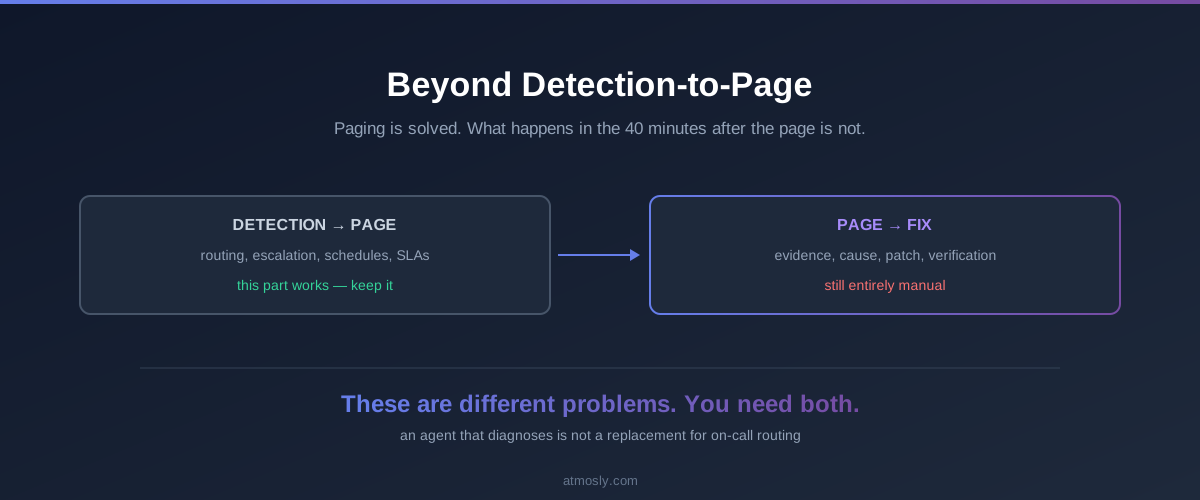
Detection is only half the job. Every incident Astra confirms is delivered to the channels you configure — routed by severity, namespace, or cluster — so the on-call sees a critical issue in Slack with the root cause already attached, while low-priority drift collects in a daily digest. No noise, no alert fatigue, and nothing to wire up by hand.
notifications · routing
Routing rule
When severity ≥ HIGH in namespace: payments → notify #oncall-payments + on-call webhook. Low severity → daily digest only.
Set the rules once — which severities go where, and which team owns which namespace or cluster. From then on, every confirmed incident is delivered automatically. Repeat events from the same flapping pod collapse into one tracked issue, so your on-call gets a single actionable alert instead of hundreds of duplicates.
Route by severity, namespace, or cluster so each alert reaches the team that owns it.
Deliver to Slack, email, or a webhook — connect the webhook to PagerDuty, Opsgenie, or your own on-call tooling.
Every alert includes the root cause and the recommended fix — not just a "pod is down" ping.
Low-priority issues roll up into a scheduled digest instead of paging anyone at 3am.
Remediation
Two ways to ship automated remediation — a pull request, or one click
Astra never changes your cluster on its own. It hands you the exact fix and lets you apply it the way your team already works — opened as a pull request for review, or applied directly from the portal. Both paths run under your RBAC, are fully audited, and are reversible.
remediation · pull request
Open a pull request
GITOPS WORKFLOW
Astra commits the fix to a new branch and opens a pull request against your manifests repo — your normal review and CI run before anything merges.
Stays in your Git workflow — reviewed, approved, and merged like any change.
Your GitOps controller (Argo CD, Flux) syncs the merged change to the cluster.
Git stays the source of truth — the diff and its author are recorded for you.
remediation · direct apply
Apply from the portal
ONE-CLICK · INSTANT
Need to act now? Apply the recommended fix straight from Atmosly — no kubectl, no context switch. It runs under scoped permissions and saves a rollback before it touches anything.
Applied to default/payments-api
single deploymentrollback savedaudit logged
One click applies the change — useful when prod is down and a PR can wait.
Runs under your RBAC — the action can never exceed the operator's access.
Every applied fix records a rollback and lands in the same audit trail.
Coverage
The failure modes it handles on day one
Purpose-built Kubernetes troubleshooting packs for the failure modes that actually page your team — not a generic chatbot guessing at YAML.
OOMKilled
Detects working-set-vs-limit pressure, distinguishes a leak from organic growth, and sizes the new limit from observed p95.
CrashLoopBackOff
Pulls --previous logs, ties the panic to a recent rollout, and recommends a rollback to the proven revision.
ImagePullBackOff
Spots stale pull secrets after a token rotation and walks you through refreshing them and rolling the pod.
Pending / unschedulable
Explains autoscaler cooldowns and capacity gaps, and recommends scaling the node group or right-sizing the request.
Config errors
Traces a missing ConfigMap back to the audit log, and offers a GitOps sync or a manual recreate when source-of-truth is known.
Learns from history
Remembers fixes that worked — "same fix resolved auth-api in 4m" — so confidence climbs with every resolved incident.
The 2am difference
What changes when the agent owns triage
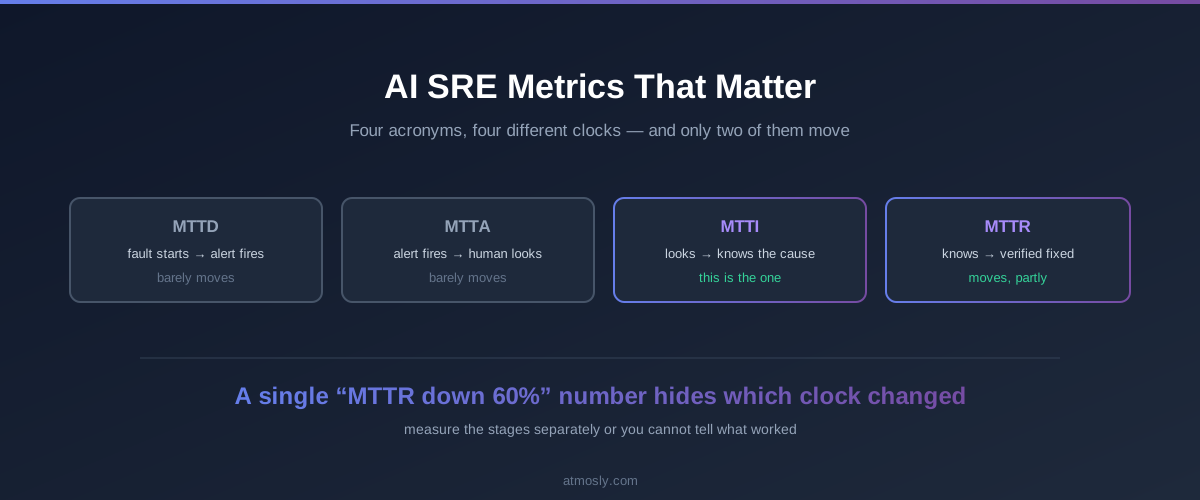
For a site reliability engineering team, it comes down to mean time to resolve. Astra compresses MTTR by owning the detect-diagnose-fix loop the moment an incident starts — so the numbers below move from war-room hours to a few quiet minutes.
<1 min
to root cause, vs. a 4-person Slack war room
94%
fewer 3am pages once triage is automated*
1-click
revert on every applied fix — nothing is one-way
24/7
coverage across every connected cluster
*Representative of customer-reported outcomes. Your results depend on workload mix and cluster size.
Same control plane
Astra is one of three cores
Incidents, security, and cost share one UI, one audit trail, and one permissions model — so a fix here is visible everywhere.
An AI SRE agent is software that does the first hour of incident response for you. Astra, Atmosly's AI SRE agent, continuously watches your Kubernetes clusters, detects failures like OOMKilled and CrashLoopBackOff, finds the root cause in under a minute, and proposes ranked, reversible fixes — the same detect, diagnose, and remediate loop a senior site reliability engineer runs, automated and always on.
Does the SRE Agent need write access to my cluster?
No. The agent runs read-only by default. It detects and diagnoses on its own, then proposes fixes as kubectl commands or pull requests for you to apply. Any write action is opt-in, scoped, and gated by your guardrails — and every applied fix records a rollback.
Which Kubernetes errors can the AI SRE Agent diagnose?
It ships with purpose-built diagnosis for the failures that actually page on-call teams: OOMKilled, CrashLoopBackOff, ImagePullBackOff, Pending or unschedulable pods, and configuration errors such as missing ConfigMaps or Secrets. For each it identifies the specific cause — a memory limit below the working set, a bad rollout, stale pull secrets, or a capacity gap — rather than guessing.
How quickly does it find the root cause of an incident?
Typically in under a minute. Astra correlates pod health, metrics, events, logs, and rollout history the moment an issue appears, then writes up the root cause with an AI confidence score — instead of a four-person Slack war room reading dashboards.
Which Kubernetes clusters and clouds does it support?
It connects to managed Kubernetes services like Amazon EKS and Google GKE, as well as self-managed and private clusters, and watches every connected cluster from one control plane — so multi-cluster and multi-cloud estates are covered from a single place.
Can it fix issues automatically, or does it just suggest them?
Both, on your terms. By default it proposes ranked fixes and leaves the decision to you — open a pull request for your GitOps review, or apply directly from the portal in one click. You can let trusted, low-risk remediations run automatically within guardrails you define — self-healing for the cases you've approved — and every applied action is scoped by RBAC, audited, and reversible.
How does it notify my team about incidents?
You configure routing once. Each confirmed incident is delivered to the channels you choose — Slack, email, or a webhook you can pipe into PagerDuty or Opsgenie — routed by severity, namespace, or cluster. Repeat events are deduplicated into one issue and low-priority items roll up into a digest, so the on-call gets signal, not noise.
Does it replace my monitoring stack?
No — it builds on your Kubernetes observability. The agent reads the signals you already collect (metrics, logs, events, rollout history) and acts on them, coexisting with Prometheus, Datadog, and your existing alerting rather than replacing them.
How do I know its fixes aren't just noise?
Every analysis carries an AI confidence score, and every fix shows its rationale, blast radius, and the preconditions the agent already checked. You see the reasoning before anything runs — and the agent gets more confident as it learns which fixes resolved similar incidents in your clusters.
Is it safe to run in production?
Yes. Read-only by default, every action reversible with a recorded rollback, a full audit trail, and RBAC + SSO. Nothing changes your cluster without you — or a guardrail you defined — approving it first.
Book a demo or start a free, read-only 5-minute cluster audit — no commitment, nothing changes in your cluster. Tell us a bit about your setup and we'll set it up fast.