In 2026, Docker continues to be one of the most important tools in modern software development. Whether you're building microservices, automating CI/CD pipelines, migrating to the cloud, or scaling enterprise applications, you've likely come across Docker containers.
But here's the surprising truth:
Most teams use Docker every day, yet very few understand what a Docker container really is.
This guide breaks it down in simple terms no heavy jargon, no confusing architecture diagrams, just a clear, modern explanation of Docker containers and why they matter for businesses in 2026.
What Exactly Is a Docker Container? (Simple Definition for 2026)
A Docker container is a lightweight, isolated environment that packages your application along with everything it needs to run code, dependencies, libraries, and configurations.
Think of it like a portable box:
Wherever you move the box your laptop, a server, AWS, or Kubernetes the application works exactly the same.
Key characteristics of a Docker container:
- Isolated: The app runs in its own environment, separate from the system.
- Portable: "Build once, run anywhere" is actually true.
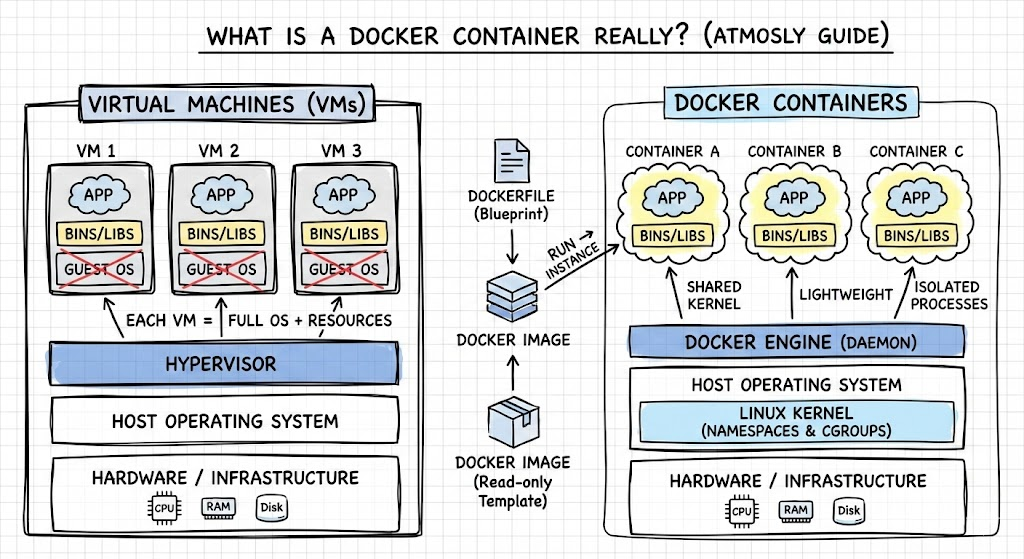
- Lightweight: Containers share the host OS kernel, so they're faster than VMs.
- Consistent: No more "works on my machine" problems.
- Scalable: Perfect for microservices and cloud-native systems.
That's why containers have become the foundation of modern DevOps and cloud infrastructure.
How Docker Containers Actually Work (Behind the Scenes)
To understand Docker, you must know these three core components:
1. Container Images
A container image is like a recipe for your application. It includes the OS layer, libraries, and your application code.
Developers create these using a Dockerfile, which defines:
- Base image
- Dependencies
- Commands
- Environment variables
When you run the image, a container is created.
2. Container Runtime (Docker Engine & Containerd)
The runtime is the engine that:
- Creates containers
- Manages their lifecycle
- Allocates resources
- Handles networking and storage
In 2026, the ecosystem has shifted toward containerd, a CNCF-graduated runtime that powers Docker under the hood and is natively used by Kubernetes.
3. Linux Kernel Features
Containers rely on Linux features like:
- Namespaces → isolate processes
- Cgroups → limit resources (CPU, memory)
- OverlayFS → allow layered image filesystems
These make containers lightweight, secure, and extremely fast compared to virtual machines.
Docker Containers vs Virtual Machines in 2026
A VM packages an entire operating system.
A container packages only what the app needs.
Here's a quick comparison:
Feature | Docker Container | Virtual Machine |
Boot Time | < 1 second | 1–2 minutes |
Resource Usage | Very low | High |
OS Included | No | Yes |
Portability | High | Medium |
Scalability | Easy | Slower |
When to use containers:
- Microservices
- CI/CD automation
- Cloud-native applications
- Stateless workloads
- High-density deployments
When VMs may be better:
- Full isolation required
- Legacy monolithic apps
- Complex Windows workloads
Benefits of Docker Containers for Modern Teams
1. Faster Development & Deployment
Containers remove environment inconsistencies and allow developers to ship updates quickly.
2. Lower Cloud Costs
Containers maximize resource utilization, reducing server overhead.
(Companies commonly save 30–40%.)
3. Perfect for CI/CD Pipelines
Docker integrates seamlessly with GitHub Actions, Jenkins, GitLab CI, and ArgoCD.
4. Scalability for Microservices
Containers can be replicated instantly ideal for unpredictable traffic.
5. More Secure Deployments
Each container runs in its own isolated environment.
Limitations of Docker Containers (Be Aware in 2026)
Docker is powerful, but not perfect.
- Requires strong orchestration (Kubernetes, ECS)
- Networking can get complex
- Persistent storage challenges
- Security requires scanning & best practices
This is why many companies work with DevOps partners to implement containerization securely and efficiently.
Docker in the Kubernetes Era (2026 Update)
In recent years, Kubernetes stopped using Docker as its runtime a change that created confusion in the industry. But here's the truth:
Docker is still fully compatible with Kubernetes.
Kubernetes now uses containerd, which Docker also uses under the hood.
So your Dockerfiles, Docker images, and development workflows continue to work seamlessly with Kubernetes clusters.
In fact, most enterprises still use Docker for:
- Local development
- Image building
- Registry management
- CI/CD workflows
Kubernetes simply handles the orchestration part.
Real-World Use Cases of Docker Containers in 2026
Microservices Architecture
Break large applications into independent services.
CI/CD Automation
Build, test, and deploy applications consistently.
Cloud Migration
Move legacy apps into modern, containerized environments.
AI/ML Model Packaging
Package ML workloads for reproducible experimentation.
Edge Computing
Run containers on lightweight edge devices.
Build Your First Docker Container (Simple Example)
Here's a beginner-friendly example:
Dockerfile
FROM node:18-alpine
WORKDIR /app
COPY . .
RUN npm install
CMD ["npm", "start"]
Run your container:
docker build -t my-app .
docker run -p 3000:3000 my-app
This simple workflow is the heart of modern containerized development.
Docker Best Practices for 2026
- Use small base images (e.g., Alpine, Distroless)
- Avoid running containers as root
- Use multi-stage builds
- Scan images for vulnerabilities
- Set CPU and memory limits
- Use .dockerignore files
- Keep images versioned and tagged properly
Following these ensures security, performance, and smooth deployments.
Should You Use Docker in 2026? (Quick Decision Guide)
Use Docker if:
- You're building cloud-native apps
- You want predictable deployments
- You need portability between environments
- You're implementing CI/CD or microservices
Avoid Docker if:
- You need full OS-level isolation
- You're handling legacy monolith apps without change
- Serverless architecture suits your app better
Conclusion
Docker containers remain one of the most essential technologies in the cloud-native world. They simplify development, enhance scalability, reduce cloud spending, and ensure reliable deployments across any environment.
But as container ecosystems grow more complex with Kubernetes, CI/CD, containerd, and security best practices companies often need expert guidance.
Ready to Containerize Your Applications the Right Way?
If you want faster deployments, reduced cloud costs, and a modern DevOps foundation for your business.
Book a FREE 30-minute DevOps & Containerization Consultation with Atmosly.
We'll help you build, secure, and scale your Docker environment the right way.