Every production incident report has a section that reads: "During the deployment of v2.4.1, traffic was routed to an unhealthy pod for 14 minutes before rollback was triggered."
That sentence is almost always the result of a deployment strategy mismatch — the team used Blue-Green when they needed Canary, or vice versa.
When comparing Blue-Green vs Canary deployment in Kubernetes, the decision isn't theoretical. It directly determines how your next release behaves under real traffic, how fast you can roll back, and whether your users notice anything at all.
This guide goes beyond surface-level definitions. We'll walk through architecture, real YAML configurations for Argo Rollouts and Istio, failure modes that catch teams off guard, and a decision framework you can use today.
Why Deployment Strategy Matters More Than You Think
Kubernetes makes it trivially easy to run containers. But deploying new versions safely in production — with real users, real databases, and real SLAs — is where the complexity hides.
The default Kubernetes rolling update strategy works fine for stateless services with low traffic. But for production-grade systems, it has real limitations:
- No traffic control — you can't send 5% of traffic to the new version first
- Slow rollback — rolling back means rolling forward to the old image, which takes time
- No validation gates — there's no built-in mechanism to check metrics before proceeding
- Mixed versions during rollout — old and new pods serve traffic simultaneously with no coordination
For teams managing multi-service architectures, the wrong deployment strategy causes:
| Failure Type | Business Impact | Typical Duration |
|---|---|---|
| Traffic routing failure | Users hit 502/503 errors | 2–15 minutes |
| Error rate spike (undetected) | Silent data corruption | 30 min – 4 hours |
| Database migration conflict | Rollback becomes impossible | Hours to days |
| SLA violation | Contractual penalties | Immediate |
| Customer trust erosion | Churn increase | Permanent |
Blue-Green and Canary deployments solve different subsets of these problems. Understanding which problems your team actually faces is the key to choosing correctly.
What Is Blue-Green Deployment in Kubernetes?
Blue-Green deployment maintains two identical production environments running in parallel:
- Blue — the current live version serving all production traffic
- Green — the new version, deployed and validated but receiving zero traffic
Once the Green environment passes all validation checks (health checks, smoke tests, integration tests), traffic is switched from Blue to Green in a single atomic operation — typically by updating a Kubernetes Service selector or an Ingress/load balancer rule.
Architecture: How Blue-Green Works in Kubernetes
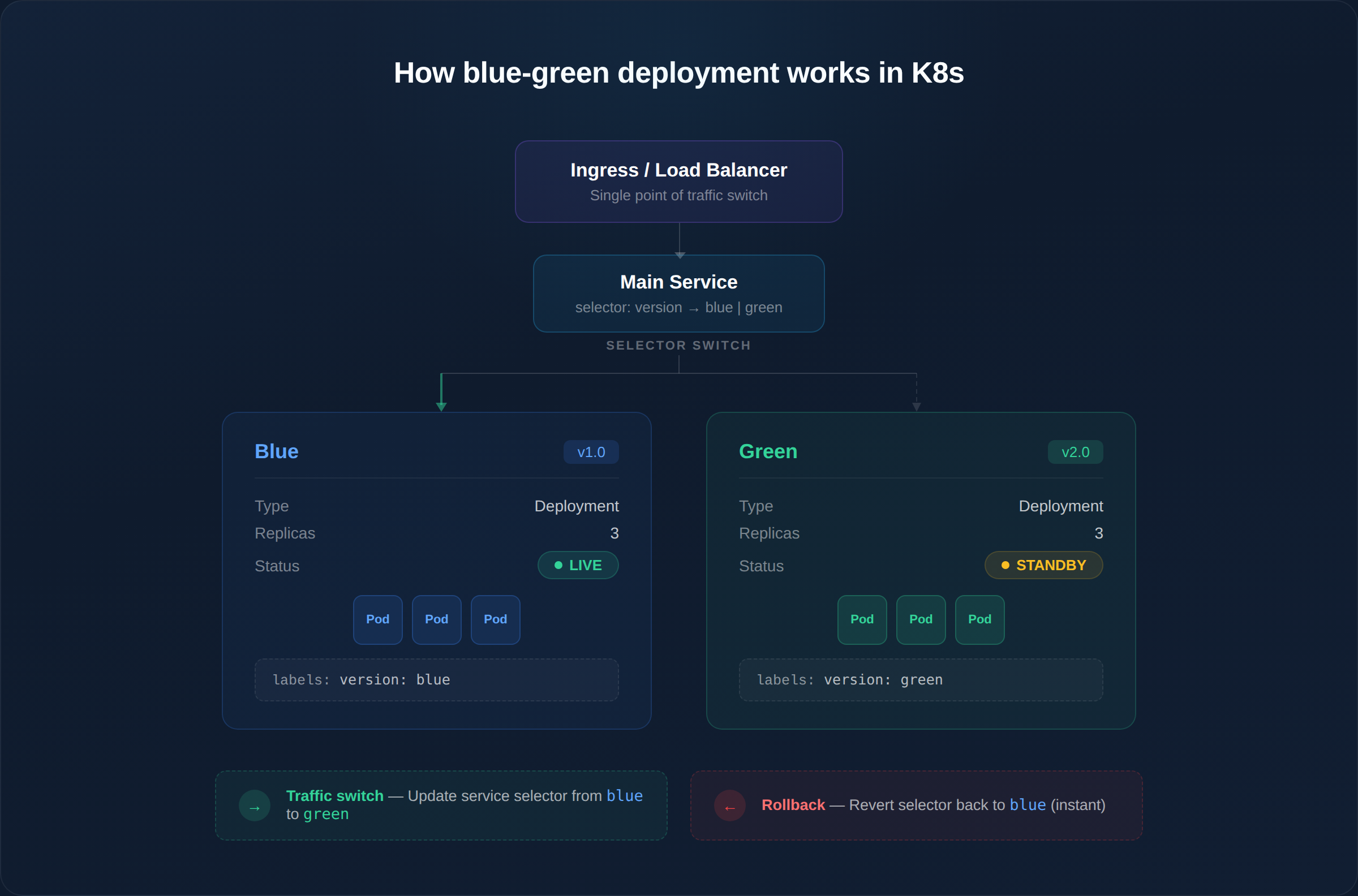
The switch is a single Kubernetes API call — updating the Service selector. This makes rollback nearly instantaneous (seconds, not minutes).
Advantages of Blue-Green Deployment
- Near-zero downtime — traffic switch is atomic, not gradual
- Instant rollback — flip the selector back; Blue environment is still running
- Clean validation — test Green with real infrastructure before exposing users
- Simple mental model — two environments, one switch. Easy for on-call engineers to reason about at 3 AM
- No mixed-version traffic — all users see the same version at any given time
Limitations of Blue-Green Deployment
- Double infrastructure cost — both environments run full replicas simultaneously. For a service with 20 pods, you need 40 pods during deployment
- Database migration complexity — if v2.0 requires schema changes, rolling back to Blue means v1.0 must work with the new schema (or you need to reverse the migration)
- All-or-nothing risk — 100% of traffic moves at once. If a bug only manifests under specific user patterns, you won't catch it until all users are affected
- Session state issues — active user sessions on Blue don't automatically migrate to Green. Stateful applications need session externalization (Redis, Memcached)
What Is Canary Deployment in Kubernetes?
Canary deployment rolls out the new version to a small percentage of production traffic first, then gradually increases exposure based on real-time metrics.
The name comes from coal mining — canaries were sent into mines first to detect toxic gases. In deployment terms, a small group of users "test" the new version before everyone else gets it.
Architecture: How Canary Works in Kubernetes
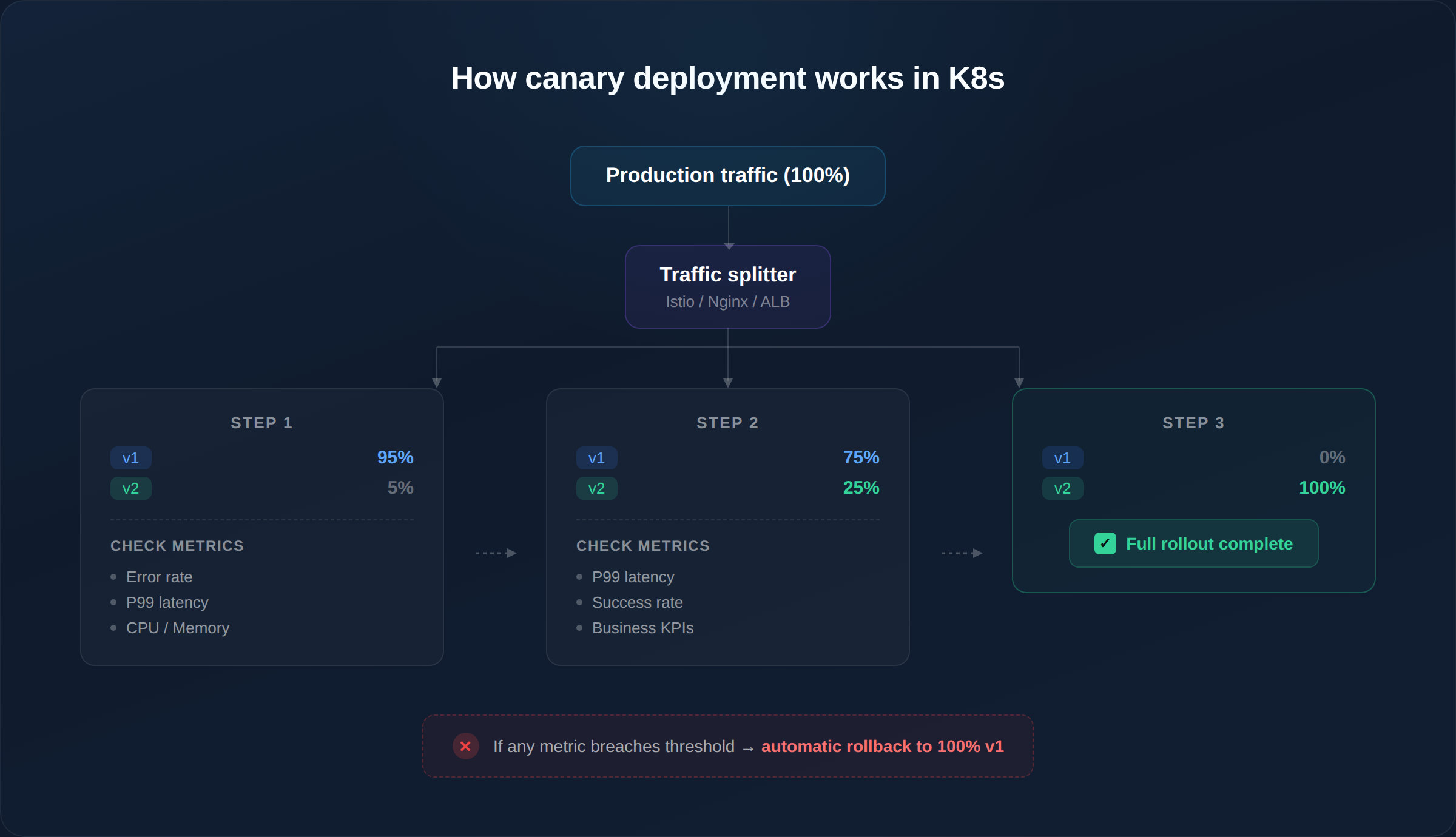
Each step has a validation gate — the rollout only proceeds if metrics stay within defined thresholds. If error rates spike at 5%, only 5% of users were affected, and rollback is automatic.
Advantages of Canary Deployment
- Minimal blast radius — bugs are caught with 5% of traffic, not 100%
- Real-world validation — synthetic tests can't replicate the diversity of production traffic patterns
- Metric-driven decisions — rollout proceeds based on data, not gut feeling
- Lower infrastructure cost — you don't need a full duplicate environment, just a few additional pods
- Ideal for continuous delivery — teams deploying multiple times per day need gradual exposure
Limitations of Canary Deployment
- Requires mature observability — without proper metrics, dashboards, and alerting, you're flying blind during the canary phase
- Slower full rollout — a 4-step canary (5% → 25% → 50% → 100%) with 10-minute analysis windows takes 40+ minutes vs. seconds for Blue-Green
- Complex traffic routing — needs a service mesh (Istio), ingress controller with traffic splitting, or a progressive delivery tool
- Version coexistence — both versions serve traffic simultaneously, which can cause issues with shared caches, API contracts, or database schemas
- Harder to debug — when 5% of users see errors, correlating logs across two versions requires proper distributed tracing
Blue-Green vs Canary Deployment: Side-by-Side Comparison
| Factor | Blue-Green | Canary |
|---|---|---|
| Traffic switch | Atomic (all at once) | Gradual (percentage-based) |
| Rollback speed | Instant (~seconds) | Fast (~30s–2 min) |
| Blast radius | 100% of users during switch | 5–25% of users during validation |
| Infrastructure cost | 2x (full duplicate environment) | 1.05x–1.25x (few extra pods) |
| Monitoring required | Basic (pre-switch validation) | Advanced (real-time metric gates) |
| Mixed versions | Never (clean cutover) | Yes (during rollout window) |
| Database migrations | Risky (schema must be backward-compatible for rollback) | Manageable (both versions run concurrently) |
| Release frequency fit | Weekly/monthly releases | Daily/hourly releases |
| Team complexity | Low (simple switch) | Medium-High (metric analysis, traffic routing) |
| Best for | Major releases, regulated industries | SaaS, high-traffic consumer apps, A/B testing |
YAML Examples: Implementing Both Strategies
Blue-Green with Native Kubernetes
Blue-Green in Kubernetes doesn't require any special tooling. You manage two Deployments and switch traffic by updating the Service selector.
Step 1: Deploy Blue (current version)
# blue-deployment.yaml
apiVersion: apps/v1
kind: Deployment
metadata:
  name: myapp-blue
  labels:
    app: myapp
    version: blue
spec:
  replicas: 3
  selector:
    matchLabels:
      app: myapp
      version: blue
  template:
    metadata:
      labels:
        app: myapp
        version: blue
    spec:
      containers:
      - name: myapp
        image: myregistry/myapp:1.0.0
        ports:
        - containerPort: 8080
        readinessProbe:
          httpGet:
            path: /healthz
            port: 8080
          initialDelaySeconds: 5
          periodSeconds: 10
Step 2: Service pointing to Blue
# myapp-service.yaml
apiVersion: v1
kind: Service
metadata:
  name: myapp
spec:
  selector:
    app: myapp
    version: blue    # ← This is the switch
  ports:
  - port: 80
    targetPort: 8080
Step 3: Deploy Green, then switch
# Deploy green
kubectl apply -f green-deployment.yaml

# Wait for all green pods to be ready
kubectl rollout status deployment/myapp-green

# Run smoke tests against green service directly
kubectl run smoke-test --image=curlimages/curl --rm -it --
  curl http://myapp-green.default.svc.cluster.local/healthz

# Switch traffic (the actual "deployment")
kubectl patch service myapp -p '{"spec":{"selector":{"version":"green"}}}'

# Rollback if needed (instant)
kubectl patch service myapp -p '{"spec":{"selector":{"version":"blue"}}}'
Canary with Argo Rollouts
Argo Rollouts is the most widely adopted tool for progressive delivery in Kubernetes. It replaces the standard Deployment resource with a Rollout resource that supports canary and blue-green strategies natively.
# canary-rollout.yaml
apiVersion: argoproj.io/v1alpha1
kind: Rollout
metadata:
  name: myapp
spec:
  replicas: 5
  revisionHistoryLimit: 3
  selector:
    matchLabels:
      app: myapp
  strategy:
    canary:
      # Step 1: Send 5% traffic to canary, pause for 5 min
      steps:
      - setWeight: 5
      - pause: { duration: 5m }

      # Step 2: Validate metrics automatically
      - analysis:
          templates:
          - templateName: success-rate
          args:
          - name: service-name
            value: myapp

      # Step 3: Increase to 25%
      - setWeight: 25
      - pause: { duration: 10m }

      # Step 4: Increase to 50%
      - setWeight: 50
      - pause: { duration: 10m }

      # Step 5: Full rollout (100%)
      - setWeight: 100

      # Anti-affinity ensures canary pods land on different nodes
      antiAffinity:
        preferredDuringSchedulingIgnoredDuringExecution:
          weight: 100

      # Traffic routing via Istio
      trafficRouting:
        istio:
          virtualServices:
          - name: myapp-vsvc
            routes:
            - primary
  template:
    metadata:
      labels:
        app: myapp
    spec:
      containers:
      - name: myapp
        image: myregistry/myapp:2.0.0
        ports:
        - containerPort: 8080
Analysis Template — automated metric validation:
# analysis-template.yaml
apiVersion: argoproj.io/v1alpha1
kind: AnalysisTemplate
metadata:
  name: success-rate
spec:
  args:
  - name: service-name
  metrics:
  - name: success-rate
    # Query Prometheus for HTTP success rate
    successCondition: result[0] >= 0.95
    interval: 60s
    count: 5
    failureLimit: 2
    provider:
      prometheus:
        address: http://prometheus.monitoring:9090
        query: |
          sum(rate(http_requests_total{
            service="{{args.service-name}}",
            status=~"2.*"
          }[2m])) /
          sum(rate(http_requests_total{
            service="{{args.service-name}}"
          }[2m]))
If the success rate drops below 95% during any analysis window, Argo Rollouts automatically rolls back to the previous stable version — no human intervention required.
Canary Traffic Splitting with Istio VirtualService
# istio-virtual-service.yaml
apiVersion: networking.istio.io/v1beta1
kind: VirtualService
metadata:
  name: myapp-vsvc
spec:
  hosts:
  - myapp.example.com
  http:
  - name: primary
    route:
    - destination:
        host: myapp-stable
        port:
          number: 80
      weight: 95          # 95% to stable
    - destination:
        host: myapp-canary
        port:
          number: 80
      weight: 5           # 5% to canary
What Breaks First When You Choose the Wrong Strategy
This is where most teams learn the hard way. Here are the four failure modes we see repeatedly:
1. Traffic Instability (Blue-Green at High Frequency)
When teams try to use Blue-Green for daily or hourly releases, every deployment means a full traffic switch. At high frequency, this causes:
- Load balancer DNS propagation delays (30s–2 min of mixed routing)
- Connection draining issues — active requests on Blue get terminated mid-flight
- Health check race conditions — Green pods pass readiness checks but aren't fully warmed up (cold caches, uninitialized connection pools)
Fix: If you deploy more than once per day, switch to Canary or add proper connection draining (terminationGracePeriodSeconds) and pre-warming to your Blue-Green setup.
2. Observability Gaps (Canary Without Metrics)
Canary without observability is worse than a rolling update — you're running two versions simultaneously with no way to compare them.
We see teams deploy Canary and then:
- Monitor only HTTP 5xx rates (missing latency degradation, memory leaks, downstream errors)
- Set analysis windows too short (2 minutes is not enough for traffic-dependent bugs)
- Skip business metrics (error rate is fine, but conversion rate dropped 12%)
Minimum observability requirements for Canary:
| Metric | Source | Threshold Example |
|---|---|---|
| HTTP success rate | Prometheus / Istio | ≥ 99.5% |
| P99 latency | Prometheus / Datadog | ≤ 500ms |
| Error log volume | Loki / ELK | ≤ 2x baseline |
| Pod restart count | kube-state-metrics | 0 restarts |
| Memory usage trend | cAdvisor | No upward trend |
3. Database Migration Conflicts
Blue-Green failure scenario: You deploy Green with a schema migration (adding a column, changing a type). Green works fine. You switch traffic. Then you discover a bug and need to rollback to Blue — but Blue can't work with the new schema. You're stuck.
Canary failure scenario: During the canary phase, v1 and v2 both query the same database. If v2 writes data in a new format that v1 can't read, the 95% of users on v1 start seeing errors — even though v1 didn't change.
Solution for both: Use expand-and-contract migrations. Deploy the schema change separately from the code change. Never make breaking schema changes in the same release as the code that depends on them.
4. CI/CD Pipeline Failures
Blue-Green requires your CI/CD pipeline to manage two full environments — build, deploy, validate, switch, then tear down the old one. Pipeline complexity doubles.
Canary requires your pipeline to:
- Deploy a partial rollout
- Wait for analysis results
- Proceed or abort based on metrics
- Handle partial rollback states
Without automation, either strategy becomes fragile. Manual Canary is an oxymoron.
Real-World Scenario: E-Commerce Checkout Migration
Consider a SaaS platform migrating its checkout service from a monolith to a Kubernetes microservice.
Context:
- 3,000 requests/second at peak
- $2M/hour revenue impact during peak hours
- Database schema changes required (new
payment_intentstable) - Team deploys 2–3 times per week
Why Blue-Green is the right choice here:
- Revenue sensitivity — at $2M/hour, even 5% canary traffic hitting a bug means $100K/hour at risk. The team prefers validating completely in the Green environment with synthetic traffic before switching.
- Schema migration — they can run the migration, validate it works with Green, and only then switch. If rollback is needed, they have the Blue environment still connected to a read replica with the old schema.
- Release frequency — at 2–3 times per week, the overhead of maintaining two environments is manageable.
When the same team would switch to Canary: Once the checkout microservice is stable and the team moves to daily releases, they'd switch to Canary with Argo Rollouts for incremental feature flags and performance tuning — where the blast radius of a regression is lower.
Tools Deep Dive: Argo Rollouts, Istio, and Flagger
Argo Rollouts
The most popular progressive delivery controller for Kubernetes. Replaces the Deployment resource with a Rollout resource.
| Feature | Details |
|---|---|
| Strategies supported | Canary, Blue-Green, both with analysis |
| Traffic routing | Istio, Nginx, ALB Ingress, SMI, Traefik, Ambassador |
| Metric providers | Prometheus, Datadog, New Relic, CloudWatch, Wavefront, Kayenta |
| Rollback | Automatic on metric failure, manual via CLI/UI |
| UI | Argo Rollouts Dashboard + kubectl plugin |
| Best for | Teams already using ArgoCD for GitOps |
Istio Service Mesh
Istio provides Layer 7 traffic management through VirtualService and DestinationRule resources. It doesn't manage the rollout lifecycle itself — it's the traffic routing layer that tools like Argo Rollouts and Flagger use underneath.
Key capability: Weighted routing at the HTTP level (not just pod count). You can send exactly 5% of requests to canary, regardless of how many pods are running.
Without Istio: Canary traffic splitting is approximate — based on the ratio of canary pods to stable pods. With 1 canary pod and 9 stable pods, you get ~10% traffic to canary, but you can't do 5% or 3%.
Flagger
Flagger is a progressive delivery operator that works similarly to Argo Rollouts but is designed to work natively with service meshes (Istio, Linkerd, App Mesh) and ingress controllers.
| Aspect | Argo Rollouts | Flagger |
|---|---|---|
| Resource type | Custom Rollout replaces Deployment | Watches standard Deployment |
| Migration effort | Must change Deployment → Rollout | No manifest changes needed |
| GitOps integration | Native ArgoCD integration | Works with Flux natively |
| Community | Larger, CNCF incubating | Smaller, CNCF graduated (via Flux) |
Our recommendation: If you use ArgoCD, choose Argo Rollouts. If you use Flux, choose Flagger. Both are production-ready.
Decision Framework: Which Strategy Fits Your Team
Use this framework to make the right choice based on your actual constraints — not theoretical ideals:
| Factor | Choose Blue-Green If... | Choose Canary If... |
|---|---|---|
| Release frequency | Weekly or less | Daily or more |
| Observability maturity | Basic (health checks, logs) | Advanced (Prometheus, distributed tracing, custom dashboards) |
| Infrastructure budget | Can afford 2x capacity | Cost-constrained |
| Rollback priority | Instant rollback is critical | Gradual exposure is more important |
| Team expertise | Smaller ops team, simpler tooling | Platform engineering team, mature tooling |
| Compliance | Regulated industry (fintech, healthcare) | Fast-moving SaaS, consumer apps |
| Database migrations | Infrequent, well-planned | Frequent, backward-compatible |
The most common mistake: Teams choose Canary because it sounds more modern, then discover they don't have the observability infrastructure to make it work. Blue-Green with proper smoke tests is safer than Canary without metrics.
Combining Blue-Green and Canary
Advanced teams often use a hybrid approach — Canary validation inside a Blue-Green framework:
Phase 1: Deploy Green environment (Blue-Green)
  └── Green receives 0% production traffic
  └── Run integration tests against Green

Phase 2: Canary inside Green
  └── Route 5% of production traffic to Green
  └── Monitor metrics for 10 minutes
  └── Route 25% → monitor → 50% → monitor

Phase 3: Full switch (Blue-Green)
  └── Switch remaining traffic to Green
  └── Keep Blue as instant rollback target

Phase 4: Cleanup
  └── After 24h stable, decommission Blue
  └── Green becomes the new Blue for next release
This layered approach gives you the best of both worlds: gradual validation (Canary) with instant rollback capability (Blue-Green). The trade-off is operational complexity — only pursue this if your team has platform engineering maturity.
Deployment Strategy and Platform Engineering
In multi-team Kubernetes clusters, deployment strategy can't be a per-team decision. Without centralized coordination:
- Team A does Blue-Green, Team B does Canary, Team C does
kubectl apply— nobody knows what's running - Rollouts from different teams conflict during shared maintenance windows
- Observability dashboards don't account for canary pods, causing false alerts
- Version tracking becomes impossible when 3 strategies coexist in one cluster
Platform engineering teams need to standardize deployment strategies as golden paths — pre-configured, tested, and governed. Engineers choose from approved patterns; the platform handles the complexity.
This is where deployment automation becomes essential. Manual coordination across teams doesn't scale past 3–4 engineering squads.
How Atmosly Helps Teams Prevent Deployment Downtime
Atmosly helps engineering teams design and automate deployment strategies that match their infrastructure maturity and business risk profile.
Instead of guessing between Blue-Green or Canary, teams get:
- Structured deployment frameworks — pre-built rollout patterns with built-in validation gates
- Automated rollback policies — metric-driven rollback without manual intervention
- CI/CD integration — deployment strategies wired into your existing pipeline, not bolted on
- Governance-first rollout design — approval gates, audit trails, and policy enforcement
- Multi-team Kubernetes coordination — centralized visibility into what's deploying across all environments
Deployment decisions become strategic — not reactive.
Conclusion
Blue-Green and Canary deployments both reduce risk in Kubernetes environments, but they solve fundamentally different problems.
Blue-Green gives you simplicity, instant rollback, and clean environment switching. It's the right choice for major releases, regulated industries, and teams without advanced observability.
Canary gives you gradual exposure, real-world validation, and metric-driven confidence. It's the right choice for continuous delivery, high-traffic SaaS, and teams with mature monitoring.
The real risk isn't choosing one over the other. The real risk is choosing based on what sounds modern rather than what matches your observability maturity, release frequency, and infrastructure budget.
As Kubernetes environments grow and multiple teams deploy independently, deployment decisions must be structured, automated, and governed — not improvised.
Downtime is rarely caused by Kubernetes itself. It's caused by poor rollout coordination.
Ready to Eliminate Deployment Risk?
If your team is scaling Kubernetes and needs structured deployment strategies — not more YAML to maintain — Atmosly can help.