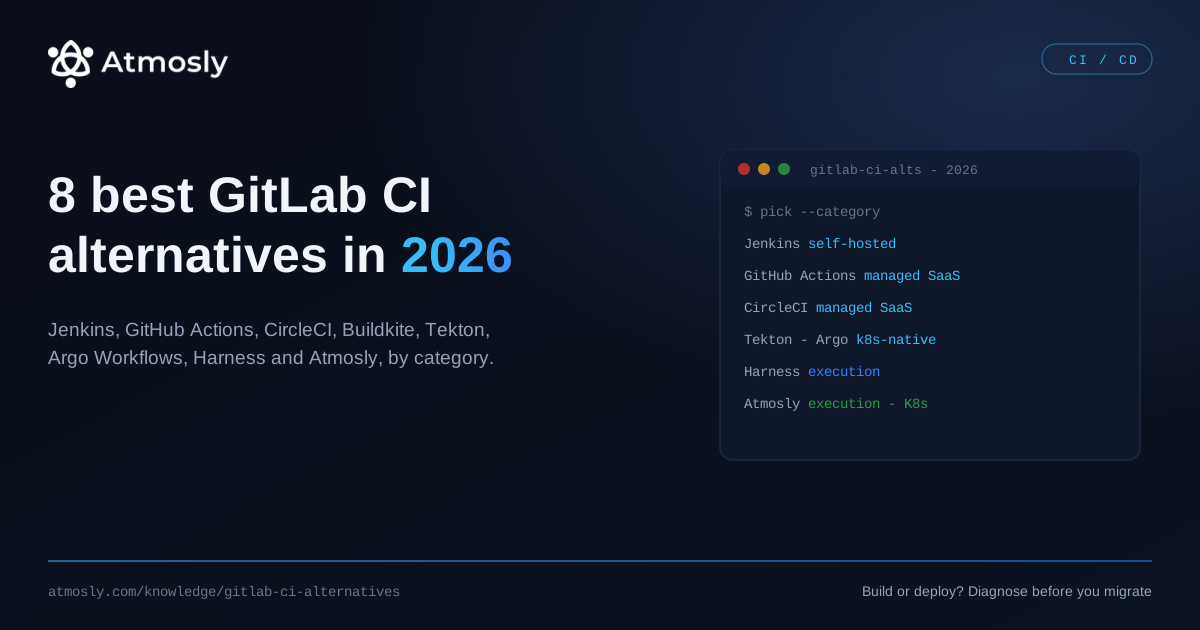
Short answer: the best GitLab CI alternative depends on which category of tool you actually need. For a self-hosted open-source runner, that is Jenkins. For managed SaaS CI, GitHub Actions, CircleCI or Buildkite. For Kubernetes-native pipelines, Tekton or Argo Workflows. And if your real problem is deployment rather than builds, an execution layer like Harness or Atmosly replaces more than the pipeline.
Below are the eight worth shortlisting in 2026, grouped by category, with pricing models, honest trade-offs, and a section on when staying on GitLab CI is the right decision. Disclosure: Atmosly is our product — it appears at number two and is judged by the same standard as the rest.
| Tool | Category | Hosting | Pricing model | Best for |
|---|---|---|---|---|
| Jenkins | Self-hosted OSS | Your infrastructure | Free (Apache 2.0); cost is operations | Full control, air-gapped or highly custom builds |
| Atmosly | Execution layer | Managed; self-hosted control plane available | Free read-only audit; paid tiers | Kubernetes teams whose pain is deploy and day-2, not build |
| GitHub Actions | Managed SaaS CI | GitHub-hosted or self-hosted runners | Per-minute on private repos; free tier by plan | Teams already moving repos to GitHub |
| CircleCI | Managed SaaS CI | Cloud or self-hosted runners | Credit-based; free tier | Fast builds with heavy caching and parallelism |
| Buildkite | Hybrid SaaS + your compute | SaaS control plane, your agents | Per-user, plus your own compute cost | Large build fleets where compute economics dominate |
| Tekton | Kubernetes-native | In your cluster | Free (CNCF incubating) | Platform teams building their own CI on Kubernetes |
| Argo Workflows | Kubernetes-native | In your cluster | Free (CNCF graduated) | DAG-style pipelines, data and ML workloads |
| Harness | Execution layer | SaaS or self-managed | Enterprise, sales-led | Governance, approvals and progressive delivery at scale |
Pick the category before you pick the tool
Most GitLab CI migrations go wrong at the first step, because teams compare a build runner against a delivery platform and cannot work out why the feature tables do not line up.
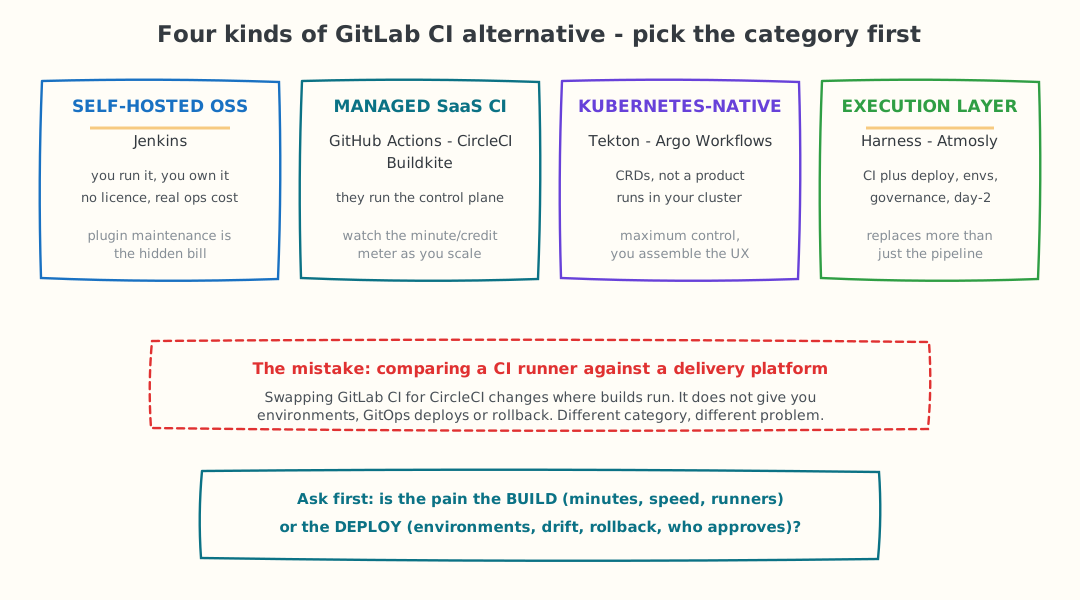
Four categories, four different problems. Swapping GitLab CI for CircleCI changes where builds run; it does not give you environments, GitOps deploys or rollback.
Before you shortlist anything, answer one question honestly: is the pain in the build or in the deploy?
- Build pain looks like slow pipelines, queueing runners, exploding CI minutes, cache misses, and a
.gitlab-ci.ymlnobody wants to touch. Any of the CI tools below fix this. - Deploy pain looks like manual environment setup, config drift between staging and production, no real rollback, and nobody knowing who approved what. No CI tool fixes this — you need a delivery layer, and swapping runners will feel like a lot of work for no relief.
Teams that skip this question end up six weeks into a migration having solved a problem they did not have. Measure two numbers first: minutes per merge, and time from merge to production. Whichever is embarrassing tells you which category to shop in.
See whether your pain is build or deploy.
Free, read-only. Takes 10 minutes. Nothing changes in your cluster.
With the category settled, here are the eight tools worth your time.
The 8 best GitLab CI alternatives in 2026
1. Jenkins — maximum control, and you pay for it in operations
Category: self-hosted OSS · Pricing: free, Apache 2.0.
Jenkins remains the most flexible CI server in existence. With well over a thousand community plugins it can integrate with virtually anything, Jenkins Pipeline gives you a real programming model in a Jenkinsfile rather than pure declarative YAML, and the controller/agent architecture scales across whatever hardware you own. If you have compliance rules that keep builds inside your own network, or genuinely unusual build requirements, Jenkins is often the only tool that can do the job at all.
The honest cost is maintenance. Plugins are the strength and the weakness — version conflicts, unmaintained plugins and upgrade anxiety are the standard complaints, and someone on your team owns that work permanently. Teams leaving GitLab CI for Jenkins usually do it for control, not for convenience. Compare it against a managed option in our Jenkins comparison.
2. Atmosly — when the real problem is everything after the build
Category: execution layer · Kubernetes only · Disclosure: Atmosly is our product.
Atmosly is not a drop-in replacement for a CI runner, and pretending otherwise would waste your time. It is an execution layer for Kubernetes: visual, GitOps-native pipelines with approvals and one-click rollback, a full ephemeral environment per pull request with its own namespace, quota and RBAC, governed provisioning with guardrails, live security posture scanning against CIS, PCI DSS, SOC 2 and NSA benchmarks, per-namespace cost attribution, and an AI SRE agent that opens fix pull requests when something breaks in production.
Many teams keep GitLab CI for build and test and put Atmosly underneath for deployment and day-2 — that is a supported pattern, not a compromise. It reads your cluster read-only by default, every action is reversible with an audit trail, a human merges every change, and capabilities switch on one at a time. It is ISO 27001 certified, with SOC 2 Type II in progress.
Where it is the wrong choice, plainly: if your workloads are not on Kubernetes, none of this applies. And if your only complaint about GitLab CI is that builds are slow, a faster CI tool from this list will serve you better than a delivery platform.
3. GitHub Actions — the default if your code is moving to GitHub
Category: managed SaaS CI · Pricing: per-minute on private repos, free minutes vary by plan.
GitHub Actions is the most common destination for teams leaving GitLab, usually because the repositories are moving too. The Marketplace of prebuilt actions removes a great deal of boilerplate, the event model covers far more than push and merge, and the developer experience of having CI in the same tab as code review is genuinely hard to beat.
Two things to plan for. First, the meter: private repositories bill per minute, and larger runners cost a multiple of the standard rate, so matrix builds across a monorepo produce bills that surprise people. Self-hosted runners remove that cost and are a standard mitigation. Second, third-party actions are supply-chain surface — pin them to a commit SHA rather than a moving tag. See the GitHub Actions comparison for the detail.
4. CircleCI — built for build speed
Category: managed SaaS CI · Pricing: credit-based with a free tier.
CircleCI's reason to exist is fast pipelines. Its caching and test-splitting are mature, parallelism is a first-class configuration rather than an afterthought, and orbs let you package reusable config across repositories in a way that .gitlab-ci.yml includes only approximate. Docker, machine and macOS executors mean mobile teams are properly served, which matters if your GitLab pipelines have been struggling with iOS builds.
The trade-off is the credit model: it is genuinely flexible but harder to forecast than a flat per-seat price, and teams that do not model it upfront get surprised at scale. Verify current pricing directly — the model has changed more than once.
5. Buildkite — their control plane, your compute
Category: hybrid · Pricing: per-user, plus the cost of the machines you run.
Buildkite splits the problem: it hosts the orchestration, dashboards and pipeline logic, while build agents run on infrastructure you own. For organisations with large build fleets, that inverts the economics of managed CI — you are paying for coordination rather than for compute minutes, and compute is bought at your cloud rates or from your own hardware.
It also means builds never leave your network, which resolves a category of security review that pure SaaS CI cannot. The trade-off is that you are back to running and scaling agents, so it suits teams with existing infrastructure competence. There is no Atmosly comparison page for Buildkite, so evaluate it directly against your current runner cost.
6. Tekton — Kubernetes-native building blocks
Category: Kubernetes-native · Pricing: free, open source.
Tekton became a CNCF incubating project in March 2026, formalising what it always was: a set of Kubernetes custom resources — Task, Pipeline, PipelineRun — for building CI systems, rather than a finished CI product. Every step is a container, everything is declarative, and it inherits Kubernetes RBAC and scaling for free. Tekton Chains adds supply-chain provenance, which matters if SLSA compliance is on your roadmap.
Be clear-eyed about what you are adopting. Tekton gives you primitives, not a user experience — the dashboard is basic, and the pipeline authoring experience is more verbose than GitLab CI, not less. It rewards platform teams who want to build something specific, and punishes teams who wanted a product. Compare via the Tekton comparison.
7. Argo Workflows — DAGs, data pipelines and ML
Category: Kubernetes-native · Pricing: free, open source.
Argo graduated from the CNCF in 2022 and Argo Workflows is its container-native workflow engine. Where Tekton is aimed squarely at CI, Argo Workflows is a general DAG executor — which makes it unusually good at fan-out/fan-in build matrices, and the standard choice when your pipelines include data processing or ML training steps alongside application builds.
It is most powerful paired with Argo CD: Workflows builds and tests, Argo CD reconciles the deployment. That combination is the closest open-source equivalent to an execution layer, at the cost of running and integrating two systems yourself. Details in the Argo Workflows comparison.
8. Harness — governance-first delivery for the enterprise
Category: execution layer · Pricing: enterprise, sales-led.
Harness targets organisations where the binding constraint is not build speed but proof: who approved this release, what policy did it satisfy, and can we show an auditor. It provides progressive delivery (canary, blue-green, feature flags), policy-as-code with OPA, automated verification against your observability data, and cloud cost visibility in the same platform.
That breadth is the point and also the cost: it is a heavier adoption than swapping a CI runner, and it is priced for enterprises. If your GitLab CI pain is genuinely about release governance rather than pipelines, it belongs on the shortlist — see the Harness comparison.
When to stay on GitLab CI
A comparison that never recommends the incumbent is marketing, not analysis. Stay on GitLab CI if:
- Your pipelines are stable and someone owns them. A working CI system with a clear owner is worth more than a marginally better one nobody understands yet.
- You use GitLab as a whole platform. If issues, merge requests, container registry, security scanning and the runner all live in one place, leaving CI means either fragmenting your toolchain or migrating far more than pipelines.
- The complaint is really about how you wrote the YAML. Much of what teams blame on GitLab CI is fixable in place — extract shared config with
extendsandinclude, split monolithic pipelines into parent-child pipelines, fix cache keys, and userulesproperly instead of longonly/exceptchains. - Nobody has measured anything. If you cannot state your current minutes per merge and merge-to-production time, you cannot tell whether a migration helped.
Migrating from GitLab CI: what actually transfers
If you have decided to move, the useful thing to know is which parts are cheap and which parts are where migrations stall.
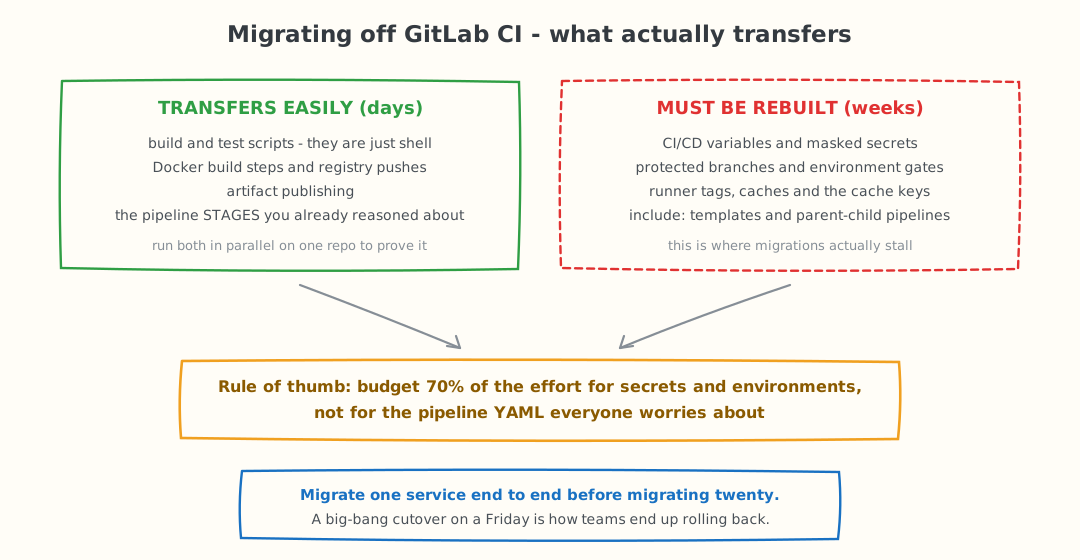
Budget most of the effort for secrets and environments, not for the pipeline YAML everyone worries about.
Transfers in days. Your build and test commands are just shell scripts — they run anywhere. Docker build steps and registry pushes translate almost one-to-one. Artifact publishing is a solved problem in every tool on this list. And the pipeline stages you already reasoned about carry over conceptually, even when the syntax differs.
Must be rebuilt, and takes weeks. CI/CD variables and masked secrets have no export path — every one is re-created by hand in the new system, and the audit of who can see what has to be redone. Protected branches and environment gates encode approval policy that must be re-expressed in a different model. Runner tags, cache configuration and cache keys are tuned to your current setup and rarely translate. And include: templates and parent-child pipelines are usually the most GitLab-specific thing you own.
Three rules that keep migrations out of trouble:
- Run both systems in parallel on one repository. Same commits, both pipelines green, for at least a week before you switch anything.
- Migrate one service end to end — build, test, deploy, rollback — before migrating twenty. The first service surfaces every assumption.
- Re-create secrets deliberately, not by copying. A migration is the best opportunity you will get to remove credentials nobody can account for.
Key takeaways
- Category first, tool second. Self-hosted OSS, managed SaaS, Kubernetes-native and execution layer solve different problems.
- Diagnose build versus deploy pain. Only build pain is fixed by changing CI tool.
- Jenkins buys control, priced in operations. Managed SaaS buys convenience, priced per minute or per credit.
- Kubernetes-native tools give primitives, not products. Tekton and Argo Workflows expect a platform team.
- Secrets and environments are the real migration cost — not the pipeline YAML.
- Staying is a legitimate answer if your pipelines are stable, owned, and you use GitLab as a whole platform.
If your workloads run on Kubernetes and you suspect the pain is downstream of the build, look at your own cluster before believing any vendor's table — including ours: start the free read-only audit, or compare Atmosly and GitLab CI side by side.